Type text, add images, blackout confidential details, add comments, highlights and more.
02. Sign it in a few clicks
Draw your signature, type it, upload its image, or use your mobile device as a signature pad.
03. Share your form with others
Send gpmp templates pdf via email, link, or fax. You can also download it, export it or print it out.
How to use or fill out GPMP and with our platform
Ease of Setup
DocHub User Ratings on G2
Ease of Use
DocHub User Ratings on G2
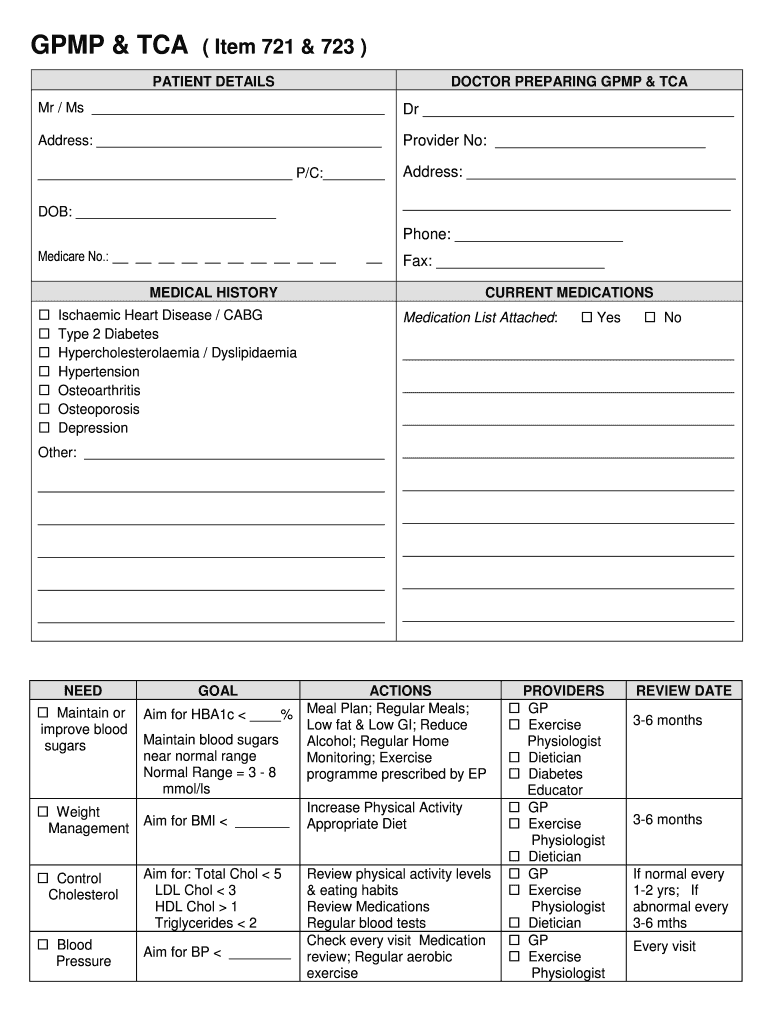
Click ‘Get Form’ to open the GPMP in the editor.
Begin by entering patient details, including name, date of birth, and Medicare number. Ensure accuracy for effective communication.
Fill in the doctor’s information, including their name and provider number. This section is crucial for identifying the healthcare provider responsible for the plan.
In the Medical History section, check relevant conditions and attach a medication list if applicable. This helps in understanding the patient's health background.
Specify needs and goals related to health management. Clearly outline actions such as meal plans or exercise programs tailored to patient requirements.
List health providers involved in care. This ensures all parties are informed and can collaborate effectively on patient care.
Finally, ensure that both patient and GP sign the agreement section to confirm consent for sharing information among providers.
Start using our platform today to streamline your GPMP completion process for free!
Effect of a general practitioner management plan on health
by GE Caughey 2016 Cited by 22 Provision of a GPMP in older patients with diabetes resulted in improved health outcomes, delaying the risk of hospitalisation at 12 months for diabetes
Like the Undergraduate Certificate program, GPMP introduces students across academic disciplines to the fundamentals of business, finance, management, marketingRead more
Cookie consent notice
This site uses cookies to enhance site navigation and personalize your experience.
By using this site you agree to our use of cookies as described in our Privacy Notice.
You can modify your selections by visiting our Cookie and Advertising Notice.