01. Edit your united kingdom dental confidential online
Type text, add images, blackout confidential details, add comments, highlights and more.
02. Sign it in a few clicks
Draw your signature, type it, upload its image, or use your mobile device as a signature pad.
03. Share your form with others
Send medical history form via email, link, or fax. You can also download it, export it or print it out.
How to use or fill out United Kingdom Medical History with our platform
Ease of Setup
DocHub User Ratings on G2
Ease of Use
DocHub User Ratings on G2
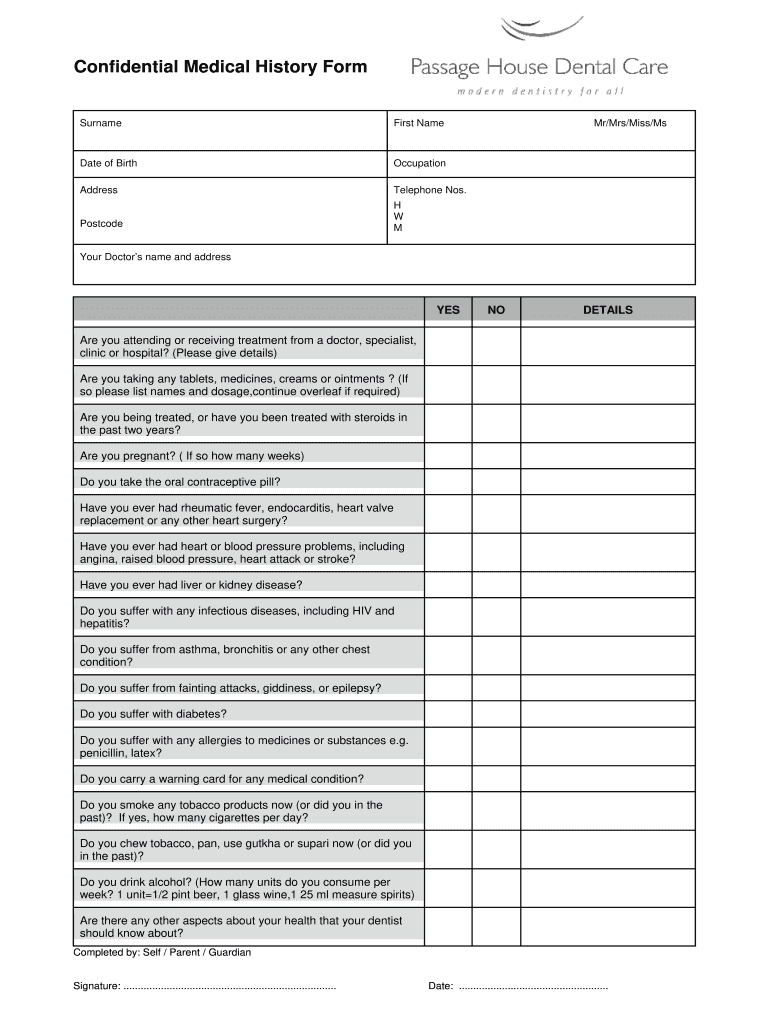
Click ‘Get Form’ to open the United Kingdom Medical History form in the editor.
Begin by entering your surname, first name, and date of birth. This information is crucial for identifying your medical records.
Fill in your occupation, address, and telephone numbers (home, work, mobile) to ensure accurate contact details.
Indicate your title (Mr/Mrs/Miss/Ms) and provide your doctor’s name and address for referral purposes.
Answer the health-related questions regarding treatments, medications, and any past medical conditions. Be thorough in providing details where necessary.
Complete the section on lifestyle habits such as smoking and alcohol consumption to give a comprehensive view of your health.
Finally, indicate who completed the form (self/parent/guardian), sign it, and date it before submission.
Start using our platform today to fill out your medical history form online for free!
Fill out united kingdom medical history online It's free
United kingdom medical history timelineUnited kingdom medical history wikipediaUnited kingdom medical history factsWhen was the first hospital built in EnglandHistory of hospitals timelineHistory of hospital tv showsGMC UKUK medical license
Security and compliance
At DocHub, your data security is our priority. We follow HIPAA, SOC2, GDPR, and other standards, so you can work on your documents with confidence.
A History of Britains Hospitals and the Background to - PMC
by L Sanai 2006 Cited by 2 Starting in the first century adthe earliest time for which records are availablethey meticulously work through the birth and development of medical andRead more
The London Medical Journal began in 1781, and ran until 1790. It was succeeded by Medical Facts and Observations. Persistent Archives of Complete Issues. 1781-Read more
Apr 5, 2023 A Summary of Care should ideally document your previous diagnoses, operations and overall historic healthcare including previously prescribedRead more
Cookie consent notice
This site uses cookies to enhance site navigation and personalize your experience.
By using this site you agree to our use of cookies as described in our Privacy Notice.
You can modify your selections by visiting our Cookie and Advertising Notice.