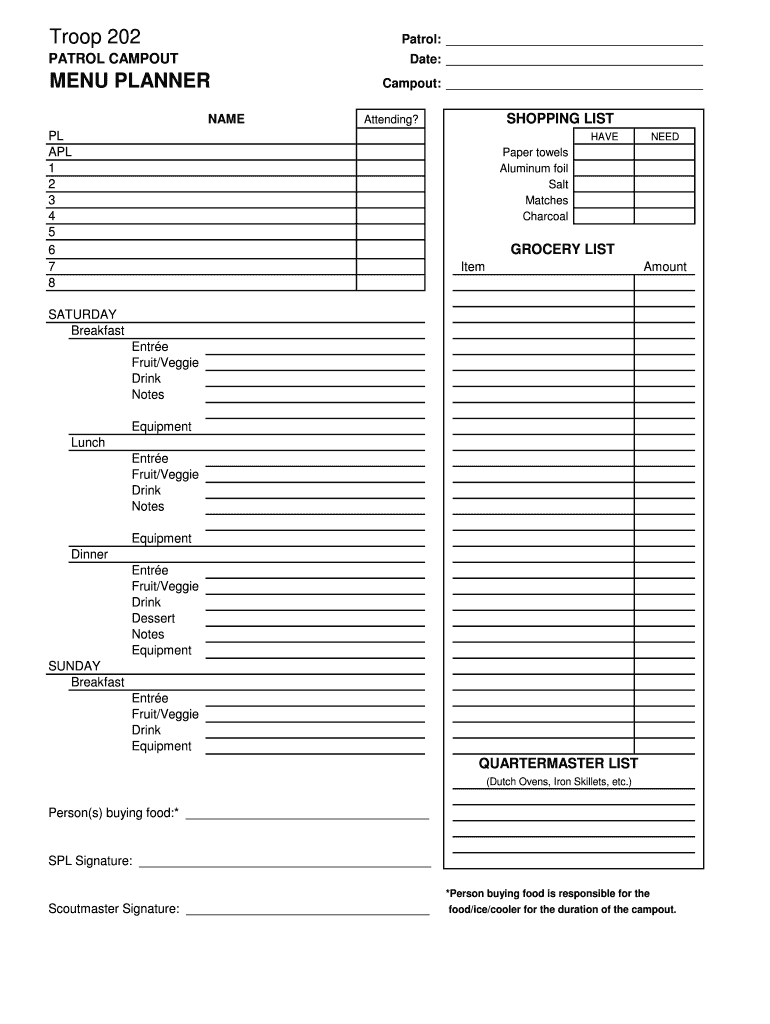
Troop 202 Patrol PATROL CAMPOUT Date MENU PLANNER - troop202 2026

Get Form
troop 202 Preview on Page 1

Here's how it works

01. Edit your troop 202 online
Type text, add images, blackout confidential details, add comments, highlights and more.
02. Sign it in a few clicks
Draw your signature, type it, upload its image, or use your mobile device as a signature pad.
03. Share your form with others
Send it via email, link, or fax. You can also download it, export it or print it out.

How to use or fill out Troop 202 Patrol PATROL CAMPOUT Date MENU PLANNER - troop202 with our platform

Form edit decoration
9.5
Ease of Setup
DocHub User Ratings on G2
9.0
Ease of Use
DocHub User Ratings on G2
  1. Click ‘Get Form’ to open the Troop 202 Patrol PATROL CAMPOUT Date MENU PLANNER in the editor.
  2. Begin by filling in the 'Patrol' and 'Campout' sections at the top of the form. This identifies your group and the specific campout event.
  3. In the 'Date' field, enter the scheduled date for your campout to keep everyone informed.
  4. Move on to the 'Shopping List' section. Here, indicate who will be attending by checking off names from PL (Patrol Leader) and APL (Assistant Patrol Leader) down to individual members.
  5. For each item listed under 'HAVE' and 'NEED', mark what supplies you already have and what needs to be purchased.
  6. Fill out the 'Grocery List' for Saturday and Sunday meals, detailing items needed for breakfast, lunch, and dinner along with quantities.
  7. Complete the 'Quartermaster List' by noting any equipment required for cooking or serving meals.
  8. Finally, ensure that both the person buying food and signatures from SPL and Scoutmaster are filled in at the bottom of the form.

Start using our platform today to streamline your planning process for Troop 202's campout!

be ready to get more

Complete this form in 5 minutes or less

Get form

Got questions?

We have answers to the most popular questions from our customers. If you can't find an answer to your question, please contact us.
Contact us

With DocHub, you can quickly approve your Troop 202 Patrol PATROL CAMPOUT Date MENU PLANNER - troop202 or any other document on iOS, even without setting up extra programs. You can access your DocHub account from any internet-connected browser and complete and sign your document in any way you like with just a few clicks.

If you edit your Troop 202 Patrol PATROL CAMPOUT Date MENU PLANNER - troop202 with DocHub, you simply will not need to look for other applications or solutions to eSign it. An electronic signature is a component of DocHub’s extensive editing toolset, which enables you to implement changes in your form without switching between platforms. Just complete your form, double-check the correctness of your data and put your electronic signature at the end to make it submission-ready within a few minutes.

Security and compliance

At DocHub, your data security is our priority. We follow HIPAA, SOC2, GDPR, and other standards, so you can work on your documents with confidence.

Learn more
ccpa2
pci-dss
gdpr-compliance
hipaa
soc-compliance
be ready to get more

Complete this form in 5 minutes or less

Get form