




Here's how it works



How to use or fill out henry transou classic with our platform

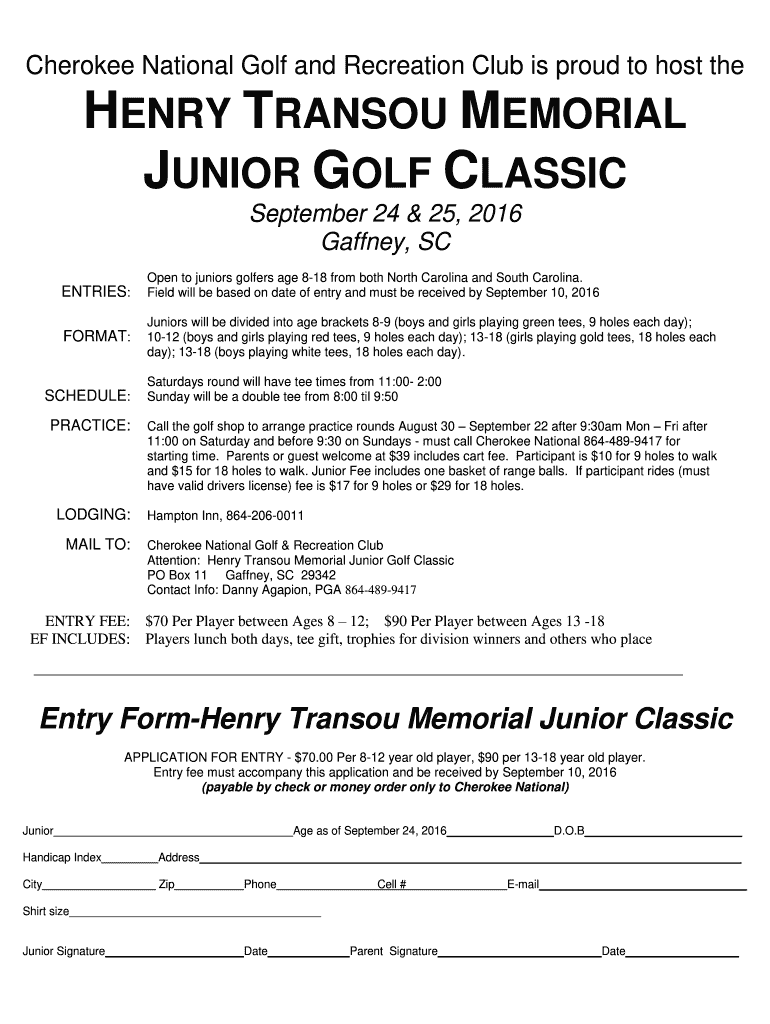
- Click ‘Get Form’ to open the henry transou classic in the editor.
- Begin by entering the junior golfer's name in the designated field. Ensure accuracy as this will be used for all official communications.
- Fill in the age of the participant as of September 24, 2016, and their date of birth (D.O.B) in the respective fields.
- Input the handicap index if applicable. This helps in categorizing players fairly based on skill level.
- Complete the address section, including city and zip code, followed by phone and cell numbers for contact purposes.
- Provide an email address to receive updates regarding the event.
- Select a shirt size from the options provided to ensure proper fitting for participants.
- Have both the junior and parent sign and date at the bottom of the form to confirm participation and agreement to terms.
Start filling out your entry form today for free using our platform!
It's free
Got questions?
How do I sign my henry transou classic free of charge?
Most eSignature services require users to have a paid subscription. With DocHub, there are two options for you to create an electronic signature to your henry transou classic without being charged:
- You can do it during a 7-day trial period;
- You can subscribe to a free plan.
The second option, however, has restrictions on the number of signatures, sign requests, emails, and forms for editing available per month. You can check for full information here.
How do you edit henry transou classic on iOS?
You can easily edit fill out your henry transou classic on any iOS device. Open an internet browser of your liking, go to the DocHub site, authorize or create a new account, upload your file for editing, and make your desired alterations. Our service is mobile-friendly, so utilizing its functions on your phone will be a no-brainer, even on the first try.
Security and compliance
At DocHub, your data security is our priority. We follow HIPAA, SOC2, GDPR, and other standards, so you can work on your documents with confidence.
Learn more


