




Here's how it works



How to use or fill out YMCA Voucher 150109.pub - PenMet Parks

- Click ‘Get Form’ to open it in the editor.
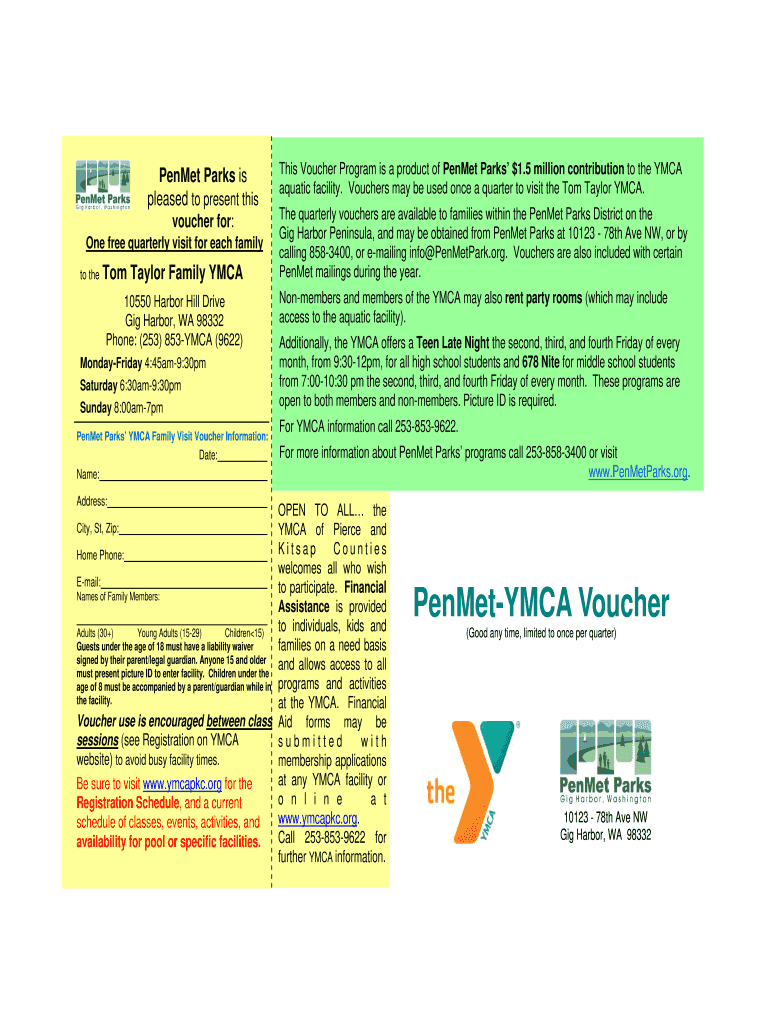
- Begin by entering the date in the designated field at the top of the voucher. This helps track your visit.
- Fill in your name and address in the appropriate fields. Ensure accuracy for identification purposes.
- List the names of family members who will be using the voucher. This section is crucial for verifying eligibility.
- Provide your home phone number and email address. This information may be used for any follow-up communication.
- Review all entered information for accuracy before saving or printing your completed voucher.
Start using our platform today to easily fill out your YMCA Voucher and enjoy a free visit!
It's free
Got questions?
Can I sign my YMCA Voucher 150109.pub - PenMet Parks - penmetparks on a mobile?
Sure, you’ll find numerous applications for this on the web. Nevertheless, if you need to eSign your YMCA Voucher 150109.pub - PenMet Parks - penmetparks without installing additional software, DocHub is the optimum choice you can make. This powerful editor works on mobile devices just like on desktops. Open our editor in your preferred internet browser, register or log in to your account, and start managing your forms.
Can I print my YMCA Voucher 150109.pub - PenMet Parks - penmetparks and finish it by myself?
If you choose analog methods of completing your YMCA Voucher 150109.pub - PenMet Parks - penmetparks, you can easily download your file for printing. Search DocHub’s Forms & Templates catalog to find the exact document template you require and open it for editing or download it on your gadget in the format of your choice. It is easy to complete your form electronically and place your handwritten signature on it after printing or eSign your document with DocHub.
Security and compliance
At DocHub, your data security is our priority. We follow HIPAA, SOC2, GDPR, and other standards, so you can work on your documents with confidence.
Learn more


