BPreb-bauthorizationb Payment bFormb pdf - Waste Management 2026

Get Form
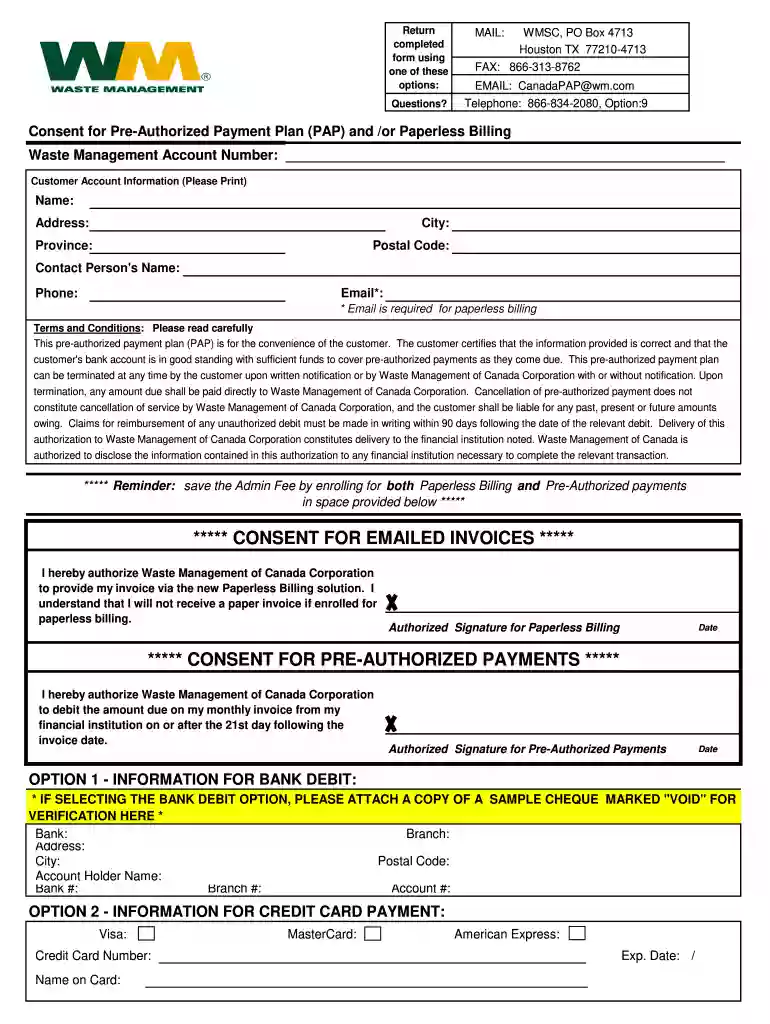
pre authorized payment plan print Preview on Page 1

Here's how it works

01. Edit your pre authorized payment plan print online
Type text, add images, blackout confidential details, add comments, highlights and more.

02. Sign it in a few clicks
Draw your signature, type it, upload its image, or use your mobile device as a signature pad.

03. Share your form with others
Send pre authorized payment plan form via email, link, or fax. You can also download it, export it or print it out.

How to use or fill out BPreb-bauthorizationb Payment bFormb pdf - Waste Management with our platform

Form edit decoration
9.5
Ease of Setup
DocHub User Ratings on G2
9.0
Ease of Use
DocHub User Ratings on G2
  1. Click ‘Get Form’ to open it in the editor.
  2. Begin by entering your Waste Management Account Number at the top of the form. This is essential for identifying your account.
  3. Fill in your Customer Account Information, including your name, address, city, province, and postal code. Ensure all details are accurate for seamless processing.
  4. Provide a contact person's name, email (required for paperless billing), and phone number. This information will help Waste Management reach you if needed.
  5. Read the Terms and Conditions carefully before proceeding. Acknowledge your understanding by signing where indicated for both Paperless Billing and Pre-Authorized Payments.
  6. If opting for bank debit, attach a voided cheque and fill in the bank details including bank name, branch address, and account information. For credit card payments, enter your card details as required.

Start using our platform today to easily complete your BPreb-bauthorizationb Payment bFormb pdf - Waste Management for free!

be ready to get more

Complete this form in 5 minutes or less

Get form

Got questions?

We have answers to the most popular questions from our customers. If you can't find an answer to your question, please contact us.
Contact us
Invoices can be paid online at wm.com/myaccount. The customary means of online payments is through automatic withdrawal from a bank account (sometimes referred to as an Automated Clearing House (ACH) transaction in the U.S. or a Pre-Authorized Debit (PAD) in Canada).
The WM payment system is powered by Paymentus to provide more convenience and flexibility for paying your invoice. When paying by credit card, debit card, or digital wallet, Paymentus charges a convenience fee per payment: $1.99 for residential service customers and $9.99 for non-residential service customers.
How do I cancel a one-time request or recurring service with WM? Log in to My WM and click on Order History in the My Services section. Orders are organized into Upcoming, Attempted/Closed or Canceled/Voided. In the Upcoming section, click the order you want to cancel to open the Cancel Request dialogue box.
How do I make a payment to my account? From wm.com, click on Make a Payment near the top of the page. Fill out the information in the Continue As Guest section and click Verify. On the My Payment screen, select a payment method and click Continue. Follow the steps to complete payment.
Pay over the phone Dial 866-964-2729 and follow the prompts to make a payment for a single account. Having your customer ID or service address on hand will make payment easier.

Security and compliance

At DocHub, your data security is our priority. We follow HIPAA, SOC2, GDPR, and other standards, so you can work on your documents with confidence.

Learn more
ccpa2
pci-dss
gdpr-compliance
hipaa
soc-compliance
be ready to get more

Complete this form in 5 minutes or less

Get form