




Here's how it works

01. Edit your work completion test online
Type text, add images, blackout confidential details, add comments, highlights and more.

02. Sign it in a few clicks
Draw your signature, type it, upload its image, or use your mobile device as a signature pad.

03. Share your form with others
Send india work completion certificate via email, link, or fax. You can also download it, export it or print it out.
How to use or fill out completion certificate test with our platform

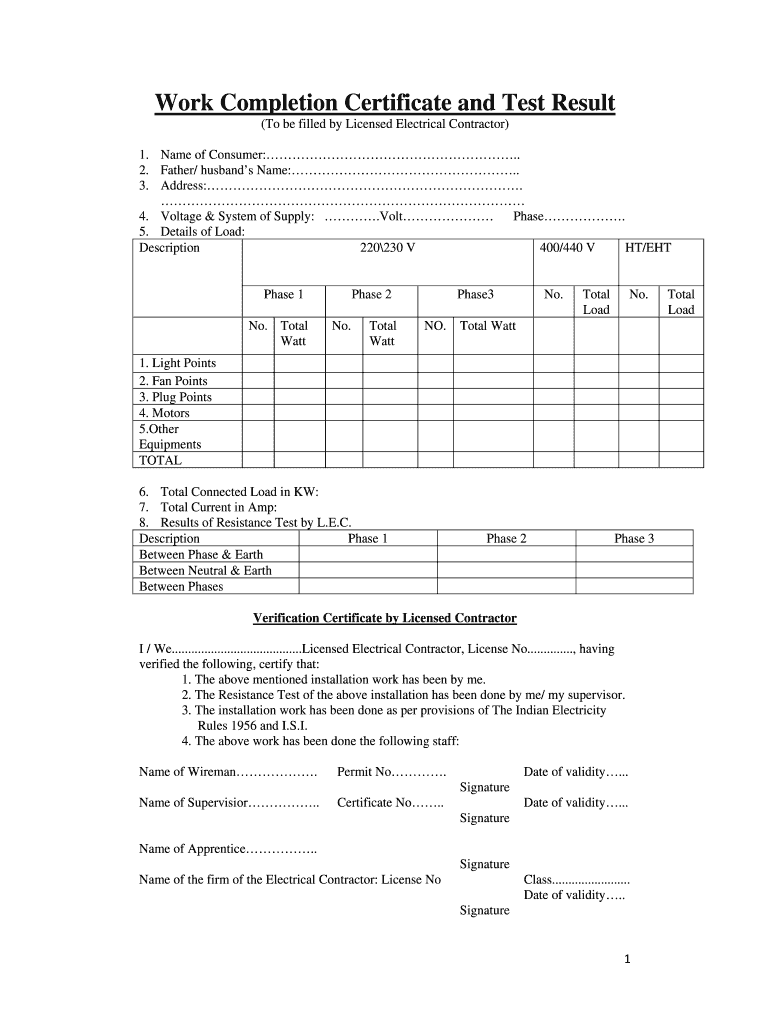
- Click ‘Get Form’ to open the completion certificate test in the editor.
- Begin by entering the 'Name of Consumer' and 'Father/Husband’s Name' in the designated fields. Ensure accuracy for proper identification.
- Fill in the 'Address' section completely, as this is crucial for documentation purposes.
- Specify the 'Voltage & System of Supply' by selecting the appropriate voltage and phase options provided.
- In the 'Details of Load' section, list all relevant equipment under each phase. Input quantities and total wattage accurately for each category.
- Calculate and enter the 'Total Connected Load in KW' and 'Total Current in Amp' based on your previous entries.
- Complete the 'Results of Resistance Test by L.E.C.' section, ensuring all tests are documented correctly across phases.
- Finally, have a Licensed Electrical Contractor verify and sign off on the document, along with any necessary declarations from consumers and inspectors.
Start using our platform today to streamline your document editing and form completion process for free!
Fill out completion certificate test online
It's free
It's free
Security and compliance
At DocHub, your data security is our priority. We follow HIPAA, SOC2, GDPR, and other standards, so you can work on your documents with confidence.
Learn more


