Jay cc receipt 2026

Get Form
ceecee jay Preview on Page 1

Here's how it works

01. Edit your ceecee jay online
Type text, add images, blackout confidential details, add comments, highlights and more.
02. Sign it in a few clicks
Draw your signature, type it, upload its image, or use your mobile device as a signature pad.
03. Share your form with others
Send it via email, link, or fax. You can also download it, export it or print it out.

How to use or fill out jay cc receipt with our platform

Form edit decoration
9.5
Ease of Setup
DocHub User Ratings on G2
9.0
Ease of Use
DocHub User Ratings on G2
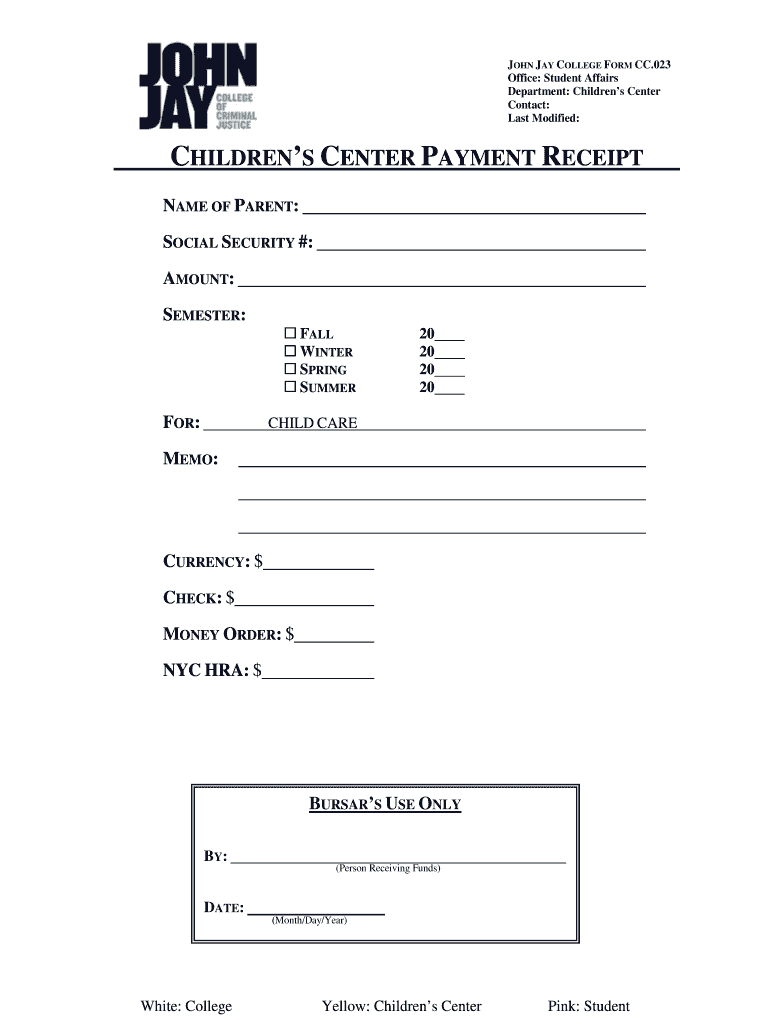
  1. Click ‘Get Form’ to open the jay cc receipt in the editor.
  2. Begin by entering the 'NAME OF PARENT' in the designated field. Ensure that the name matches official documents for accuracy.
  3. Next, input the 'SOCIAL SECURITY #' in the appropriate section. This is crucial for identification purposes.
  4. Fill in the 'AMOUNT' you are paying. Make sure this reflects the correct payment due for child care services.
  5. Select the relevant 'SEMESTER' by checking one of the boxes: FALL, WINTER, SPRING, or SUMMER.
  6. In the 'FOR:' section, indicate the year of service by filling in both fields provided (e.g., 20XX).
  7. Complete any additional payment details under 'CURRENCY', 'CHECK', 'MONEY ORDER', and 'NYC HRA' as applicable.
  8. Leave the sections labeled 'BURSAR’S USE ONLY' blank; these will be filled out by authorized personnel.
  9. Finally, review all entries for accuracy before saving your completed form.

Start using our platform today to fill out your jay cc receipt easily and for free!

be ready to get more

Complete this form in 5 minutes or less

Get form

Got questions?

We have answers to the most popular questions from our customers. If you can't find an answer to your question, please contact us.
Contact us
The receipt types available in Practice CS are: Cash (CA) Check (CHK) Electronic Funds (ACH) Credit Card (CC)
If you would like to speak with us directly, or if this is urgent, please call us at: 1-800-KRO-GERS (1-800-576-4377)
Credit Card Number (CC# / CCN) A Credit Card Number, also known as a payment card number or primary account number (PAN), is a unique numeric identifier assigned to a credit card or payment card. It is a crucial component of payment card transactions and serves as a reference to identify the cardholders account.
In your journal, you will want to record: The transaction date. Notes about the transaction. Check number (if applicable) Amount. Cash receipt account types (e.g., accounts receivable) Any sales discounts.
Heres just how easy it is! Make sure you have a JayC Plus Card. If you do not, please get one for free at any participating JayC Food Store at the customer service counter.

Security and compliance

At DocHub, your data security is our priority. We follow HIPAA, SOC2, GDPR, and other standards, so you can work on your documents with confidence.

Learn more
ccpa2
pci-dss
gdpr-compliance
hipaa
soc-compliance
be ready to get more

Complete this form in 5 minutes or less

Get form

People also ask

What is Cash Credit? A Cash Credit (CC) is a short-term source of financing for a company. In other words, a cash credit is a short-term loan extended to a company by a bank. It enables a company to withdraw money from a bank account without keeping a credit balance.
Answer: Cash credit, CC, is a short-term loan given to eligible businesses by banks. The funds provided in CC loans are supposed to satisfy working capital needs. The business owner can withdraw money within the existing borrowing limits without running a credit balance.
A convenience fee is levied by a merchant for offering customers the privilege of paying with an alternative non-standard payment method. Merchants can process convenience fees in all 50 states. A surcharge is levied by a merchant for customer purchases made with a credit card.

Related links