




Here's how it works

01. Edit your form online
Type text, add images, blackout confidential details, add comments, highlights and more.

02. Sign it in a few clicks
Draw your signature, type it, upload its image, or use your mobile device as a signature pad.

03. Share your form with others
Send it via email, link, or fax. You can also download it, export it or print it out.
How to use or fill out the liner order form with our platform

- Click ‘Get Form’ to open the liner order form in the editor.
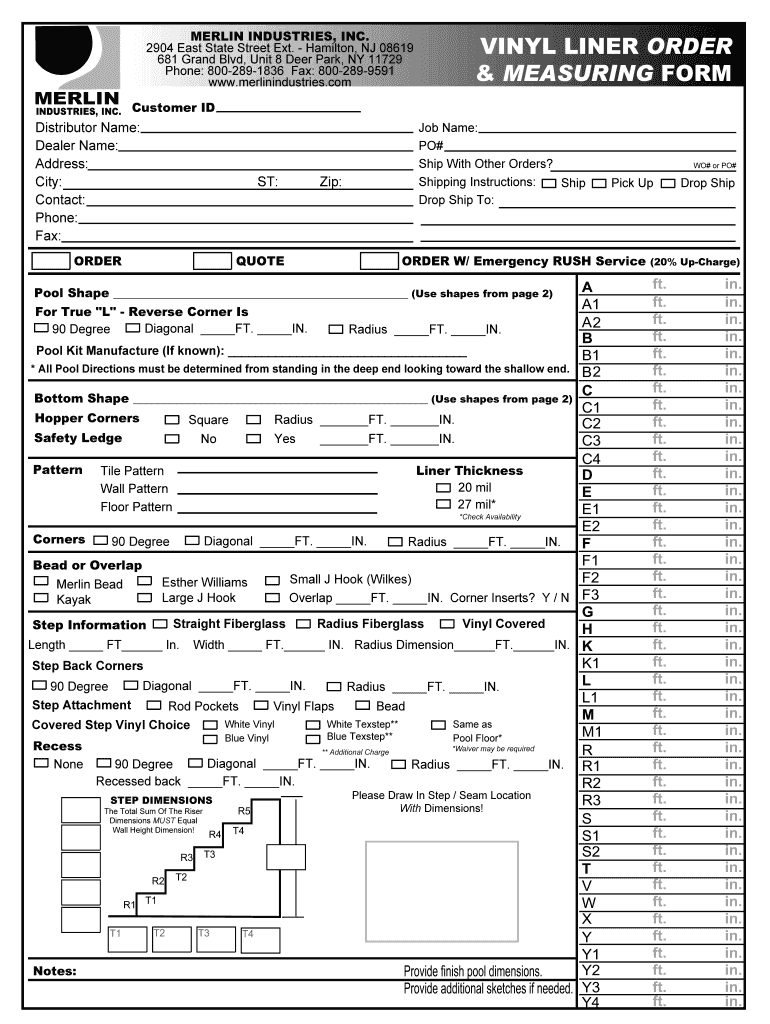
- Begin by entering your Customer ID, Distributor Name, and Dealer Name in the designated fields. This information is crucial for processing your order accurately.
- Fill in your address details including City, Zip Code, Contact Name, Phone, and Fax numbers to ensure proper communication regarding your order.
- In the ORDER section, specify the Job Name and PO# (Purchase Order Number). Indicate if you want to ship with other orders and provide any specific shipping instructions.
- For pool specifications, select the Bottom Shape from the options provided. Use page 2 of the form for reference on pool shapes.
- Complete the dimensions for various features such as Radius and Length under Step Information. Ensure all measurements are accurate for a perfect fit.
- Review all entries carefully before submitting your form to avoid any errors that could delay processing.
Start using our platform today to streamline your liner order process effortlessly!
Fill out liner order form online
It's free
It's free
Got questions?
We have answers to the most popular questions from our customers. If you can't find an answer to your question, please contact us.
Contact us
How do I make a purchase order form?
Heres a breakdown of the typical purchase order form format: Header. Buyer and seller details, addresses, contacts, and a unique PO number. Date and delivery. Issue date and expected delivery date. Itemized list. Payment terms. Shipping/billing. Signatures. Logo and branding.
Can I use Google Forms to make an order form?
Navigate to Google Forms and choose from a blank form or one of the provided templates. There is an order form template available, but it doesnt include any payment questions.
Which is thicker, 20 or 30 mil?
A shipping order is an inventory control document that identifies space booked on a vessel. Shipping orders identify goods included in the freight shipment. The shipment destination is detailed in a shipping order.
What software is used to create order forms?
Google Forms is a popular tool that allows users to create order forms quickly and easily using pre-made templates or by designing their own forms. PDFs with fillable forms are also an option for creating order forms, which can be filled out and submitted electronically.
What is a shipping order form?
Cheapest and most manageable as a non plaster professional would be to convert to vinyl liner.
Security and compliance
At DocHub, your data security is our priority. We follow HIPAA, SOC2, GDPR, and other standards, so you can work on your documents with confidence.
Learn more


People also ask
How do I create a fillable form online for free?
Login to your Canva account and search for form templates. Pick a design or start with a blank template. Choose a pre-made form template design. Customize your form. Edit your form by adding text, labels, logos, and other graphic elements. Download and print. Publish and share your form.
How do I make an order form?
The higher the mil, the thicker the liner. For example, a 20-mil liner is 0.20 of an inch thick, a 30-mil liner is 0.30 of an inch thick and so on.