




Here's how it works



How to use or fill out Quidditch Permission Slip - Mason County District Library - masoncounty lib mi with our platform

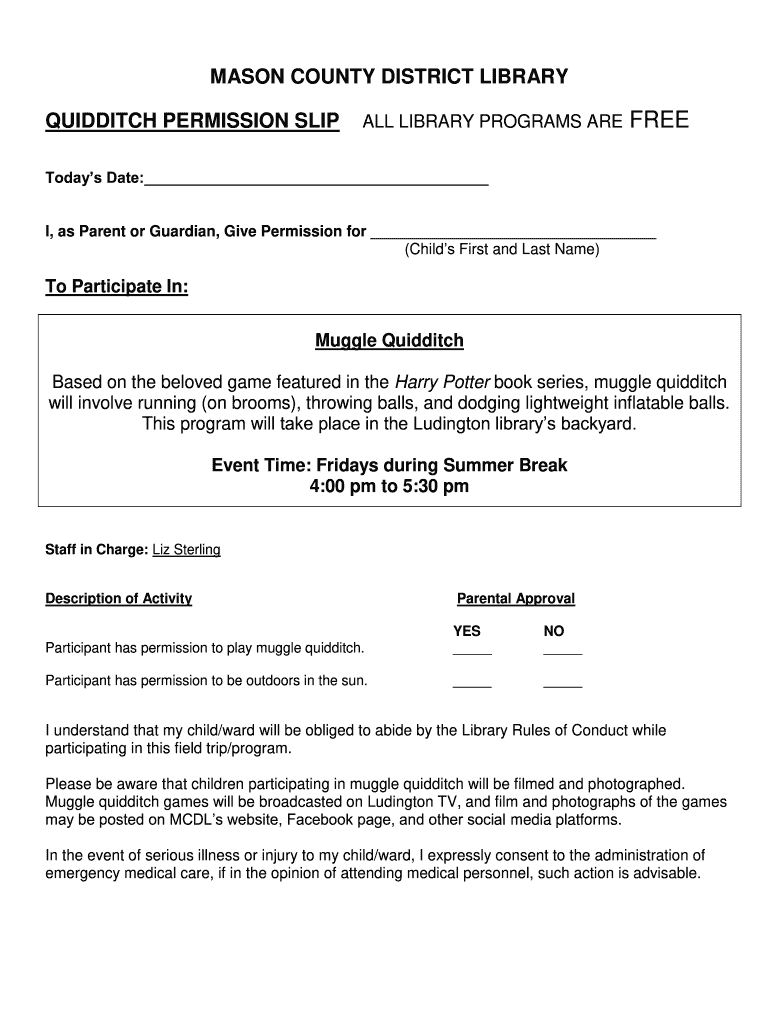
- Click ‘Get Form’ to open the Quidditch Permission Slip in the editor.
- Begin by entering today’s date in the designated field at the top of the form.
- In the next section, provide your child’s first and last name where indicated.
- Review the event details, including the activity description and time. Ensure you understand what Muggle Quidditch entails.
- Indicate your parental approval by selecting 'YES' or 'NO' for both participation in Muggle Quidditch and outdoor activities.
- Sign the form in the designated area, confirming that you have read and understood its terms.
- Fill out your relationship to the minor, address, telephone numbers, email, and emergency contact information as required.
Start using our platform today to easily complete your Quidditch Permission Slip for free!
It's free
Got questions?
What is the simplest way to electronically sign my Quidditch Permission Slip - Mason County District Library - masoncounty lib mi?
A lot of software applications are available out there for document modifying and signing. DocHub is one of the most popular online solutions that comply with all data protection and compliance requirements and guarantees your eSigned documentation is legally enforceable. All you need to give it a try is to register an account, add your Quidditch Permission Slip - Mason County District Library - masoncounty lib mi, provide the required details, and click Sign. Create your eSignature by typing, drawing it, uploading its image to your document, or scanning a unique QR code.
Do I need to install software to edit my Quidditch Permission Slip - Mason County District Library - masoncounty lib mi?
When you edit your Quidditch Permission Slip - Mason County District Library - masoncounty lib mi with DocHub, you merely require a steady internet connection and virtually any web browser installed on your device. No need to set up any third-party software or research tutorials. Simply open a tab with DocHub, drag and drop your file, and modify it immediately.
Security and compliance
At DocHub, your data security is our priority. We follow HIPAA, SOC2, GDPR, and other standards, so you can work on your documents with confidence.
Learn more


