




Here's how it works

01. Edit your louisiana emergency rental assistance program intake form online
Type text, add images, blackout confidential details, add comments, highlights and more.

02. Sign it in a few clicks
Draw your signature, type it, upload its image, or use your mobile device as a signature pad.

03. Share your form with others
Send how long does it take to get approved for rental assistance via email, link, or fax. You can also download it, export it or print it out.
How to use or fill out Louisiana Rental Application - unityhousinglink with our platform

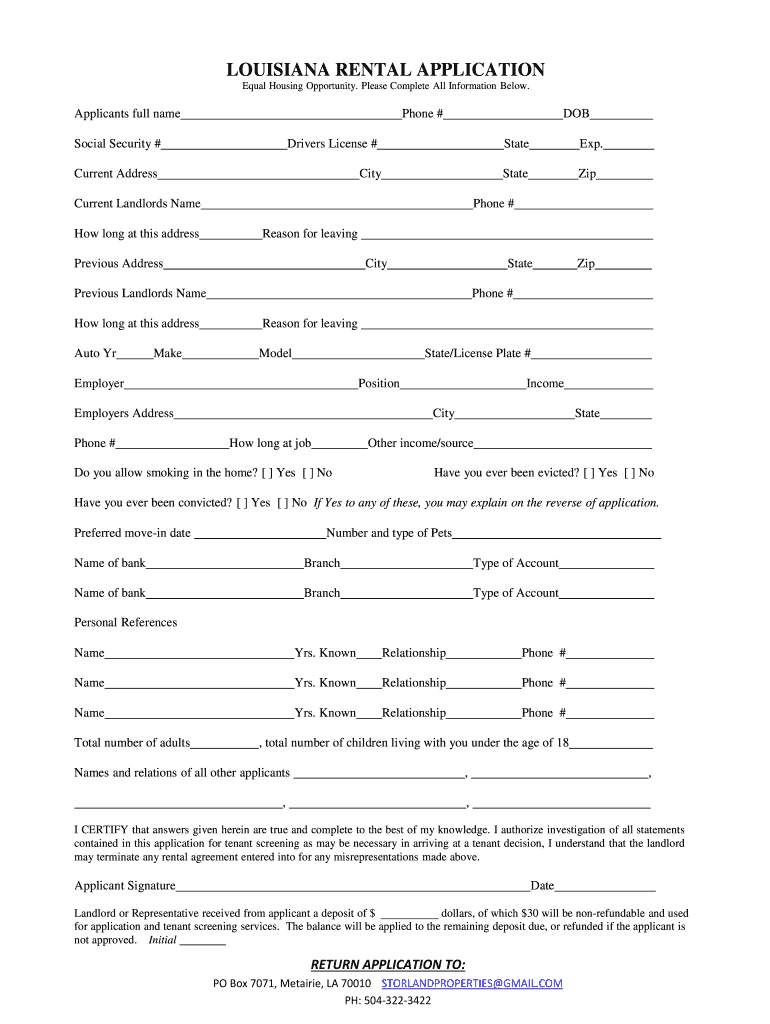
- Click ‘Get Form’ to open the Louisiana Rental Application in the editor.
- Begin by entering your full name, phone number, and date of birth in the designated fields. Ensure accuracy as this information is crucial for identification.
- Fill in your Social Security number and driver's license details, including the state and expiration date. This information helps verify your identity.
- Provide your current address along with the city, state, and zip code. Include your landlord's name and phone number for reference.
- Indicate how long you have lived at your current address and briefly explain your reason for leaving if applicable.
- Repeat the previous step for any previous addresses, ensuring to include landlord contact details.
- List your vehicle information including year, make, model, state, and license plate number.
- Detail your employment status by providing employer name, position, income, and how long you have been employed. Include any additional sources of income if applicable.
- Answer questions regarding smoking preferences and past evictions or convictions truthfully. If necessary, provide explanations on a separate page.
- Complete sections about preferred move-in dates, pet information, bank details, personal references, and total household members.
- Finally, certify that all provided information is true by signing and dating the application before submission.
Start filling out your Louisiana Rental Application today using our platform for free!
Fill out Louisiana Rental Application - unityhousinglink online
It's free
It's free
Security and compliance
At DocHub, your data security is our priority. We follow HIPAA, SOC2, GDPR, and other standards, so you can work on your documents with confidence.
Learn more


