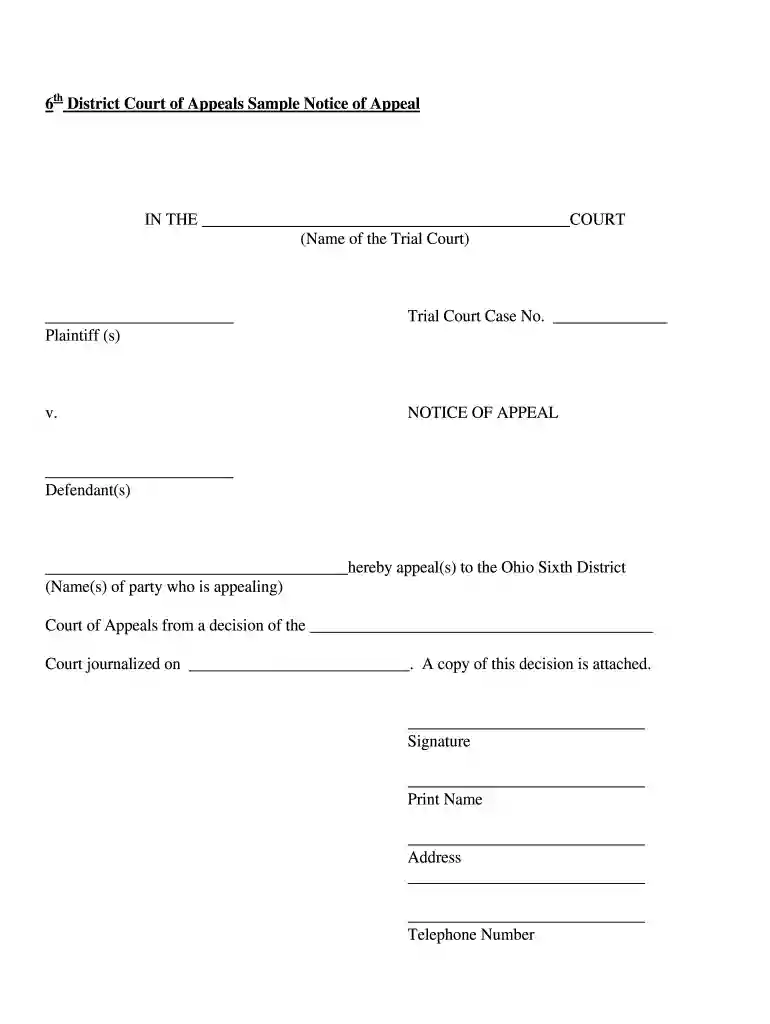
district sample notice Preview on Page 1

Ohio appeals notice form 2026

Here's how it works

  • 01. Edit your district sample notice online

    Type text, add images, blackout confidential details, add comments, highlights and more.

  • 02. Sign it in a few clicks

    Draw your signature, type it, upload its image, or use your mobile device as a signature pad.

  • 03. Share your form with others

    Send notice of appeal sample via email, link, or fax. You can also download it, export it or print it out.

How to use or fill out ohio appeals notice form with DocHub

Form edit decoration
9.5
Ease of Setup
DocHub User Ratings on G2
9.0
Ease of Use
DocHub User Ratings on G2
  1. Click ‘Get Form’ to open the Ohio Appeals Notice Form in our platform's editor.
  2. Begin by entering the name of the trial court in the designated field at the top of the form. This is crucial for identifying where your appeal originates.
  3. Fill in the names of the plaintiffs and defendants as they appear in your case. Ensure accuracy to avoid any complications during processing.
  4. Input the trial court case number, which is essential for tracking your appeal within the court system.
  5. In the section stating 'hereby appeal(s) to', write your name or names clearly, indicating who is appealing.
  6. Specify the decision being appealed from by naming the trial court and including the date it was journalized. Attach a copy of this decision if required.
  7. Finally, sign and print your name, providing your address and telephone number for contact purposes.

Start using our platform today to fill out your Ohio Appeals Notice Form online for free!

be ready to get more

Complete this form in 5 minutes or less

Got questions?

We have answers to the most popular questions from our customers. If you can't find an answer to your question, please contact us.

What to include in an appeal letter Your professional contact information. A summary of the situation youre appealing. An explanation of why you feel the decision was incorrect. A request for the preferred solution youd like to see enacted. Gratitude for considering your appeal. Supporting documents attached, if relevant.
1. Civil Appeal against any judgment or order. 90 days The date of the judgment or order.
R. 54(B), a party may file a notice of appeal within thirty days of entry of the judgment or order appealed or the judgment or order that disposes of the remaining claims.
54(B), a party may file a notice of appeal within thirty days of entry of the judgment or order appealed or the judgment or order that disposes of the remaining claims.
The appeal shall be taken within fifteen (15) days from notice of the judgment or final order appealed from. Where a record on appeal is required, the appellant shall file a notice of appeal and a record on appeal within thirty (30) days from notice of the judgment or final order.

Security and compliance

At DocHub, your data security is our priority. We follow HIPAA, SOC2, GDPR, and other standards, so you can work on your documents with confidence.

People also ask

After a Decision is Issued Step 1: File the Notice of Appeal. Step 2: Pay the filing fee. Step 3: Determine if/when additional information must be provided to the appeals court as part of opening your case. Step 4: Order the trial transcripts. Step 5: Confirm that the record has been transferred to the appellate court.

Related links

Affirmative Disclosures

Affirmative Disclosures 1 Introduction 2 Information required to be published under subsection (a)(1) 3 Information required to be made available under underRead more

Learn more
Appellate Court Forms

Click on the link(s) for the forms youd like to download. Appellate Court Benefits, Judicial Expenses, Leave Payroll.Read more

Learn more
Appealing an Admission Decision

Applicants appealing the admissions decision are encouraged to submit their appeal materials by the priority date of April 1. Appeals will be considered afterRead more

Learn more
If you believe that this page should be taken down, please follow our DMCA take down process here