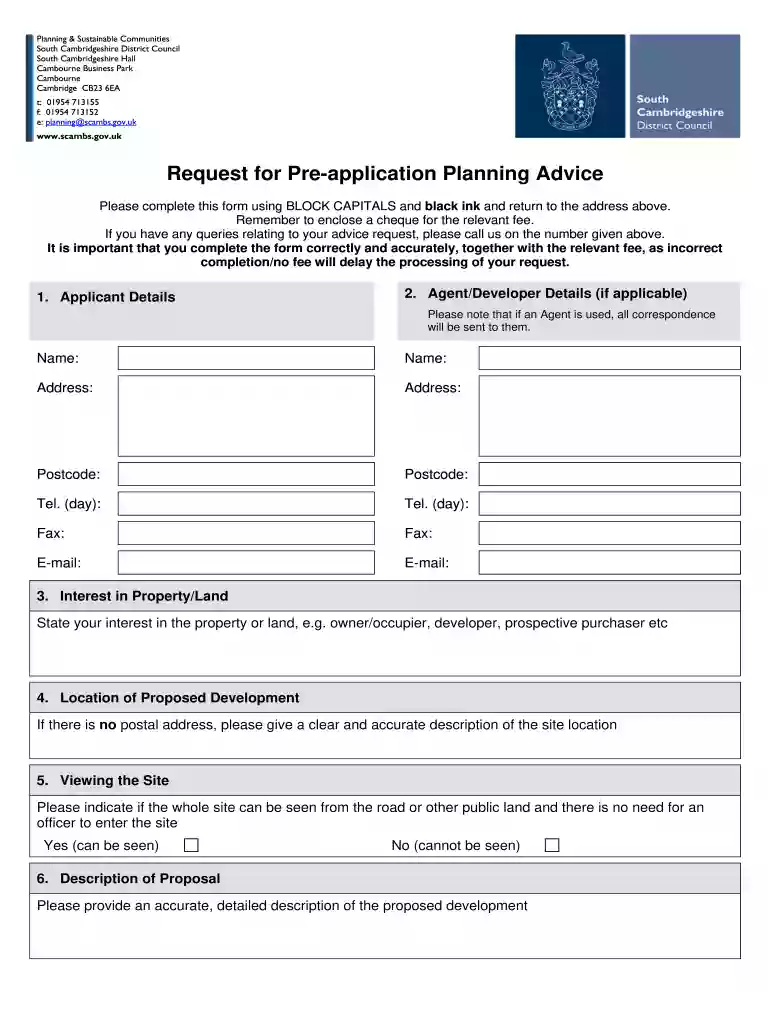
Planning Pre Application Form - South Cambridgeshire District ... 2025

Get Form
south cambs planning applications Preview on Page 1

Here's how it works

01. Edit your south cambs planning applications online
Type text, add images, blackout confidential details, add comments, highlights and more.

02. Sign it in a few clicks
Draw your signature, type it, upload its image, or use your mobile device as a signature pad.

03. Share your form with others
Send pre application form via email, link, or fax. You can also download it, export it or print it out.

How to use or fill out Planning Pre Application Form - South Cambridgeshire District with our platform

Form edit decoration
9.5
Ease of Setup
DocHub User Ratings on G2
9.0
Ease of Use
DocHub User Ratings on G2
  1. Click ‘Get Form’ to open it in the editor.
  2. Begin by filling out the 'Applicant Details' section. Ensure you use BLOCK CAPITALS and black ink for clarity.
  3. If applicable, complete the 'Agent/Developer Details' section. Remember, all correspondence will be directed to the agent if one is appointed.
  4. In the 'Interest in Property/Land' section, specify your relationship to the property, such as owner or developer.
  5. Provide a clear description of the site location in the 'Location of Proposed Development' field, especially if there is no postal address.
  6. Indicate whether the site can be viewed from public land in the 'Viewing the Site' section by selecting Yes or No.
  7. Detail your proposal in the 'Description of Proposal' section, ensuring accuracy and completeness.
  8. Attach any necessary plans and supporting information as listed in section 7. Use our platform's upload feature for convenience.
  9. Select your preferred advice option in the 'Advice Requested' section and ensure you calculate any fees accurately.
  10. Finally, review all sections for accuracy before submitting your form through our platform.

Start using our platform today to streamline your Planning Pre Application Form submission!

be ready to get more

Complete this form in 5 minutes or less

Get form

Got questions?

We have answers to the most popular questions from our customers. If you can't find an answer to your question, please contact us.
Contact us
You can: pay by Debit or Credit Card. pay at the Post Office. Pay by Cash. pay by Telephone, Internet Banking, Standing Order, or at a Bank or Building Society.
The Greater Cambridge Shared Planning service (GCSP) manages planning for us and South Cambridgeshire District Council.
You can contact us 24-hours a day using our online form. Our main phone line 01954 713 000 is open 8am to 5:30pm on Monday, Tuesday, Thursday and Friday.
You can contact us 24-hours a day using our online form. Our main phone line 01954 713 000 is open 8am to 5:30pm on Monday, Tuesday, Thursday and Friday. On Wednesday our main phone line is open 8am to 6:30pm.
Please note you can gain permission to a fence or gate up to 3ft high in the front garden or next to a highway, or up to 6ft high in the rear garden. If you wish to fencing higher than stated, you will need to submit a planning application.
be ready to get more

Complete this form in 5 minutes or less

Get form

People also ask

by email - planningdc@cambridgeshire.gov.uk. by post - County Planning, Minerals, and Waste Team, Box ALC2613, New Shire Hall, Emery Crescent, Alconbury Weald, Huntingdon, PE28 4YE.
The application will not be processed any further until the application is made valid. If we do not receive a response within the timescales given, well return the application plus any fee. If youre the applicant and youre unsure about what you need to submit, contact us at planning@greatercambridgeplanning.org.

south cambs planning portal