Naccrra self certification 2026

Get Form
naccrra Preview on Page 1

Here's how it works

01. Edit your naccrra online
Type text, add images, blackout confidential details, add comments, highlights and more.
02. Sign it in a few clicks
Draw your signature, type it, upload its image, or use your mobile device as a signature pad.
03. Share your form with others
Send it via email, link, or fax. You can also download it, export it or print it out.

How to use or fill out naccrra self certification with our platform

Form edit decoration
9.5
Ease of Setup
DocHub User Ratings on G2
9.0
Ease of Use
DocHub User Ratings on G2
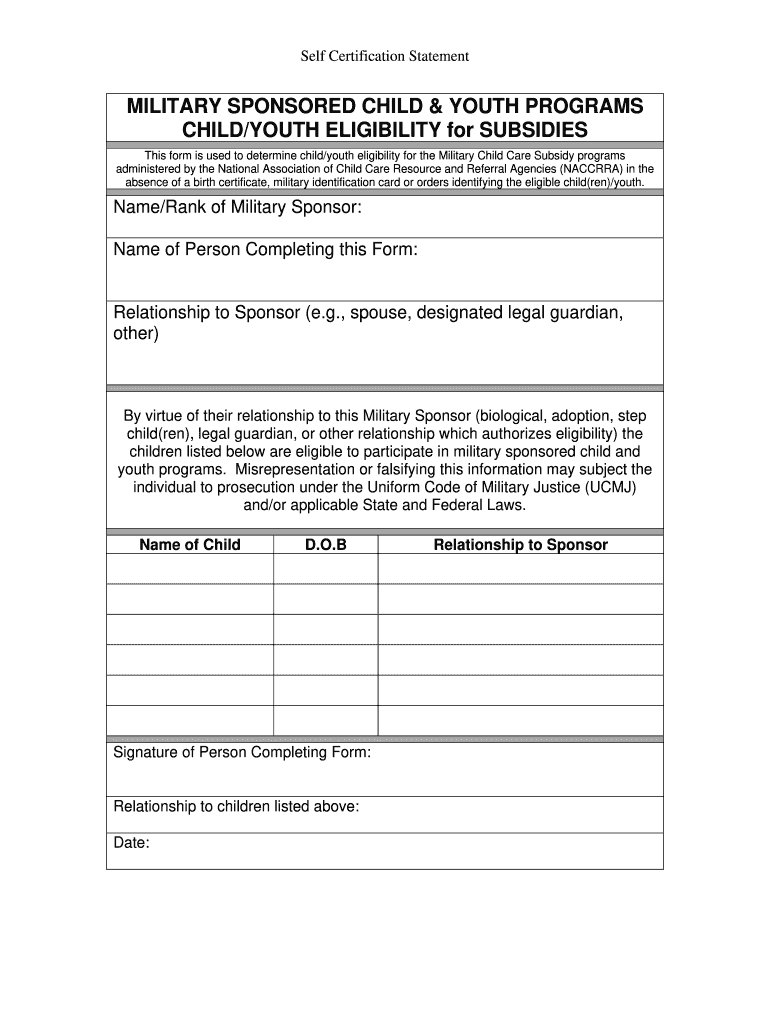
  1. Click ‘Get Form’ to open the naccrra self certification in the editor.
  2. Begin by entering the 'Name/Rank of Military Sponsor' in the designated field. This identifies the military member associated with the child/youth eligibility.
  3. Next, fill in the 'Name of Person Completing this Form'. Ensure that this is accurate as it will be used for verification purposes.
  4. Indicate your 'Relationship to Sponsor' by selecting from options such as spouse, designated legal guardian, or other. This helps clarify your connection to the military sponsor.
  5. List each child’s name and date of birth (D.O.B) in the provided fields. This information is crucial for determining eligibility for subsidies.
  6. Finally, sign and date the form where indicated. Your signature confirms that all information provided is true and accurate.

Start using our platform today to complete your naccrra self certification easily and for free!

be ready to get more

Complete this form in 5 minutes or less

Get form

Got questions?

We have answers to the most popular questions from our customers. If you can't find an answer to your question, please contact us.
Contact us
The statement of self-certification should cover residency status in all cases and, where foreign tax residency is identified, affirmation by the Account Holder of their date of birth and the TIN provided.
Top Certifications for Daycare Workers Certified Child Care Professional (CCCP) Certified Early Childhood Educator (CECE) National Administrator Credential for Early Childhood Education (NAC-ECE) NAEYC Professional Development Certificate. Child Development Associate (CDA) Credential.
The term self-certification means, sworn statement by the person concerned in place of a regular certificate (art. 2, Law 15/1968). This offers the citizen the possibility of supplying the same information present in the public registry but in a simpler and less costly manner.
Self-certification If employees are off work for 7 days or less, they do not need to give their employer a fit note or other proof of sickness from a healthcare professional. When they return to work, their employer can ask them to confirm theyve been off sick. This is called self-certification.
This form is required for CDL drivers to self-certify their medical qualifications. Use this file to select your type of operation and provide necessary details. Ensure your information is accurate to avoid penalties with your drivers license.

Security and compliance

At DocHub, your data security is our priority. We follow HIPAA, SOC2, GDPR, and other standards, so you can work on your documents with confidence.

Learn more
ccpa2
pci-dss
gdpr-compliance
hipaa
soc-compliance
be ready to get more

Complete this form in 5 minutes or less

Get form

People also ask

A statement written and signed by the person concerned regarding his/her personal status and data to be used in relations with the public administration and agencies and providers of public services. Using a self-certification in relations with a private person is up to ones own discretion.
Many employers have their own self-certification forms. If your employer doesnt have its own form your can download this Self Certification Form (PDF). Please print it, fill it in and hand it in to your employer. You do not need to see a Doctor.
This sworn statement authenticates that the testator (person whose will it is) was of sound mind when they signed their will. The affidavit is typically created simultaneously with the will, although it can be added later, provided the original witnesses are available to sign it.

Related links