Photo consent form 2026

Get Form
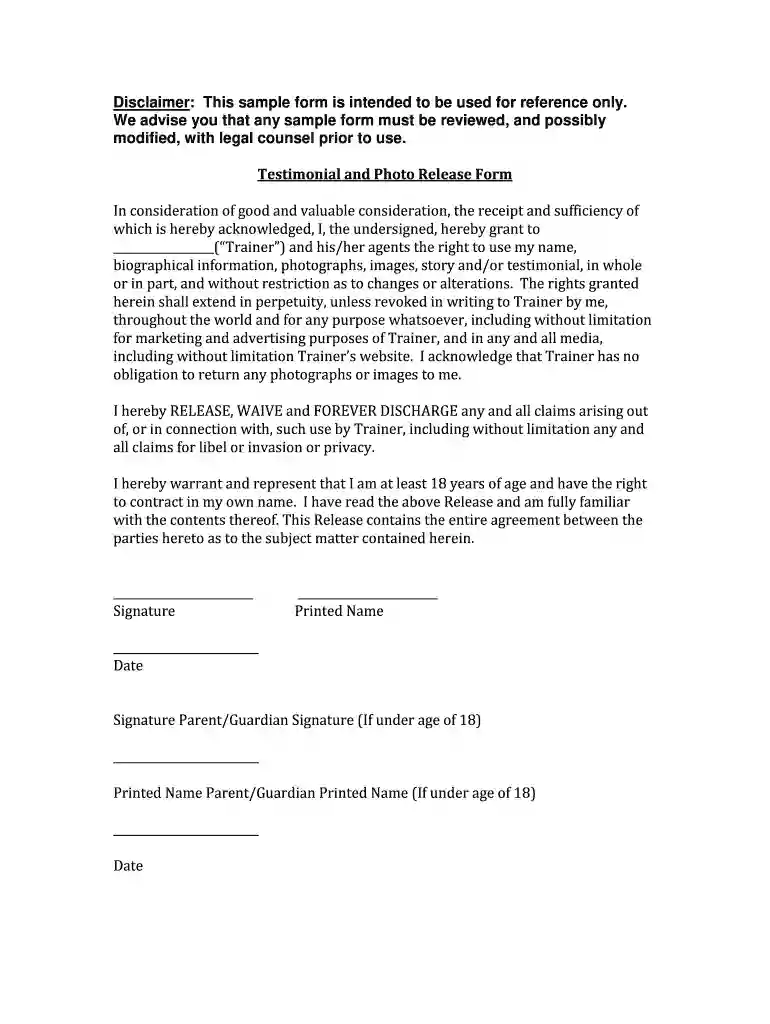
photo consent form Preview on Page 1

Here's how it works

01. Edit your photo consent form online
Type text, add images, blackout confidential details, add comments, highlights and more.

02. Sign it in a few clicks
Draw your signature, type it, upload its image, or use your mobile device as a signature pad.

03. Share your form with others
Send it via email, link, or fax. You can also download it, export it or print it out.

How to use or fill out photo consent form with our platform

Form edit decoration
9.5
Ease of Setup
DocHub User Ratings on G2
9.0
Ease of Use
DocHub User Ratings on G2
  1. Click ‘Get Form’ to open the photo consent form in the editor.
  2. Begin by filling in your name and biographical information in the designated fields. This ensures that your identity is clearly associated with the consent provided.
  3. Review the section granting rights to the Trainer. Make sure you understand that this allows them to use your images and testimonials for marketing purposes.
  4. Sign the form electronically in the signature field. If you are under 18, ensure a parent or guardian signs as well, using their printed name and date.
  5. Finally, double-check all entries for accuracy before saving or submitting your completed form.

Start using our platform today to easily complete your photo consent form online for free!

be ready to get more

Complete this form in 5 minutes or less

Get form

Got questions?

We have answers to the most popular questions from our customers. If you can't find an answer to your question, please contact us.
Contact us
Where can you find a photo release consent form? Subject name. Include the complete name of the person in the photo and leave space for a guardian to sign if the model is a minor. Photographer name. Permission statement. Alteration statement. Release statement. Signature and date.
I, the undersigned, agree to and provide permission for the image, artwork, photographic, video, audio or any other form of electronic recording of me for use by the (insert organsiation name). If signing as a parent or guardian, I have explained this consent form and sought the consent of the child.
Seek specific consent from the adult, letting them know how exactly their image will be used. If they lack capacity to consent do not use their photo. Before using any photographs or film footage for publicity purposes, show them to the person/people concerned for approval.
As with many legal questions, the answer is that it depends on the context. In public spaces, a person can usually take your photo without consent. Yet, the law protects your privacy rights in many other places and situations. Everyone is a photographer in the age of social media and cell phones.
Your photo quality disclaimer should include: A statement that you make no warranties or guarantees regarding the outcome of the photos. A note that quality can be affected by factors beyond your control such as weather, lighting, venue restrictions, or uncooperative subjects.
be ready to get more

Complete this form in 5 minutes or less

Get form

People also ask

To create a consent form, you need to list the consenting parties and specify the activities or data covered by the consent. It should also state the parties rights and responsibilities and include dates, contact information, and other necessary details.

Related links