




01. Edit your form online
Type text, add images, blackout confidential details, add comments, highlights and more.

Type text, add images, blackout confidential details, add comments, highlights and more.

Draw your signature, type it, upload its image, or use your mobile device as a signature pad.

Send it via email, link, or fax. You can also download it, export it or print it out.

Start using our platform today for free to complete your Fire Life Safety Self Inspection Form efficiently!
You need to use only trustworthy software solutions with strong security compliance to approve your paperwork electronically. DocHub is just the type of service you need! It stores data on Amazon Web Servers and complies with all essential security standards and eSignature regulations, so it’s a trustworthy way to eSign your Fire Life Safety Self Inspection Form - Coon Rapids, Minnesota or other paperwork using this tool.
If you edit your Fire Life Safety Self Inspection Form - Coon Rapids, Minnesota with DocHub, you will not need to look for other software or solutions to sign it. An electronic signature is a component of DocHub’s extensive editing toolset, which allows you to implement changes in your form without jumping between platforms. Simply complete your form, double-check the correctness of the data and place your electronic signature at the end to make it submission-ready within minutes.
At DocHub, your data security is our priority. We follow HIPAA, SOC2, GDPR, and other standards, so you can work on your documents with confidence.
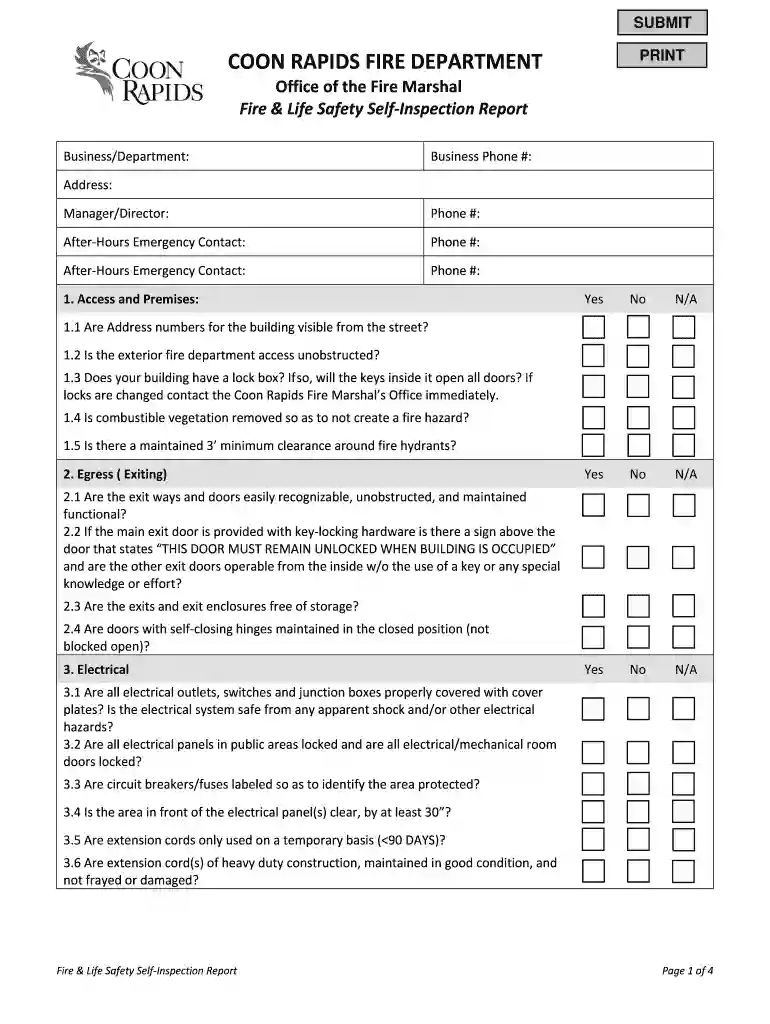
Fire Life Safety Self-Inspection Report. Page 2 of 4. Page 3. 10.2 If the building is equipped with a fire sprinkler system, has the required annual serviceRead more
Dec 15, 2025 Hazard mitigation planning refers to any sustained action to reduce or eliminate long-term risk to human life and property from naturalRead more


