




Here's how it works

01. Edit your king high school graduation 2023 online
Type text, add images, blackout confidential details, add comments, highlights and more.

02. Sign it in a few clicks
Draw your signature, type it, upload its image, or use your mobile device as a signature pad.

03. Share your form with others
Send it via email, link, or fax. You can also download it, export it or print it out.
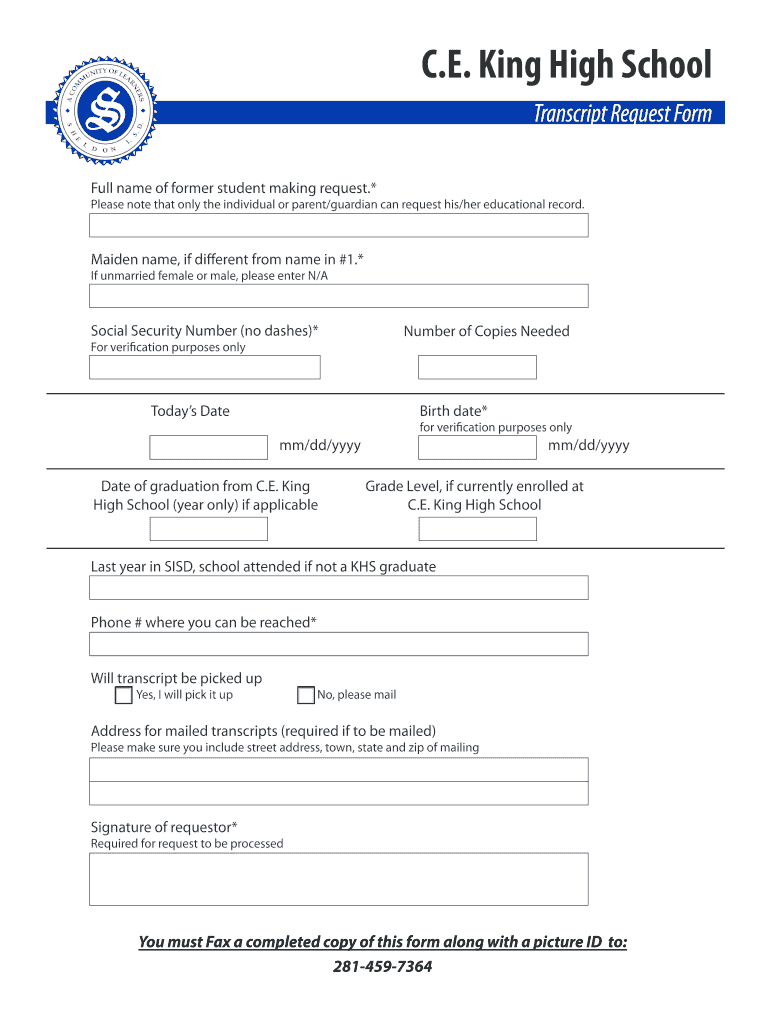
How to use or fill out C.E. King High School Transcript Request with Our Platform

- Click ‘Get Form’ to open the C.E. King High School Transcript Request in the editor.
- Begin by entering the full name of the former student making the request in the designated field.
- If applicable, provide the maiden name of the student in the next field.
- Input the Social Security Number without dashes for verification purposes.
- Indicate the number of copies needed for your records.
- Fill in today’s date and birth date in mm/dd/yyyy format.
- If applicable, enter the year of graduation from C.E. King High School.
- Provide your current grade level if you are still enrolled at C.E. King High School.
- List the last year attended in SISD and any other school if not a KHS graduate.
- Enter a phone number where you can be reached for follow-up inquiries.
- Select whether you will pick up the transcript or if it should be mailed, providing a complete mailing address if necessary.
- Finally, sign as the requestor to validate your request before submitting it along with a picture ID via fax to 281-459-7364.
Start using our platform today to easily fill out and submit your transcript request for free!
Fill out ce king high school transcript request online
It's free
It's free
Security and compliance
At DocHub, your data security is our priority. We follow HIPAA, SOC2, GDPR, and other standards, so you can work on your documents with confidence.
Learn more


