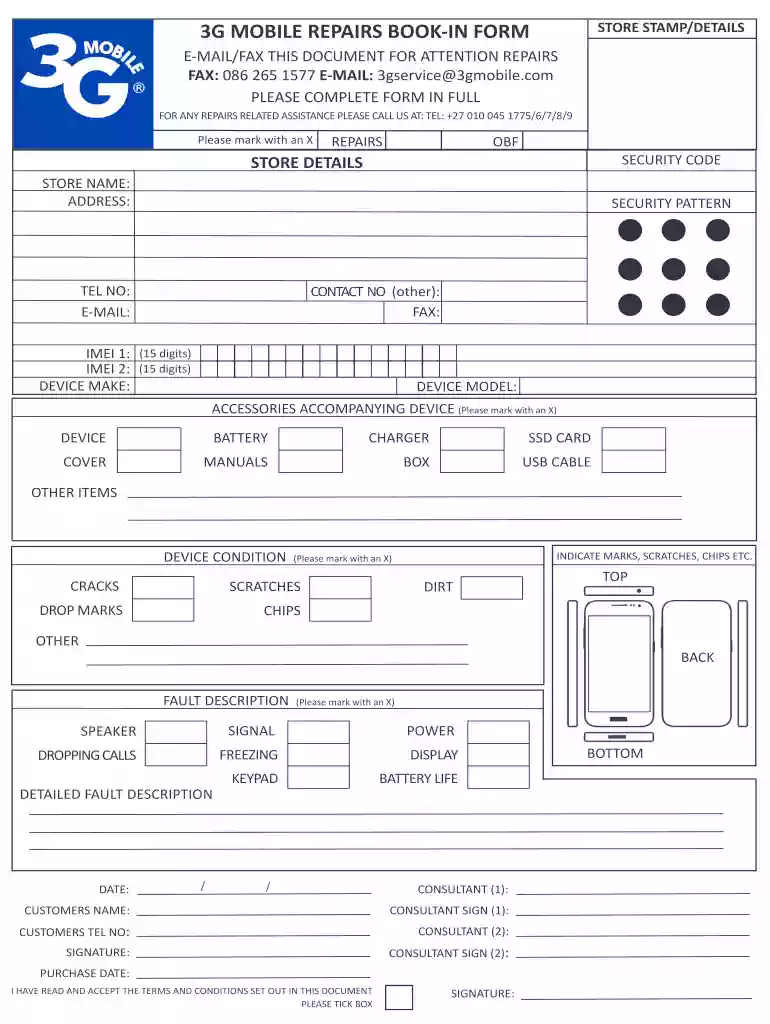
3G MOBILE REPAIRS BOOK-IN FORM 2026

Get Form
3g mobile repair centre contact number Preview on Page 1

Here's how it works

01. Edit your 3g mobile repair centre contact number online
Type text, add images, blackout confidential details, add comments, highlights and more.

02. Sign it in a few clicks
Draw your signature, type it, upload its image, or use your mobile device as a signature pad.

03. Share your form with others
Send receipt description via email, link, or fax. You can also download it, export it or print it out.

How to use or fill out 3G MOBILE REPAIRS BOOK-IN FORM

Form edit decoration
9.5
Ease of Setup
DocHub User Ratings on G2
9.0
Ease of Use
DocHub User Ratings on G2
  1. Click ‘Get Form’ to open it in the editor.
  2. Begin by entering your STORE DETAILS. Fill in the STORE NAME, ADDRESS, and contact information including TEL NO and E-MAIL.
  3. Next, provide the IMEI numbers for your device (IMEI 1 and IMEI 2) along with the DEVICE MAKE and MODEL.
  4. Indicate any ACCESSORIES accompanying the device by marking them with an X. This includes items like the battery, charger, and USB cable.
  5. Assess the DEVICE CONDITION and mark any visible damages such as cracks or scratches.
  6. Describe the FAULT DESCRIPTION by marking relevant issues like speaker problems or display issues. Provide a detailed fault description in the designated area.
  7. Complete the form by filling in your DATE, CUSTOMER'S NAME, and signing where indicated. Ensure you tick the box confirming you have read and accepted the terms.

Start using our platform today to fill out your form quickly and efficiently!

be ready to get more

Complete this form in 5 minutes or less

Get form

Got questions?

We have answers to the most popular questions from our customers. If you can't find an answer to your question, please contact us.
Contact us

Most eSignature services require users to have a paid subscription. With DocHub, there are two options for you to add an electronic signature to your 3g mobile repair centre at no cost:

  • You can do it during a 7-day trial period;
  • You can subscribe to a free plan.

The second option, however, has limitations on the number of signatures, sign requests, emails, and forms for adjusting available per month. You can check for full information here.

You can easily edit fill out your item description on any iOS gadget. Open an internet browser of your choice, visit the DocHub site, authorize or create a new account, add your file for editing, and make your desired changes. Our service is mobile-friendly, so using its features on your phone will be a no-brainer, even on the first try.

To become a Cell Phone Repair Technician, you need a high school diploma or equivalent. Though most jobs only require a vocational school certificate in cell phone repair or a related field, some Cell Phone Repair Techn jobs just require on-the-job training or an apprenticeship period to work in this field.
6 Steps to Get into Cell Phone Repair Research the Market and Competition. Before starting any business, its essential to research the market and competition. Develop a Business Plan. Obtain the Necessary Licenses and Permits. Find a Location. Purchase Equipment and Supplies. Hire Employees.
Table of Startup Expenses Expense TypeAverage Costs Store inventory, including spare parts, accessories, and replacement tools $5,000-$20,000 Insurance coverage $1,000-$5,000 Hiring qualified staff $2,000-10,000 Setting up accounting and legal services $1,000-5,0006 more rows May 29, 2025

Security and compliance

At DocHub, your data security is our priority. We follow HIPAA, SOC2, GDPR, and other standards, so you can work on your documents with confidence.

Learn more
ccpa2
pci-dss
gdpr-compliance
hipaa
soc-compliance

People also ask

For example, in California, youre required to get a license with the Bureau of Household Goods and Services to repair smartphones and appliances.

3g mobile