Type text, add images, blackout confidential details, add comments, highlights and more.
02. Sign it in a few clicks
Draw your signature, type it, upload its image, or use your mobile device as a signature pad.
03. Share your form with others
Send it via email, link, or fax. You can also download it, export it or print it out.
How to use or fill out patient registration kleinert with our platform
Ease of Setup
DocHub User Ratings on G2
Ease of Use
DocHub User Ratings on G2
Click ‘Get Form’ to open the patient registration kleinert in the editor.
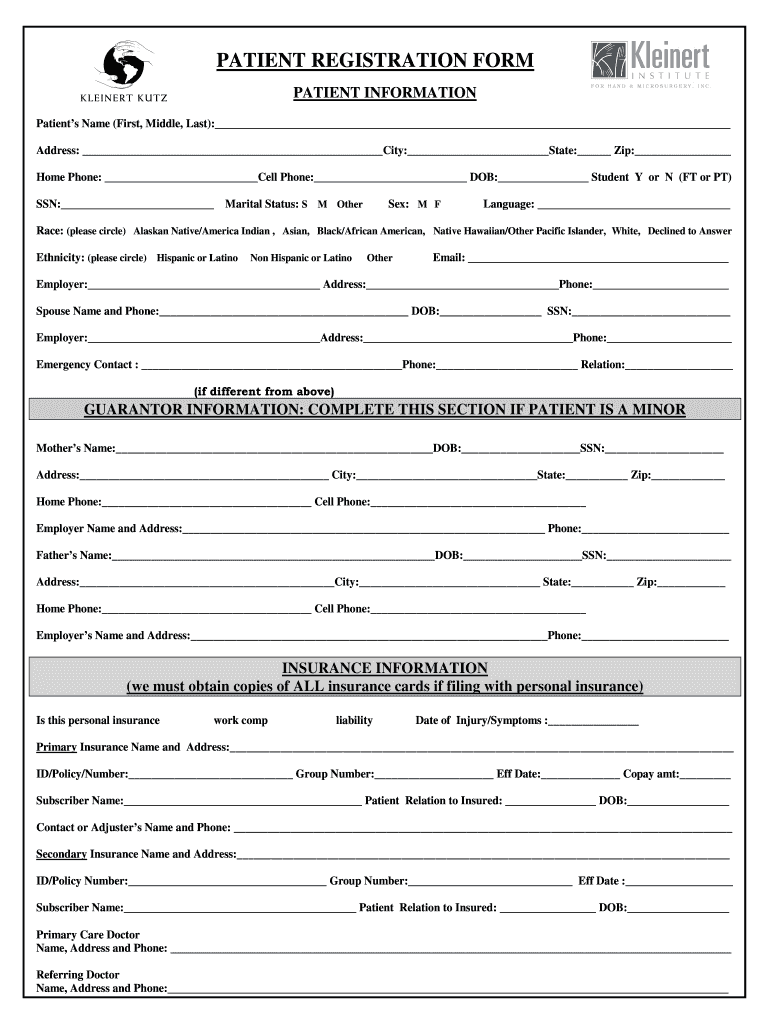
Begin by filling out the 'Patient Information' section. Enter your full name, address, contact numbers, date of birth, and marital status. Ensure all fields are completed accurately.
Proceed to the 'Guarantor Information' section if applicable. This is essential for minors; provide details about the parent or guardian.
In the 'Insurance Information' section, indicate whether you have personal insurance or other types. Fill in your primary and secondary insurance details, including policy numbers and subscriber information.
Complete the 'Health Information Sheet' by detailing any current health issues, previous injuries, and medications. This helps ensure comprehensive care.
Review all entered information for accuracy before saving or submitting your form through our platform.
Start using our platform today to streamline your patient registration process for free!
Fill out patient registration kleinert online It's free
Promoting well-being in later life - a qualitative analysis of
by E Kleinert 2025 Cited by 3 This study explores older adults perspectives on well-being and medical decision-making to inform patient-centered care practices in family medicine.Read more
Cookie consent notice
This site uses cookies to enhance site navigation and personalize your experience.
By using this site you agree to our use of cookies as described in our Privacy Notice.
You can modify your selections by visiting our Cookie and Advertising Notice.