
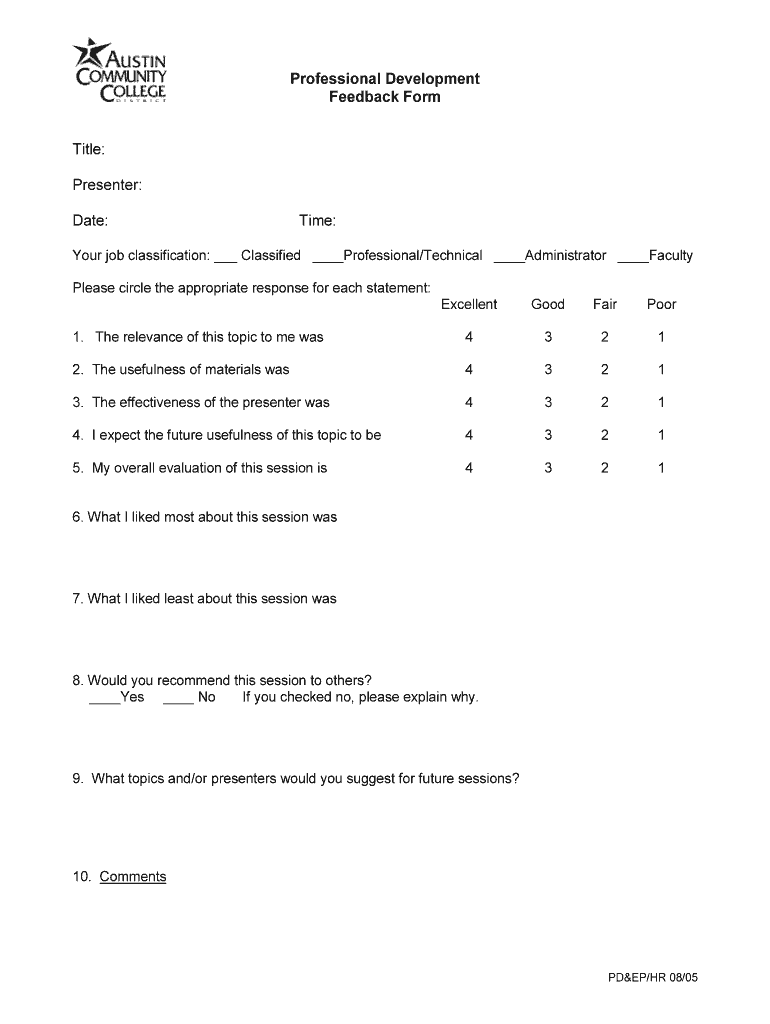







Definition & Meaning of the Professional Development Feedback Form
The Professional Development Feedback Form is a structured document used primarily in educational and corporate settings. Its primary purpose is to collect responses from participants regarding a professional development session, such as a workshop, seminar, or training. This feedback is crucial in evaluating the effectiveness of the event and identifying areas for improvement. Typically, this form tracks various aspects like the presenter's effectiveness, session content, time management, and the overall relevance to the participant's job role.
How to Use the Professional Development Feedback Form
To effectively use this form, begin by distributing it to participants at the conclusion of a professional development session. Participants should complete the form while the session's details remain fresh in their minds to ensure accuracy and depth in their feedback. Once the forms are collected, organizers can analyze the responses to fine-tune future sessions for better outcomes.
Completing the Feedback Sections
- Presenter Evaluation: Participants rate the presenter’s clarity, engagement, and expertise.
- Content Relevance: Feedback on whether the material is relevant and beneficial to the participant's role.
- Time Management: Insights on whether the session was appropriately timed.
- Overall Satisfaction: General feelings about the session's effectiveness.
Steps to Complete the Professional Development Feedback Form
- Provide Your Personal Information: Fill in your name, job classification (e.g., Faculty, Administrator), and the date of the session.
- Evaluate the Presenter: Rate the presenter on several criteria such as delivery style and knowledge.
- Assess the Content: Indicate how well the content aligned with your role and its applicability to your work.
- Time Evaluation: Judge whether the session’s duration was adequate.
- Submit Comments: Offer any additional suggestions for improving future sessions.
Who Typically Uses the Professional Development Feedback Form
This form is utilized by a diverse group of individuals and organizations involved in professional learning and improvement. These can include, but are not limited to:
- Educational Institutions: Teachers and administrators attending workshops.
- Corporations: Employees participating in training sessions.
- Nonprofits: Volunteers and staff involved in skill-building events.
- Government Agencies: Public servants attending mandated training programs.


Key Elements of the Professional Development Feedback Form
Important Sections
- Participant Information: Gathers details about the respondent to categorize feedback effectively.
- Questions for Specific Feedback: Focus on session relevance, presenter effectiveness, and overall satisfaction.
- Comments Section: Allows for open-ended feedback, providing qualitative data for organizers.
Types of Ratings
The form may include a Likert scale, where participants can rate each aspect from one to five, alongside checkboxes and open fields for detailed responses.
Examples of Using the Professional Development Feedback Form
Consider a continuing education seminar at a university. At the end of the session, participants are asked to complete this form. Data collected helps faculty improve future sessions by addressing areas like curriculum adjustments and instructional methods.
Real-World Case Scenario
In a corporate setting, employees attending a leadership workshop fill out the form upon completion. The HR department analyzes results to tailor future workshops, ensuring they meet the employees' learning needs effectively.
Digital vs. Paper Version
The Professional Development Feedback Form can be completed either digitally or in paper form. Each version has its advantages:
- Digital Form: Facilitates quick distribution and collection, integrates easily with data analysis tools.
- Paper Form: Offers a tangible option for those not comfortable with digital platforms or when digital access is limited.
Versions or Alternatives to the Professional Development Feedback Form
Some organizations may adapt or create their own variants of the form to fit specific needs or contexts. For instance, a tech company might include technical proficiency metrics within the feedback form to assess how well technology was integrated into the training session.
Software Compatibility
The form, whether digital or printable, is commonly compatible with a variety of software like DocHub, Google Forms, or Microsoft Word. These platforms can streamline the creation, distribution, and analysis of the feedback data, enhancing the overall feedback process.




