






Definition and Purpose of the Proof of Authority for My CFIA Business Use
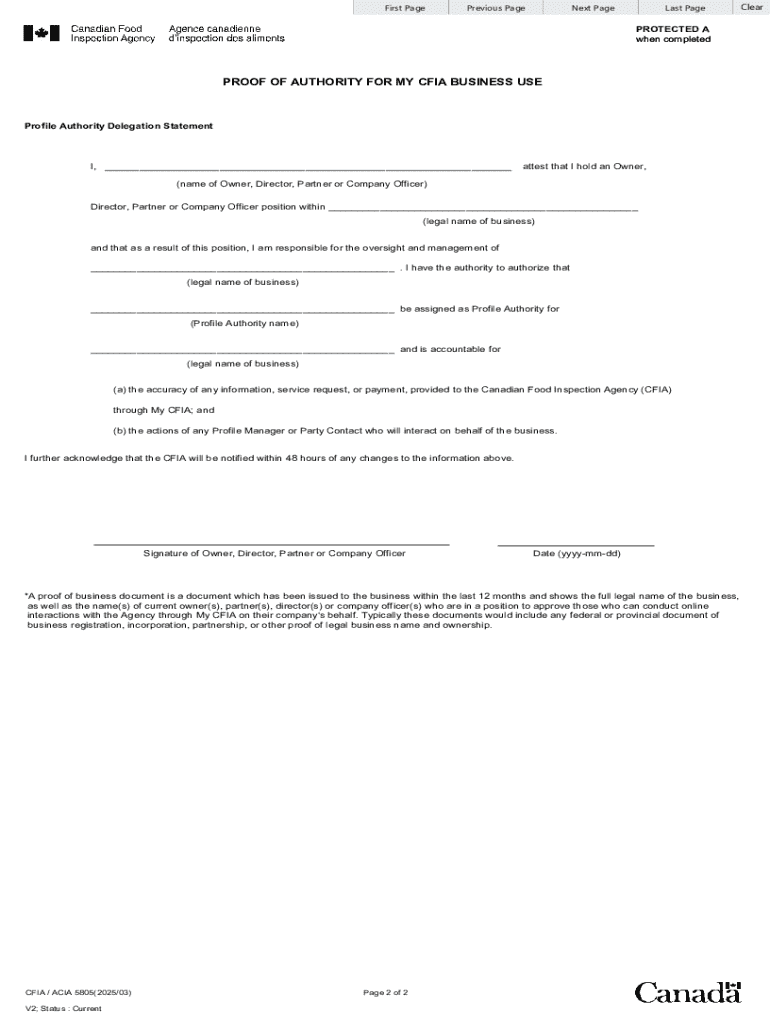
The "Proof of Authority for My CFIA Business Use" form is a vital document used by businesses engaging with the Canadian Food Inspection Agency (CFIA). It designates an individual, referred to as the Profile Authority, who will manage all information and interactions with CFIA on behalf of a business entity. The Profile Authority is entrusted with responsibilities such as legal name matching and ensuring compliance with online registration requirements.
- Profile Authority Role: Acts as the primary contact and responsible individual for CFIA-related activities.
- Designation Importance: Ensures clear, authorized communication channels between a business and the CFIA.
- Legal Compliance: Helps maintain alignment with CFIA regulations, ensuring the business meets all necessary requirements.
Steps to Complete the Proof of Authority for My CFIA Business Use
Completing the "Proof of Authority for My CFIA Business Use" requires attention to detail and accuracy. Below are detailed steps to guide users through the process:
- Gather Required Information: Collect the business's legal name, registration number, and the designated individual's full name, contact information, and position within the business.
- Complete Online Registration: Access the CFIA online portal to begin the registration process. Ensure that all business and individual details are input accurately to avoid delays.
- Assign Profile Authority: Clearly indicate the individual designated as the Profile Authority, confirming their responsibilities and the scope of their authority.
- Review and Verify Details: Double-check all information for accuracy, ensuring no discrepancies exist between the form and official business documents.
- Submit the Form: Submit the completed form through the designated CFIA online portal or via other permissible submission methods, such as mail or in person.
Key Elements of the Proof of Authority for My CFIA Business Use
Understanding the key components of this form is crucial for its proper completion and submission:
- Business Identification: Include the business's full legal name and registration number.
- Profile Authority Details: Provide comprehensive information about the assigned Profile Authority, including their role and contact information.
- Legal Name Matching: Ensure all entries match existing business registrations or records.
- Terms and Conditions: Acknowledge understanding and compliance with CFIA terms regarding data management and authority responsibilities.
Who Typically Uses the Proof of Authority for My CFIA Business Use
The form is designed for specific roles within a business, typically involving owners or senior management:
- Business Owners: Entrepreneurs who own and operate their own businesses and need to interact directly with CFIA.
- Directors and Partners: Individuals in these roles who need to facilitate and oversee CFIA-related activities.
- Officers: Company officers delegated with authority to manage regulatory interactions and compliance obligations.


Required Documents for Submission
When submitting the "Proof of Authority for My CFIA Business Use," include the following documents to ensure a comprehensive application package:
- Valid Identification: A government-issued ID for the Profile Authority to verify identity.
- Business Registration Documents: Copies of official business registration certificates or licenses.
- Authorization Letters: If applicable, include letters that confirm the authority and role of the designated individual, signed by relevant business executives.
Legal Use and Compliance Requirements
Using the form correctly ensures legal compliance with CFIA’s regulations. Key compliance aspects include:
- Authorization Legitimacy: Confirm that the designated Profile Authority is genuinely authorized by the business to handle CFIA interactions.
- Data Protection: Adhere to regulations regarding the protection and use of sensitive business and personal data shared with CFIA.
- Regulatory Adherence: Ensure that all business activities under CFIA’s jurisdiction comply with relevant Canadian regulations and standards.
Submission Methods for the Proof of Authority for My CFIA Business Use
Businesses have multiple methods for submitting this form, allowing for flexibility based on resources and preferences:
- Online Submission: Utilize the CFIA’s electronic submission portal for expedited processing.
- Mail Submission: Send completed forms and supporting documents to the CFIA’s official postal address.
- In-Person Submission: Deliver documents directly to CFIA offices, if this option is available and preferable.
Variants or Alternatives to the Proof of Authority for My CFIA Business Use
Businesses may encounter different document requirements based on their specific industry or CFIA interactions. Understanding forms that relate to or complement the "Proof of Authority for My CFIA Business Use" is useful:
- Form Variants: Stay informed about any updates or revised versions of the form provided by CFIA.
- Related Documents: Be aware of other forms or declarations that may be required in conjunction with proof of authority, especially for complex business operations or sector-specific requirements.
Software Compatibility for Document Handling
For efficient handling of the "Proof of Authority for My CFIA Business Use," businesses may employ various document management and filling software:
- DocHub: Offers tools for editing, signing, and managing the form digitally, streamlining the submission process.
- Cloud Integration: Compatible with cloud platforms such as Google Drive for easy sharing and access.
- Software Tools: Other compatible software might include QuickBooks for records management and Adobe for PDF handling.
By following these instructions and details, business entities can effectively navigate the process of completing and submitting the "Proof of Authority for My CFIA Business Use," ensuring proper designation of authority and compliance with CFIA requirements.