




Here's how it works

01. Edit your how to transfer fpl account to another person online
Type text, add images, blackout confidential details, add comments, highlights and more.

02. Sign it in a few clicks
Draw your signature, type it, upload its image, or use your mobile device as a signature pad.

03. Share your form with others
Send statement claimant sample via email, link, or fax. You can also download it, export it or print it out.
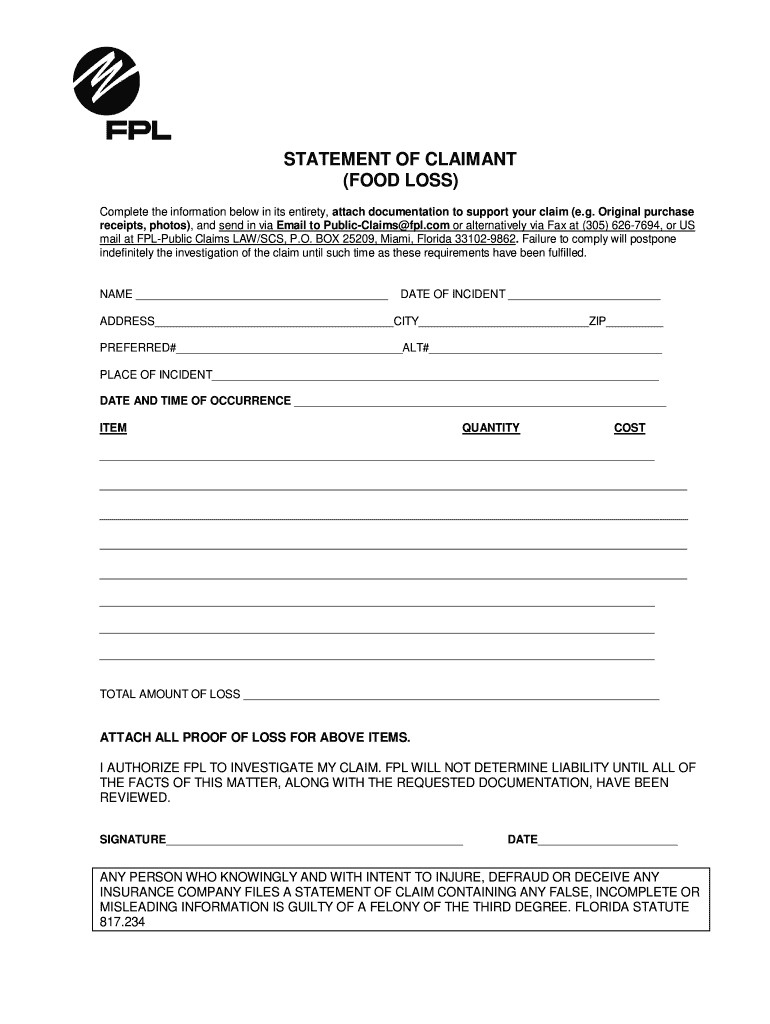
How to use or fill out fpl claim statement with our platform

- Click ‘Get Form’ to open the fpl claim statement in the editor.
- Begin by entering your name in the designated field at the top of the form. This identifies you as the claimant.
- Fill in the date of the incident, ensuring accuracy for proper processing of your claim.
- Provide your complete address, including city and ZIP code, to facilitate communication regarding your claim.
- Enter your preferred and alternate contact numbers so that FPL can reach you easily if needed.
- Describe the place where the incident occurred, providing as much detail as possible.
- Document the date and time of occurrence to establish a timeline for your claim.
- List each item affected by the incident along with its quantity and cost in the provided sections. Be thorough to support your total loss amount.
- Calculate and enter the total amount of loss at the bottom of this section.
- Attach all necessary proof of loss documentation, such as receipts or photos, directly within our platform for easy submission.
- Sign and date at the bottom to authorize FPL to investigate your claim, confirming that all information is accurate.
Start filling out your fpl claim statement online for free today!
Fill out fpl claim statement online
It's free
It's free
Security and compliance
At DocHub, your data security is our priority. We follow HIPAA, SOC2, GDPR, and other standards, so you can work on your documents with confidence.
Learn more


