Camp slo liability release form 2026

Get Form
camp slo liability release form Preview on Page 1

Here's how it works

01. Edit your form online
Type text, add images, blackout confidential details, add comments, highlights and more.
02. Sign it in a few clicks
Draw your signature, type it, upload its image, or use your mobile device as a signature pad.
03. Share your form with others
Send it via email, link, or fax. You can also download it, export it or print it out.

How to use or fill out camp slo liability release form with our platform

Form edit decoration
9.5
Ease of Setup
DocHub User Ratings on G2
9.0
Ease of Use
DocHub User Ratings on G2
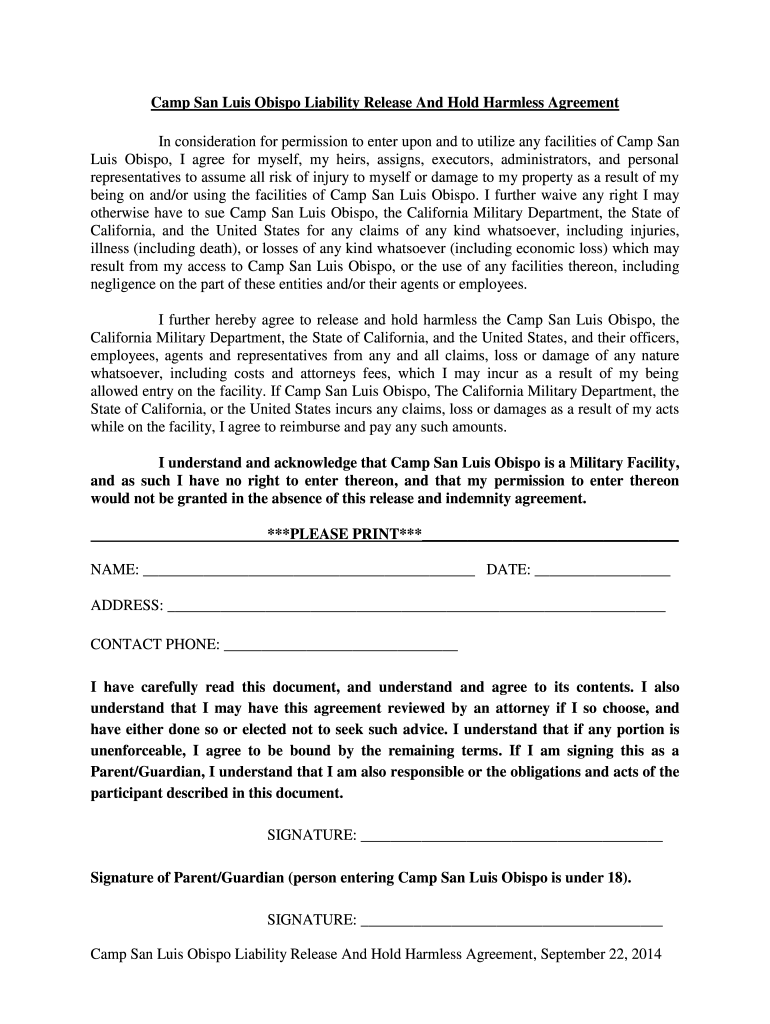
  1. Click ‘Get Form’ to open the Camp SLO Liability Release form in the editor.
  2. Begin by entering your full name in the designated field. This is crucial as it identifies you as the participant.
  3. Next, fill in the date of completion. This helps track when the agreement was signed.
  4. Provide your complete address and contact phone number in the respective fields. This information is essential for any necessary communication.
  5. Carefully read through the entire document to understand your rights and responsibilities. Ensure you acknowledge that you may seek legal advice if needed.
  6. Sign the document where indicated. If you are a parent or guardian signing for a minor, ensure to sign in both places provided for guardians.

Start filling out your Camp SLO Liability Release form online for free today!

be ready to get more

Complete this form in 5 minutes or less

Get form

Got questions?

We have answers to the most popular questions from our customers. If you can't find an answer to your question, please contact us.
Contact us

Yes, you can use DocHub for signing any business and private paperwork, including your camp slo liability release form. All eSignatures you create with our service are legally binding and court-admissible, as DocHub complies with standards required by ESIGN and UETA. Save your accomplished document with a detailed Audit Trail if needed.

If you use Chrome, there are two easy ways to edit your camp slo liability release form online. First, go to the DocHub site, add your document, and edit it utilizing our toolbar. You may also install our Chrome extension and edit any document by dragging and dropping it in your browser window.

Liability waivers are enforceable in California to the extent they immunize the defendant from ordinary negligence. Under California law, a liability waiver cannot excuse an injury caused by a defendants: gross negligence, recklessness, or.
How Do You Write a Media Release Form? Name of the parties involved, i.e., releasor and releasee. Detailed information about the project. Explicit information of the permissions granted. Any special considerations, including payment obligations or credit, if any. A space for all parties to sign.
Yes, liability waivers can be legally binding documents. Its, therefore, advisable to seek legal or professional guidance to ensure your waiver is well-drafted and legally valid for your location. Other relevant factors that determine the enforceability of liability waivers include: The terms and language used.

Security and compliance

At DocHub, your data security is our priority. We follow HIPAA, SOC2, GDPR, and other standards, so you can work on your documents with confidence.

Learn more
ccpa2
pci-dss
gdpr-compliance
hipaa
soc-compliance
be ready to get more

Complete this form in 5 minutes or less

Get form

People also ask

Free Release of Liability Form | Liability Waiver (US) | LawDepot.

Related links