






Definition and Importance of a Team Roster
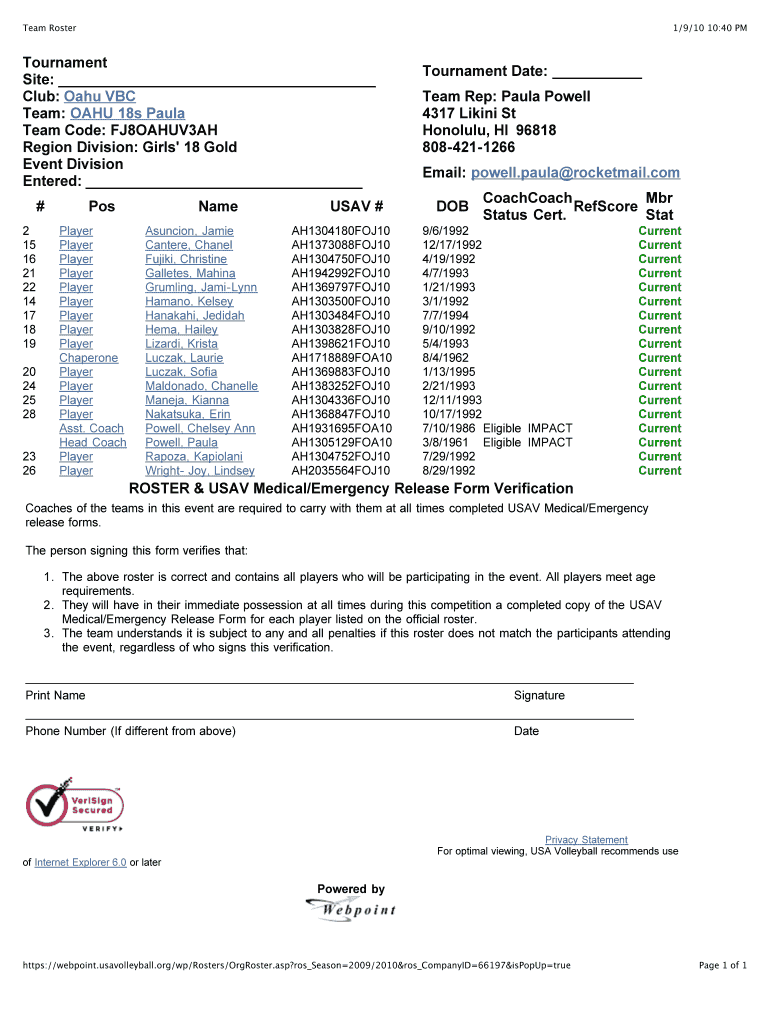
A team roster is a comprehensive list detailing the members of a team, their respective roles, and related identifiers. Primarily used in sports, such as for a volleyball team, it helps in organizing, managing, and ensuring all necessary personnel are accounted for. This document becomes essential in various settings, providing clarity on who is part of a team and what role each member plays. It's not only critical for record-keeping but also for planning strategies, managing substitutions during competitions, and communicating effectively within the team.
How to Use the Team Roster Effectively
Utilizing a team roster effectively involves several key practices. First, maintain accurate and up-to-date information, ensuring all changes in team membership are promptly recorded. Regular updates help in planning and executing team events seamlessly. Profiles within the roster should include pertinent details such as player names, positions, USAV numbers, and contact details. This information facilitates smooth operations during competitions or training sessions. Moreover, distributing copies to relevant stakeholders ensures that everyone involved has access to the necessary data for strategic planning and communication during games.
Steps to Complete the Team Roster
To complete a team roster accurately, follow these steps:
-
Gather Information: Collect personal and professional details of each team member. This includes names, contact information, player positions, and identification numbers.
-
Organize the Data: Use a structured format to input details into the roster. Ensure that each player's information is listed under easily identifiable categories.
-
Verify Details: Cross-check all entered data for accuracy. This involves validating contact numbers, spellings of names, and correctness of positional information.
-
Secure Required Signatures: If the roster includes sections that necessitate signatures, such as the verification statement from a team representative, ensure these are signed properly.
-
Distribute Copies: Once finalized, provide copies to coaches, team members, and administrative staff to facilitate transparent communication and strategy formulation.
Key Elements of the Team Roster
A team roster typically comprises specific elements that ensure comprehensive information representation. Key components include:
- Player Names and Positions: Identifying who is on the team and their respective roles.
- Uniform Numbers: Vital for identification during matches.
- Contact Information: Ensures seamless communication among team members.
- USAV Numbers: Essential for participation validation in competitions.
- Emergency Contacts: Critical for addressing unforeseen circumstances promptly.
Legal Use and Compliance of the Team Roster
Ensuring that the team roster complies with legal standards is paramount. This involves adhering to data protection laws, notably in handling personal information. Each team member must consent to their data being processed and shared within the limits set by privacy regulations. It's crucial to ensure that the roster is used solely for its intended purpose of team management and competition organization. Misuse of a roster, such as unauthorized sharing of personal data, can lead to significant legal ramifications.
Who Typically Uses the Team Roster?
The primary users of a team roster include coaches, team managers, and administrative staff. Coaches use the roster to strategize plays and ensure proper player substitutions during a game. Team managers utilize it to track player eligibility and roster changes, while administrative staff may use it for logistical planning and communication with other teams and event organizers. Additionally, parents and team members might access the roster for contact information and game-day organization details.


Examples of Using the Team Roster
Real-world scenarios underscore the practical application of a team roster. For instance, in a volleyball tournament, the team representative might use the roster to verify player eligibility with event coordinators. It could also be employed to ensure all medical release forms are accounted for, thereby fulfilling competition prerequisites. Another example includes coaches analyzing roster data to adjust player positions based on performance metrics or injuries, demonstrating its dynamic utility in strategizing team configurations.
Versions and Alternatives to the Team Roster
While the traditional paper-based team roster remains standard, digital alternatives have gained traction, offering enhanced functionality. Digital rosters, for instance, can be accessible via cloud platforms, enabling real-time updates and easier dissemination. Software solutions like DocHub can aid in managing and updating team rosters, providing secure access and ensuring compliance with data protection laws. Additionally, specialized sports management software may offer integrated scheduling, communication, and statistics analysis features, broadening the traditional scope of a roster.