Definition & Meaning
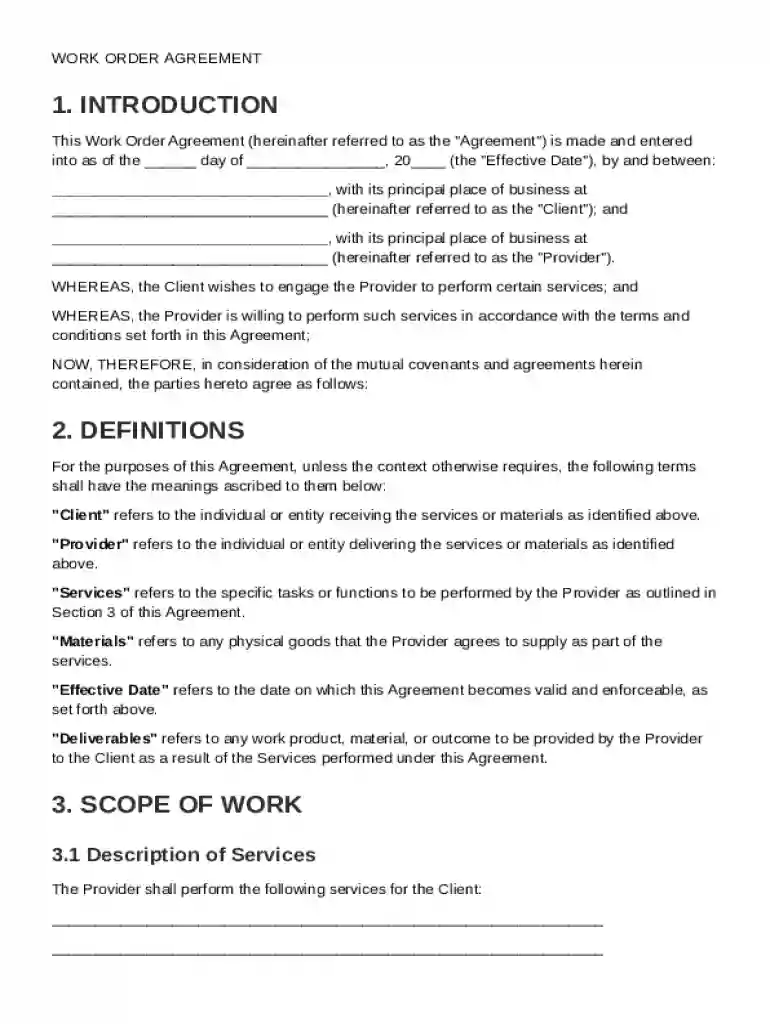
A Work Order Agreement Template is an essential document that formalizes the understanding between a client and a provider regarding specific services to be performed. This template outlines the scope of work, payment terms, responsibilities, and various legal protections to ensure clarity and mutual agreement. By providing a structured format, it facilitates a clear delineation of expectations, responsibilities, and legal obligations, minimizing the risk of misunderstandings and disputes. This document serves as a solid foundation for a professional relationship, ensuring both parties are aligned in terms of deliverables and timelines.
How to Use the Work Order Agreement Template
Using the Work Order Agreement Template involves several key steps to effectively capture all necessary details of a service engagement. First, identify the specific services that will be performed. Clearly define each party's responsibilities, focusing on deliverables, timelines, and any milestones. Next, establish the payment terms, including the total fee, payment schedule, and conditions for payment. Ensure you address confidentiality obligations to protect any sensitive information exchanged. Lastly, include a dispute resolution process to manage potential disagreements amicably. This structured approach ensures all critical elements are covered, enhancing the efficacy of the agreement.
Steps to Complete the Work Order Agreement Template
- Fill in Basic Details: Start by entering the date, client information, and provider's details. Ensure that the contact information for both parties is accurate.
- Define the Scope of Work: Clearly outline the services to be provided, including any specific tasks, deliverables, and deadlines.
- Set Payment Terms: Specify the agreed-upon compensation, payment methods, and the schedule for payments. Include conditions that might affect payment timing or amounts.
- Outline Responsibilities: Detail the responsibilities of both parties, ensuring there is no ambiguity about who is responsible for what.
- Include Confidentiality Requirements: Add clauses that protect sensitive information and outline each party’s obligations regarding confidentiality.
- Address Liability and Dispute Resolutions: Define liability limitations and procedures for resolving disputes should they arise.
- Final Review and Signatures: Review the entire document for accuracy and completeness. Both parties should sign the agreement to make it legally binding.
Key Elements of the Work Order Agreement Template
- Service Description: A comprehensive outline of the services to be provided, detailing every aspect of work involved.
- Payment Information: Clear guidelines regarding the payment structure, including rates, terms, and payment schedules.
- Roles and Responsibilities: Definitions of what is expected from both the client and the provider, ensuring clarity.
- Confidentiality Clauses: Provisions that protect any disclosed confidential information during the course of the business relationship.
- Liability and Dispute Resolution: Terms limiting liability and providing a roadmap for resolving disputes, safeguarding both parties’ interests.
- Termination Conditions: Stipulations detailing the circumstances under which the agreement can be terminated by either party.
Important Terms Related to the Work Order Agreement Template
- Client: The party receiving the services outlined in the agreement.
- Provider: The party responsible for performing the services described.
- Deliverables: Specific outputs or results expected as part of the services.
- Milestones: Key points within the project timeline where specific deliverables or stages are agreed to be completed.
- Confidential Information: Any sensitive data shared between parties that is protected by confidentiality clauses.
- Force Majeure: Events beyond the control of either party that may affect the delivery of services, such as natural disasters.
Legal Use of the Work Order Agreement Template
The Work Order Agreement Template serves as a legally binding contract between the client and the provider, ensuring that both parties are protected under the law. It adheres to U.S. legal standards, addressing essential components such as liability, confidentiality, and dispute resolution. By clearly defining the terms of service, this template helps mitigate legal risks and potential conflicts. Both parties should review the agreement thoroughly and may consult legal professionals to ensure the document meets specific legal requirements and adequately protects their interests.
Examples of Using the Work Order Agreement Template
- Construction Projects: A contractor can detail the various phases of a building project, including specific tasks like plumbing or electrical work, payment schedules, and project milestones.
- IT Services: A tech company can outline software development tasks, specify timelines, and delineate support services, ensuring clients understand what to expect over the project's life cycle.
- Freelance Graphic Design: A designer can specify design deliverables, such as logos or marketing materials, and agree on payment terms for initial drafts, revisions, and final submission.
Business Types That Benefit Most from the Work Order Agreement Template
- Construction Firms: Ensures clarity, accountability, and legal protection in complex projects involving multiple subcontractors.
- Consulting Firms: Allows consultants to outline their services and payment agreements clearly, minimizing misunderstandings.
- IT and Software Development Companies: Facilitates transparent agreements for project scope, timelines, and payment for development services.
- Marketing Agencies: Provides a structured format to define campaign objectives, deliverables, and evaluation criteria, ensuring client and agency alignment.
- Freelancers and Independent Contractors: Offers a straightforward way to document project details and payment terms, enhancing professional client relationships.