






Definition & Meaning
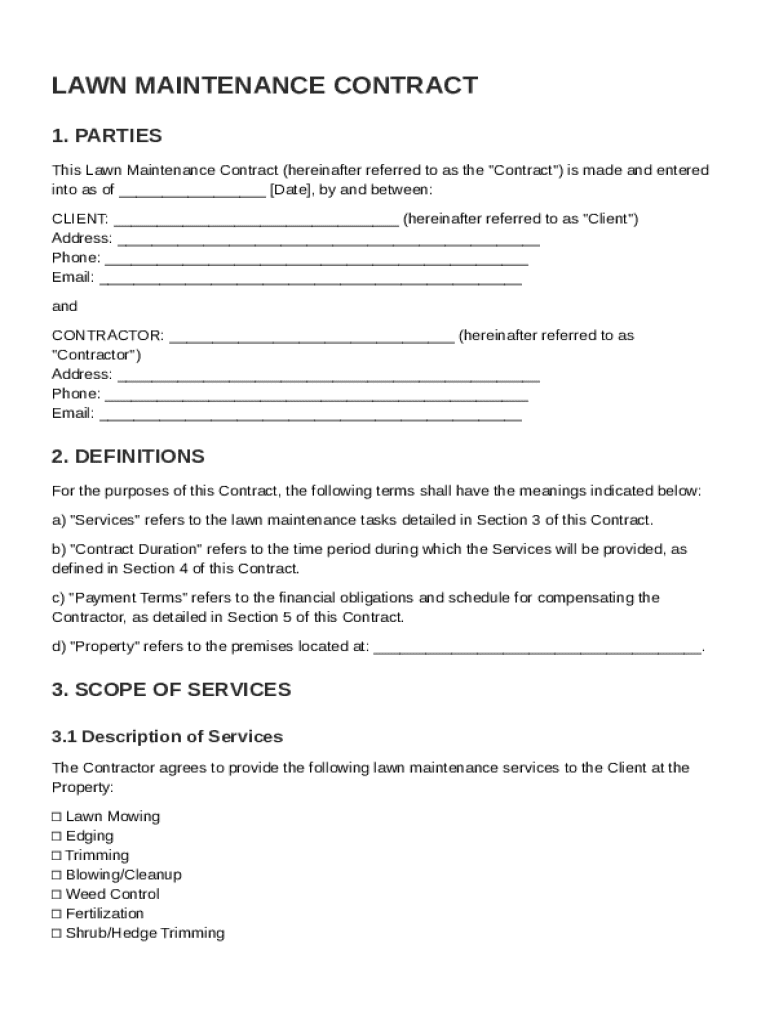
The Lawn Maintenance Contract Template is a standardized document used to formalize agreements between a Client and a Contractor for lawn care services. This template outlines contractual terms such as the scope of services, payment details, duration, and responsibilities of both parties involved. It also includes clauses pertaining to liability insurance, dispute resolution, and the conditions under which the contract can be terminated or renewed. The contract is crucial for setting clear expectations and safeguarding the interests of both parties.
Key Elements of the Lawn Maintenance Contract Template
The template typically includes several key components to ensure a comprehensive agreement:
- Scope of Services: Specifies the types of maintenance tasks, such as mowing, fertilization, and pest control, along with their frequency.
- Payment Terms: Details about how and when the Contractor will be paid for services rendered, including any advance payments or installment plans.
- Contract Duration: Defines the length of time the contract will be in effect and options for renewal.
- Responsibilities: Clarifies duties for both Client and Contractor, ensuring both parties understand their respective roles.
- Insurance and Liability: Addresses the insurance requirements for the Contractor, including potential liabilities for property damage or service failures.
- Dispute Resolution: Outlines the process for resolving disagreements, possibly through mediation or arbitration.
How to Use the Lawn Maintenance Contract Template
Using the Lawn Maintenance Contract Template involves a few critical steps to tailor it to specific needs:
- Download the Template: Obtain the template from a reliable source, ensuring it matches your regional requirements.
- Customize the Template: Edit the document to insert specific details related to the project, such as the Client's name, the Contractor's name, and exact services needed.
- Review Legal Requirements: Ensure that all aspects of the contract comply with local laws and regulations.
- Seek Legal Advice: Consider consulting with a legal professional to review the contract, particularly if customized clauses are added.
- Sign and Store: Once both parties agree to the terms, sign the document and store it securely for future reference.
Important Terms Related to Lawn Maintenance Contract Template
To fully understand and utilize the Lawn Maintenance Contract Template, it is essential to become familiar with several key terms:
- Client: The individual or entity requesting the lawn care services.
- Contractor: The individual or company providing the lawn care services.
- Liability Insurance: Insurance that covers any potential damages or losses during the execution of the contract.
- Termination: Conditions under which the contract may be ended before its agreed-upon term.
- Renewal: The process and conditions for extending the contract beyond the original duration.
Steps to Complete the Lawn Maintenance Contract Template
Completing the Lawn Maintenance Contract Template requires thoughtful input and attention to detail:
- Gather Information: Compile all necessary details about the services, parties involved, and any special conditions.
- Input Data: Fill in the relevant sections of the template, including contact information and service specifics.
- Review: Thoroughly check the document for errors or omissions, paying special attention to numerical data and names.
- Discuss: Communicate with the other party to ensure mutual understanding and agreement on all terms.
- Finalize: Once both parties are satisfied, sign the document and exchange copies.
Legal Use of the Lawn Maintenance Contract Template
The legal use of this contract template is governed by state and federal laws, ensuring that it is enforceable:
- Compliance: Ensure clauses are consistent with legal standards, covering areas like labor laws, privacy rights, and contractual obligations.
- Enforceability: A legally compliant contract ensures that terms can be enforced in a court of law, should disputes arise.
- Update Regularly: Legal norms evolve, so it's essential to review and update contracts periodically to ensure they remain compliant.
State-Specific Rules for the Lawn Maintenance Contract Template
Lawn maintenance contracts may be subject to state-specific rules or regulations:
- Varying Laws: Each state may have different requirements for what must be included in a contract, particularly concerning worker safety and environmental regulations.
- Local Permits: In some areas, special permits might be necessary for certain types of lawn care activities.
- Liability Norms: State laws may dictate the minimum insurance coverage required for contractors operating within their jurisdiction.
Examples of Using the Lawn Maintenance Contract Template
In the real world, this contract template can be applied in various contexts:
- Residential Services: Homeowners may employ a contractor to maintain their lawns, detailing services like seasonal clean-ups, weekly mowing, or designing landscape features.
- Commercial Properties: Businesses engaging in maintenance contracts to ensure public spaces, like corporate campuses or shopping centers, are well-kept and presentable.
- Community Associations: Homeowners' associations (HOAs) may use the contract to secure consistent maintenance across common areas within a neighborhood, ensuring all residents benefit from well-maintained spaces.