






Definition and Meaning of the Quality Technical Agreement Template
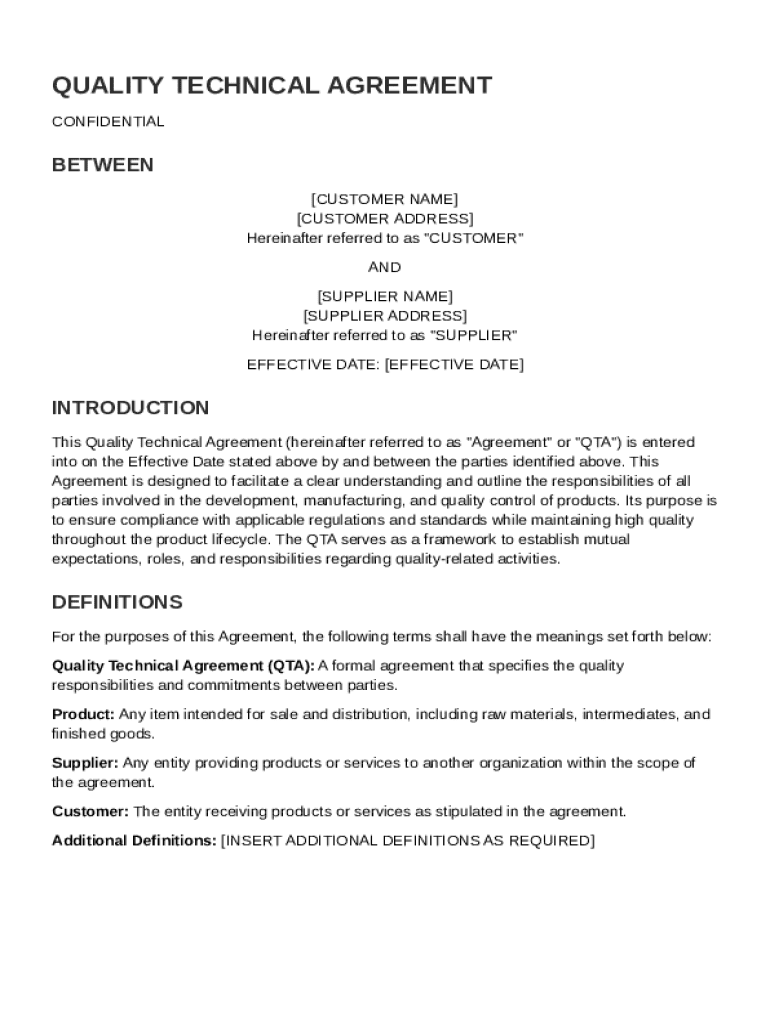
The Quality Technical Agreement (QTA) Template serves as a formal document outlining the duties and responsibilities between a customer and a supplier concerning product development, manufacturing, and quality control. This agreement sets mutual expectations for compliance with industry regulations and standards. It helps define the scope of cooperation, assigns roles, and includes provisions for implementing quality management systems, conducting audits, and managing changes. The QTA also addresses confidentiality, termination conditions, and establishes protocols for dispute resolution, ensuring both parties are aligned on essential operational aspects.
Key Elements of the Quality Technical Agreement Template
A comprehensive Quality Technical Agreement Template incorporates several crucial components:
- Scope of Agreement: Defines the range of products and services covered, outlining specific project parameters.
- Roles and Responsibilities: Clearly delineates what is expected from the customer and the supplier, enhancing accountability.
- Quality Management Systems: Details the processes and procedures to ensure products meet regulatory and quality standards.
- Audit Protocols: Specifies how audits will be conducted, including frequency, scope, and reporting requirements.
- Change Control Procedures: Outlines how changes to processes or products will be managed and communicated between parties.
- Confidentiality Clauses: Ensures sensitive information is protected and outlines penalties for breaches.
- Termination and Dispute Resolution: Sets conditions under which the agreement can be terminated and procedures for resolving disagreements.
How to Use the Quality Technical Agreement Template
Using the Quality Technical Agreement Template involves several steps that ensure all relevant aspects are addressed:
- Review the Template: Familiarize yourself with the sections and standard clauses included in the template.
- Customize Content: Modify sections to reflect the specific needs and agreements between customer and supplier.
- Assign Responsibilities: Clearly define roles for both parties and ensure both understand their obligations.
- Integrate Quality Management: Align quality management procedures with industry standards and compliance requirements.
- Final Review: Conduct a thorough review to ensure all details are accurate and reflect shared agreements.
- Sign and Implement: Once agreed upon, both parties sign the document to formalize the contract, which is then enacted in operations.
Steps to Complete the Quality Technical Agreement Template
Filling out the Quality Technical Agreement Template requires careful attention to detail:
- Gather Necessary Information: Collect all required data concerning the products and services involved.
- Define Scope and Terms: Clearly articulate the scope of the agreement and specific terms for quality standards and compliance.
- Detail Responsibilities: Assign clear roles and duties to prevent miscommunication.
- Outline Quality Assurance Measures: Include specific metrics and processes for maintaining quality control.
- Review Legal Compliance: Ensure the agreement complies with applicable laws and regulations.
- Double-Check for Accuracy: Verify that all entries are correct and reflect true expectations and realities.
- Finalize: Complete the template by securing signatures from all involved parties after mutual agreement is reached.
Who Typically Uses the Quality Technical Agreement Template
The Quality Technical Agreement Template is widely used by various stakeholders involved in supply chain operations:
- Manufacturers and Suppliers: Define mutual obligations regarding product quality and regulatory compliance.
- Quality Assurance Teams: Use the template to ensure all products adhere to established quality protocols.
- Legal and Compliance Departments: Ensure all contractual aspects are legally sound and compliant with industry standards.
- Project Managers: Oversee implementation and adherence to the QTA terms during the product development cycle.


Important Terms Related to the Quality Technical Agreement Template
Essential terminologies related to the Quality Technical Agreement Template that may influence understanding and execution include:
- Compliance: Ensuring that all processes and products meet industry regulations and standards.
- Quality Control: The processes and measures used to maintain desired product quality levels.
- Audit: A systematic examination to assess compliance with agreements and standards.
- Confidentiality: Safeguards put in place to protect sensitive information shared between parties.
- Liability and Indemnity: Legal terms defining responsibilities and compensation for losses or damages.
Legal Use of the Quality Technical Agreement Template
The legal use of the Quality Technical Agreement Template encompasses adherence to industry standards and legal frameworks:
- Regulatory Compliance: Ensures all products and processes meet relevant legal standards.
- Intellectual Property Rights: Protects proprietary information and technology involved in collaborative projects.
- Contract Enforcement: Establishes legal remedies and actions for any party failing to meet agreed terms.
- Legal Consultation: Encourages both parties to seek legal advice to verify clauses and terms adhere to applicable laws.
Examples of Using the Quality Technical Agreement Template
Practical applications of the Quality Technical Agreement Template in real-world scenarios include:
- Production Partnerships: Two companies entering a long-term agreement for the manufacture of pharmaceuticals, ensuring all production stages meet FDA standards.
- Supplier Agreements: A retailer negotiating terms with a primary supplier for the delivery of materials, focusing on maintaining eco-friendly production methods.
- Outsourcing Contracts: A technology company sourcing components from international suppliers, spelling out criteria for quality testing and inspection.