Definition & Meaning
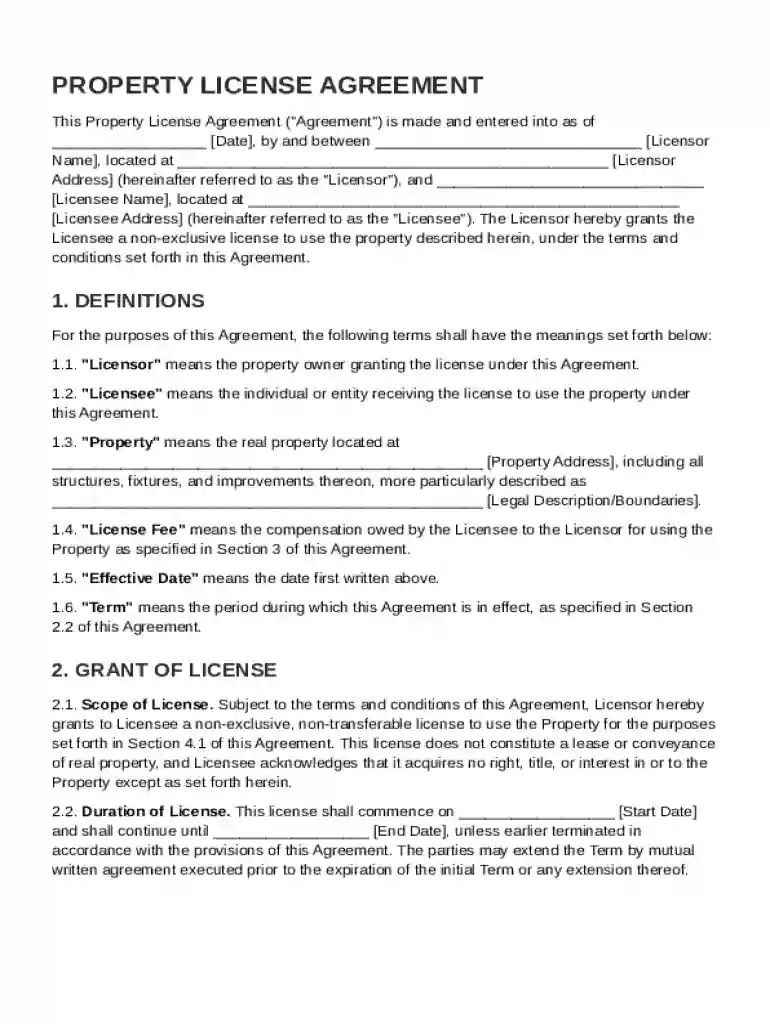
A Property License Agreement, often synonymous with leasing arrangements, outlines the rights and obligations concerning the temporary use of a specific property. Fundamentally, it grants the Licensee a non-exclusive license to utilize the Licensor's property under specific terms. This arrangement is distinct from a lease since it does not confer any form of ownership or exclusive possession rights to the Licensee. The agreement typically covers essential aspects like definitions, duration, permitted uses, and termination conditions. For instance, while a lease transfers exclusive possession, a license allows a Licensee to access and use the property alongside others.
Key Elements of the Property License Agreement Template
This template captures several crucial components necessary for a legally sound agreement. Key elements include:
- Definitions: Clear distinctions of terms used within the agreement, such as 'Licensor', 'Licensee', and 'Property'.
- Scope and Duration: Specifies the allowed uses of the property and the time frame for which the license is granted.
- Payment Terms: Details regarding fees, due dates, and acceptable payment methods.
- Responsibilities: Outlines maintenance obligations and liabilities for both Licensor and Licensee.
- Indemnification Clauses: Identifies any risk assumptions and compensations related to damages or losses.
- Termination Conditions: Describes scenarios under which the agreement can be concluded prematurely and the protocol for such an occurrence.
How to Use the Property License Agreement Template
This structured template is user-friendly and accessible, offering guidance on tailoring it to specific needs:
- Download or Import: Start by downloading the template from your preferred source or importing it directly into a document management platform like DocHub.
- Customizing the Agreement: Adjust clauses to reflect the particular property, parties involved, and transactional details. It's essential for the document to match the unique legal needs of both parties.
- Fillable Fields: Utilize fillable fields to ensure consistency in data collection across necessary entries like party information, property details, and specific conditions.
- Review and Revise: Thoroughly review the completed template to ensure accuracy and compliance with relevant legal standards.
- Execute with Signatures: Obtain legally binding electronic signatures from both parties to finalize the agreement.
Steps to Complete the Property License Agreement Template
Completing this template involves several deliberate actions, ensuring accuracy and legality:
- Gather Information: Collect all necessary details regarding the parties involved, the property, and the terms of use.
- Populate the Template: Begin filling out the template, starting with the Licensor's and Licensee's information, moving on to property specifics.
- Configure Terms and Conditions: Detail the terms, including payment schedules, permitted uses, and responsibility assignments.
- Review Legal Clauses: Pay close attention to indemnification, termination, and any miscellaneous provisions to ensure comprehensive protection for all parties.
- Finalize and Sign: After completing the details, both parties should agree to the terms and execute the document through digital signatures.
Legally Binding Electronic Signatures
The integration of electronic signature capability ensures that the execution of the Property License Agreement is both efficient and legally binding:
- Compliance with ESIGN Act: All electronic signatures obtained through platforms like DocHub are compliant with U.S. law, ensuring their legality in the court of law.
- Multiple Signature Options: Users have the flexibility to draw, type, or upload an image of their signature using various devices, including computers and smartphones.
- Audit Trails: For added security, each signed document includes detailed audit trails to track when each party viewed and signed the document.
State-Specific Rules for the Property License Agreement Template
Legal nuances can vary significantly from one state to another in the U.S., affecting the enforceability of license agreements:
- State-Specific Provisions: Some states may have unique regulations on indemnity clauses, termination rights, and specific use permits.
- Consult Local Laws: It is advisable to consult with legal professionals familiar with state-specific property laws to customize these agreements accordingly.
Software Compatibility
Incorporating this template within document management systems like DocHub offers various benefits:
- Document Import and Export: Seamless integration with cloud services, allowing import from and export to platforms like Google Drive.
- Universal File Formats: Compatible with multiple file types beyond PDFs, including DOC, PPT, XLS, and TXT, offering flexibility to users across different systems.
- Online Editing: Allows for versatile editing capabilities, suitable for both individual and collaborative environments.