






Definition and Meaning of a Workflow Contract Template
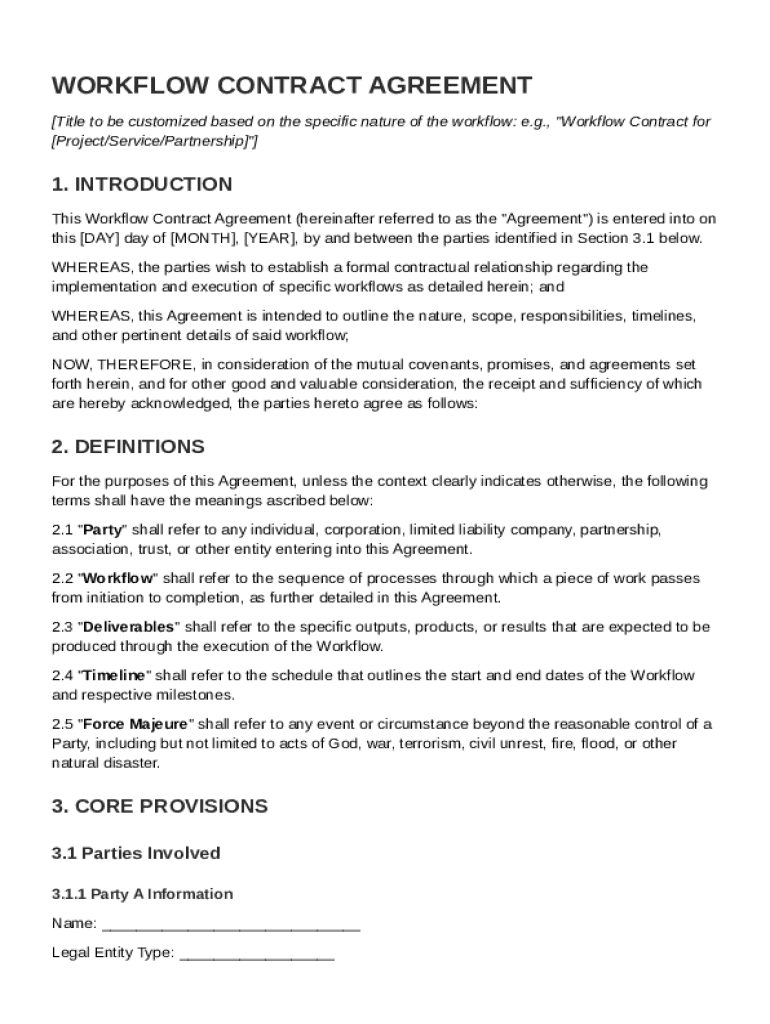
A Workflow Contract Template is a formal document that establishes the terms and conditions between two parties for the implementation and management of specific workflow processes. It outlines the obligations, responsibilities, timelines, and deliverables agreed upon by both parties. This template is crucial in defining the scope of services, ensuring both parties have a clear understanding of what is expected in terms of performance and outcomes.
The Workflow Contract Template typically includes sections covering confidentiality, payment terms, dispute resolution, and termination clauses. By utilizing this template, organizations can streamline the creation of agreements, maintain consistency in their contracts, and reduce the time spent drafting new documents from scratch. It serves as a standardized format, ensuring all essential elements are covered, thereby avoiding misunderstandings or omissions that could lead to disputes.
How to Use the Workflow Contract Template
Using a Workflow Contract Template involves several key steps to ensure it effectively captures the agreement's specifics. Start by reviewing the template to understand its structure and standard clauses. This familiarization helps identify areas where customization is required to fit the specific workflow in question.
-
Identify the Parties: Clearly state the names and contact information of both parties involved in the workflow.
-
Define the Scope: Clearly outline the workflow processes, including the specific tasks, responsibilities, and deliverables expected from each party.
-
Customize Terms: Modify sections on payment, timelines, and responsibilities to reflect the specific agreement between the parties.
-
Review Legal Clauses: Pay special attention to confidentiality, dispute resolution, and termination clauses to ensure legal protection.
-
Seek Legal Assistance: If necessary, consult with a legal professional to review the template and ensure it complies with relevant laws and regulations.
Once completed, both parties should carefully review the document and communicate any concerns or changes before signing to confirm mutual agreement.
Steps to Complete the Workflow Contract Template
Completing a Workflow Contract Template involves a methodical approach to ensure all elements are accurately and thoroughly stated.
-
Gather Information: Collect all relevant details about the workflow, including tasks, schedules, deliverables, and parties involved.
-
Input General Information: Fill in the basic details at the beginning of the template, such as party names, addresses, and contact information.
-
Describe the Workflow: Clearly articulate the objectives, scope, and processes of the workflow in the respective sections of the template.
-
Set Timelines and Milestones: Define the start and end dates, along with any interim milestones essential for tracking progress.
-
Detail Financial Arrangements: Specify payment terms, including amounts, due dates, and methods, to avoid financial disputes.
-
Incorporate Legal Provisions: Ensure confidentiality, liability, and dispute resolution sections are fully understood and agreed upon by both parties.
-
Review and Revise: Carefully go through the completed template to check for accuracy, clarity, and completeness.
-
Finalize and Sign: Once both parties have reviewed and agreed upon the content, sign the document to make it legally binding.
Who Typically Uses the Workflow Contract Template
The Workflow Contract Template is utilized by a wide variety of professionals and industries. Common users include project managers, businesses, consultants, and freelancers who regularly engage in collaborative projects that require clear definition and management of workflows.
-
Businesses: Companies use these templates to formalize partnerships with service providers or contractors, ensuring all parties understand their roles and responsibilities.
-
Project Managers: They rely on workflow contracts to detail the specific processes involved in project execution and to define clear deliverables and timelines.
-
Consultants and Freelancers: These professionals often use the template to structure agreements with their clients, establishing the scope and deliverables of their services.
In all cases, the primary purpose is to ensure a mutual understanding and prevent potential conflicts by having a clear, written agreement in place.


Key Elements of the Workflow Contract Template
The Workflow Contract Template includes several key elements vital to outlining a comprehensive agreement:
-
Scope of Work: Details specific tasks, processes, and deliverables involved in the workflow.
-
Timeframes: Establishes deadlines for deliverables and major project milestones.
-
Responsibilities: Clearly delineates the duties and obligations of each party involved in the contract.
-
Payment Terms: Specifies financial arrangements, including the amount, schedule, and method of payment.
-
Confidentiality Agreement: Ensures that proprietary information shared during the contract remains protected.
-
Dispute Resolution Mechanism: Outlines the procedures for resolving any disagreements that arise in the course of the contract.
-
Termination Conditions: Describes situations under which the contract can be terminated by either party.
These elements are essential to providing structure and clarity, ensuring all parties have a common understanding of the agreement's content.
Important Terms Related to the Workflow Contract Template
Understanding key terms related to the Workflow Contract Template helps in effectively utilizing the document. Some important terms include:
-
Party: Any individual or organization entering into the contract agreement.
-
Deliverable: A tangible or intangible item that must be provided to fulfill contractual obligations.
-
Milestone: A specific point in the timeline marking significant progress within the workflow.
-
Confidentiality: An obligation to keep certain information disclosed during the contract confidential.
-
Arbitration: A form of dispute resolution used as an alternative to court proceedings, often stipulated in the contract.
By familiarizing yourself with these terms, you can better navigate the template and understand the implications of each section.
Examples of Using the Workflow Contract Template
To better grasp how the Workflow Contract Template is utilized, consider the following examples:
-
Software Development Project: A tech company contracts an independent developer to deliver a new software application. The template is used to specify deliverables, such as code releases and project timelines, as well as payment schedules and confidentiality terms.
-
Marketing Campaign Collaboration: Two marketing agencies collaborate on a nationwide campaign. The contract delineates tasks like content creation, strategy development, timelines, and data-sharing protocols.
-
Construction Workflow: A construction firm uses the template to formalize an agreement with a subcontractor to deliver specific services within a development project. It establishes responsibility for deliverables like blueprints, project phase completions, and quality checks.
These examples highlight the versatility of the Workflow Contract Template across various sectors, ensuring clear communication and fulfillment of roles.
Software Compatibility
The Workflow Contract Template is compatible with various software, enhancing its usability across different platforms. Users can download and modify the template using standard document editing applications such as:
-
Microsoft Word: Perfect for users who need robust editing features and compatibility with other Office Suite applications.
-
Google Docs: Ideal for collaborative efforts, as it allows multiple users to simultaneously edit and view changes in real-time.
-
Adobe PDF Editor: Useful for users who need to maintain a consistent format or require the contract to be signed electronically.
Compatibility with these tools ensures that users can efficiently make the necessary adjustments to the Workflow Contract Template, tailoring it to their specific project requirements while maintaining professional presentation and format.