




01. Edit your form online
Type text, add images, blackout confidential details, add comments, highlights and more.

Type text, add images, blackout confidential details, add comments, highlights and more.

Draw your signature, type it, upload its image, or use your mobile device as a signature pad.

Send it via email, link, or fax. You can also download it, export it or print it out.
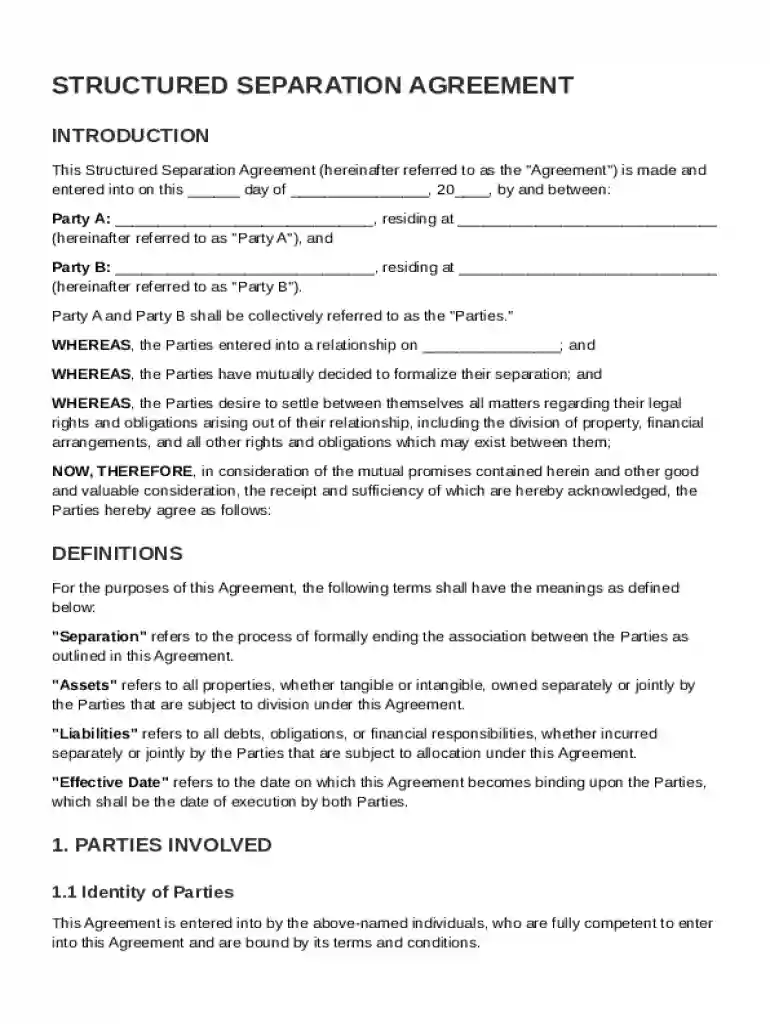
A Structured Separation Agreement Template is a legally binding document that outlines the formal separation between two parties, usually in a marriage or partnership, detailing their rights and responsibilities. This template covers essential aspects such as property division, financial arrangements, support obligations, and custody agreements for any minor children involved. It is structured to emphasize mutual consent for separation and often includes provisions for confidentiality and dispute resolution via mediation or arbitration. Such templates provide a standardized framework to ensure all necessary legal areas are covered, supporting both parties in formalizing their separation in an organized and equitable manner.
Understanding the key components included in a Structured Separation Agreement Template can aid in customizing the document to suit specific needs. Typical elements encompass:
Property Division: Details on how the parties’ assets and liabilities will be divided. This includes real estate, personal property, bank accounts, and debts.
Financial Arrangements: Outlines the financial responsibilities of each party post-separation, including spousal support (alimony) and debt responsibility.
Child Custody and Support: Specifies agreements on custody and visitation rights for any minor children, as well as child support obligations reflecting the children's needs and parents' financial status.
Mediation and Arbitration Clause: Provides a mechanism for resolving disputes without the need for litigation, aiming to save time and costs.
Confidentiality Agreement: Ensures the terms of the separation remain private, protecting the privacy of both parties involved.
Each element is crucial in creating a comprehensive agreement that minimizes future disputes and provides clarity on each party's responsibilities.
Using a Structured Separation Agreement Template effectively requires an understanding of its structure and customization options. Here’s a step-by-step guide:
Review Pre-filled Sections: Begin by reviewing the pre-filled sections to understand the template's framework and legal language.
Enter Specific Information: Input details relevant to the parties involved, such as personal information and specific terms for property and financial arrangements.
Customize Clauses: Adjust clauses related to unique circumstances, such as time-sharing arrangements for children or specific financial nuances.
Consult Legal Advice: Consider consulting an attorney to ensure the agreement complies with state laws and covers all necessary legal aspects.
Finalize and Save: Once the document is tailored to meet both parties' needs, save the finalized version for each party’s records.
By following this process, users can ensure their separation agreement is comprehensive and legally sound.
In a legal context, the Structured Separation Agreement Template serves several purposes:
Documentation: It formalizes the terms agreed upon by both parties, providing a legal document that can be referenced in potential disputes.
Enforcement: Courts often recognize these agreements and can enforce their terms if correctly executed and compliant with state laws.
Amendments: Over time, circumstances might change, necessitating amendments. The original document sets a baseline for any modifications.
It's essential for users to be aware of the template's legal status and handle it accordingly to prevent enforceability issues.
Completing this template involves several key steps to ensure accuracy and legal validity:
Information Gathering: Collect all necessary personal, financial, and property information from both parties involved.
Initial Drafting: Fill in the template with gathered information, specifying terms for each section clearly.
Mutual Review: Both parties should review the draft, suggesting necessary adjustments or additional clauses.
Legal Review: It’s advisable to seek legal counsel to review the document for compliance with state laws and fairness.
Signing and Notarization: Once both parties agree on the final draft, sign the document in the presence of a notary to give it legal weight.
Each step ensures the document is complete, compliant, and agreeable to both parties.
State laws can significantly affect the contents and enforceability of a separation agreement. Users should be aware of:
Property Laws: Community property states might necessitate different division approaches compared to equitable distribution states.
Child Support Guidelines: Varies by state, often requiring adherence to specific calculation methods.
Filing Requirements: Some states might have unique requirements for filing or notarizing such agreements.
Researching state-specific legal requirements ensures that the separation agreement is enforceable and compliant with local laws.
Real-world scenarios where these templates prove invaluable include:
Amicable Separations: When both parties agree on the terms, using a structured template aids in swift, conflict-free documentation.
Complex Financial Arrangements: Templates help in systematically detailing intricate financial arrangements, providing clarity.
Custody Arrangements: For couples with children, templates provide a foundation for clear custody and visitation plans.
Such examples highlight the practical utility of structured templates in diverse separation contexts.
Understanding crucial legal terms associated with the agreement can facilitate better comprehension:
Spousal Support (Alimony): Monies paid by one spouse to another post-separation to maintain living standards.
Custody Types: Legal custody involves decision-making power over a child, while physical custody refers to with whom the child resides.
Community Property: Property acquired during a marriage, subject to division upon separation depending on state laws.
Familiarity with such terms aids in effectively negotiating and understanding separation agreements.
At DocHub, your data security is our priority. We follow HIPAA, SOC2, GDPR, and other standards, so you can work on your documents with confidence.



Legal separation basics In a legal separation, you stay married but the court divides your property and debts and makes orders about financial support.
Oct 7, 2025 The process begins with schema-based mechanical protection, where the discloser shares the schema of the data to be disclosed prior to sharingRead more


