






Definition and Meaning of UI Contract Template
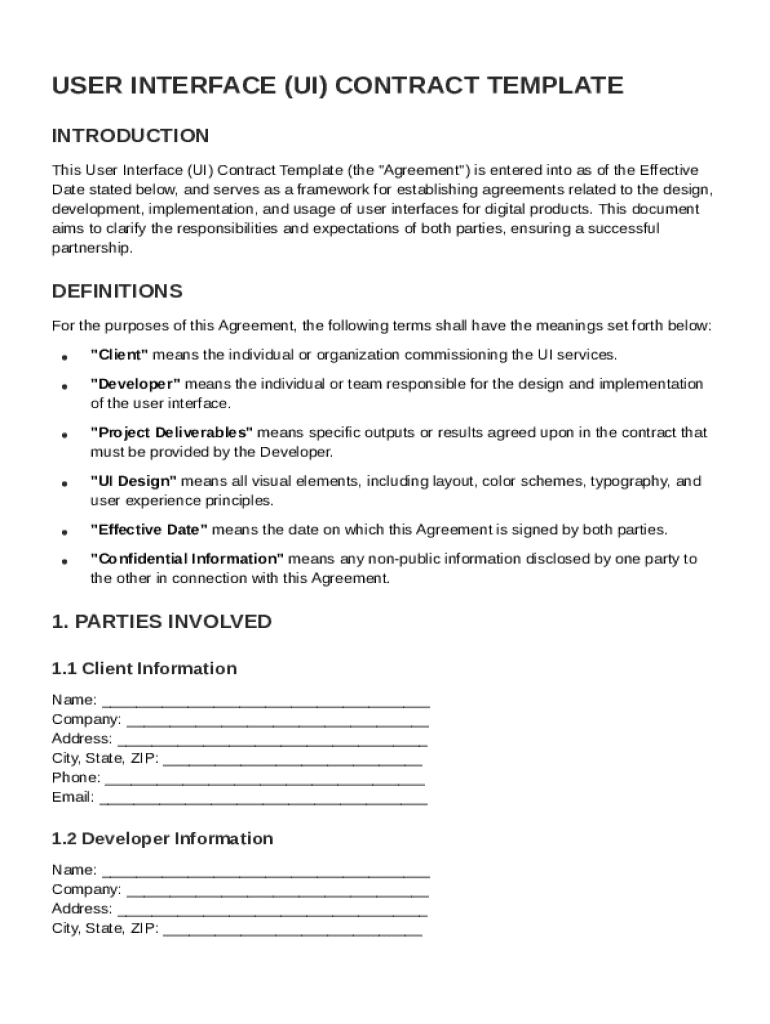
A UI Contract Template is a structured legal document that outlines the agreement between a client and a developer for the development, design, and deployment of user interfaces for digital products. This template serves as a roadmap that specifies various aspects of the collaboration, including project scope, responsibilities, and deliverables. It aims to establish clear expectations and foster mutual understanding between the involved parties.
The contract typically includes sections covering the scope of work, timelines, compensation terms, intellectual property rights, and confidentiality obligations. It also addresses dispute resolution processes and termination conditions, providing a comprehensive framework for managing the relationship effectively. By defining roles and responsibilities, the UI Contract Template helps prevent misunderstandings and potential conflicts, ultimately ensuring a smoother workflow.
How to Use the UI Contract Template
Using a UI Contract Template involves customizing the document to suit the specific needs and expectations of the project and the parties involved. Here are key steps to effectively use the template:
- Customization: Tailor the specific sections, such as project scope, timelines, and deliverables, to reflect the goals and requirements of the project.
- Define Roles: Clearly outline the responsibilities of both the client and the developer, ensuring both parties understand their obligations.
- Compensation Terms: Specify payment schedules, rates, and any additional financial terms to avoid future disputes.
- Review and Approval: Conduct a comprehensive review with legal advisors to ensure that the template complies with applicable laws and addresses potential legal issues.
Using a UI Contract Template streamlines the document creation process, providing a structured approach that saves time and reduces the risk of errors or omissions.
Steps to Complete the UI Contract Template
Filling out a UI Contract Template requires careful attention to detail. Follow these steps for efficient completion:
- Gather Information: Collect all relevant project details, including objectives, timelines, and roles.
- Customize the Template: Adjust sections as needed to fit the specific context of the project.
- Detail Responsibilities: Clearly define each party's duties, ensuring there is no ambiguity.
- Establish a Timeline: Set realistic milestones and timelines for the project's completion.
- Outline Compensation: Describe payment terms, including amounts and payment schedules.
- Include Legal Clauses: Add necessary legal terms to protect intellectual property and privacy.
- Review: Have both parties review the document for accuracy and clarity before finalizing.
Completing the template accurately ensures that both parties are aligned on the project's expectations and legal requirements.
Key Elements of the UI Contract Template
The key elements of a UI Contract Template are designed to provide comprehensive coverage of the agreement's terms and conditions. They include:
- Project Scope: Detailed description of tasks and outcomes.
- Responsibilities: Clear assignment of roles and tasks for both parties.
- Compensation Terms: Outline of payment structure and schedules.
- Intellectual Property: Ownership rights of the work produced.
- Confidentiality: Clause to protect sensitive information shared during the project.
- Dispute Resolution: Procedure for resolving disagreements should they arise.
- Termination Conditions: Processes for ending the contract if necessary.
These elements ensure that all significant factors affecting the project are addressed, fostering a transparent and accountable relationship.
Legal Use of the UI Contract Template
The UI Contract Template must adhere to specific legal standards to be enforceable. Here are key considerations:
- Compliance with Laws: Ensure the contract follows applicable federal, state, and local laws.
- Binding Agreement: Include language that makes the contract legally binding upon acceptance.
- Mutual Consent: Both parties must agree and sign the document, indicating mutual consent.
- Legal Review: It is advisable to have the contract reviewed by legal counsel to identify any potential legal issues or gaps.
By ensuring the contract's legal standing, parties can avoid legal pitfalls and disputes.
Who Typically Uses the UI Contract Template
The UI Contract Template is primarily used by:
- Contract Developers: Freelancers or agencies responsible for UI design and implementation.
- Tech Startups: Businesses launching new digital products requiring custom interfaces.
- Corporations: Companies outsourcing UI development to external partners.
- Agencies: Design and development agencies undertaking client projects.
Using a standardized contract template helps these entities formalize their engagements and protect their interests.


Important Terms Related to UI Contract Template
To fully understand and utilize the UI Contract Template, familiarizing yourself with related terms is crucial:
- Scope of Work: The detailed description of tasks and responsibilities outlined in the contract.
- Deliverables: Specific outcomes or products expected from the project’s completion.
- IP Rights: Intellectual Property rights deal with ownership of the created designs and code.
- Milestones: Key progress points in the project timeline that may be tied to payments.
- Confidentiality Agreement: A legal framework to protect private and sensitive information exchanged during the project.
Understanding these terms is critical to effectively drafting and working within the parameters set by the contract.
Examples of Using the UI Contract Template
Exploring real-world applications highlights how diverse industries can utilize the UI Contract Template:
- Software Development Firms: Use the contract to delineate expectations and deliverables when designing new software UI.
- Freelance Designers: Protect their work and define terms when hired by clients for custom UI projects.
- Corporate Entities: Engage with agencies or freelancers to enhance user interfaces for internal or consumer-facing applications.
These examples illustrate the flexibility and applicability of the template across different sectors and project types.