
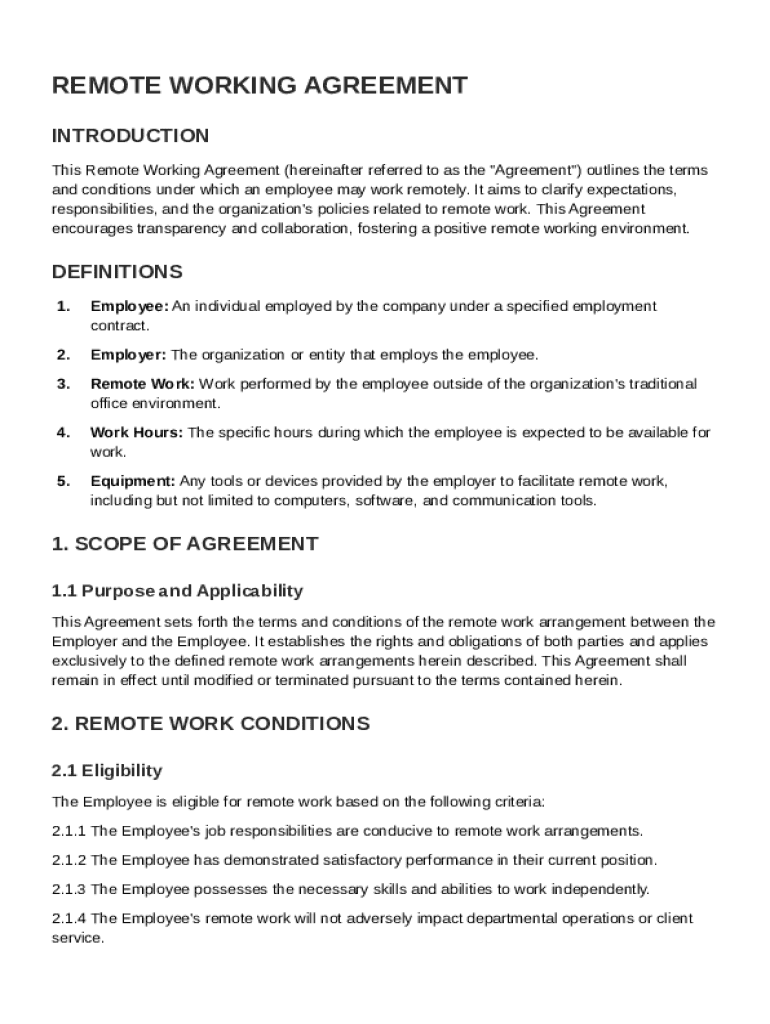







Definition & Meaning of the Remote Working Agreement Template
The "Remote Working Agreement Template" serves as a foundational document detailing the terms and conditions under which an employee may work remotely. It is a crucial tool for delineating specific expectations and responsibilities of both parties—employers and employees—to ensure that remote work operations are seamless and well organized. This agreement typically encompasses essential elements such as work hours, performance standards, communication protocols, and data security measures. By placing these matters in writing, the template supports a mutual understanding of remote working dynamics and helps prevent potential conflicts or misunderstandings.
Core Components of the Agreement
- Work Hours and Availability: Establish predefined work hours and expectations for availability to facilitate synchronous communication between remote employees and the management team.
- Responsibilities and Performance Metrics: Clearly outline the specific duties expected of the employee and any key performance indicators that will be used to assess work quality or output.
- Data Security Protocols: Define security measures needed to protect company data, including the use of specific software or hardware and compliance with relevant data protection regulations.
How to Use the Remote Working Agreement Template
Utilizing the Remote Working Agreement Template effectively involves a few systematic steps to adapt it to suit the organization's particular requirements. This process ensures that the document serves its intended purpose while accommodating unique employer and team needs.
- Review Template Structure: Familiarize yourself with the existing template structure and content to identify sections that require customization.
- Customize Terms to Fit Needs: Adjust template sections (e.g., work hours, communication tools, and security requirements) to align with company-specific policies and personal preferences.
- Incorporate Legal Compliance: Ensure that the agreement conforms with local, state, and federal labor laws, including any remote work-related legislations relevant in your jurisdiction.
- Consult with HR or Legal Teams: Engage with human resources or legal departments to validate the agreement's terms and confirm its completeness and enforceability.
Implementation Process
- Distribute to Employees: Share the finalized agreement with the relevant employees, ensuring they have ample time to review and comprehend the document.
- Collect Feedback: Allow employees to raise questions or suggest amendments for clarity or practicality.
- Final Signatures: Both parties must sign the agreement to indicate acceptance and comprehension of its terms and obligations.
Steps to Complete the Remote Working Agreement Template
Complete the Remote Working Agreement Template by addressing a series of essential steps that guide the creation of a tailored, effective document. Each step delivers a specific outcome, contributing to a comprehensively structured agreement.
- Initial Setup: Start by downloading or accessing a blank Remote Working Agreement Template through DocHub or another document management platform.
- Input Company Details: Fill in the company's name, logo, and contact information to personify the document.
- Define Employee Role: Specify the employee's name, job title, and remote work starting date.
- Tailor Work Expectations: Outline precise work duties, project deadlines, and preferred communication tools.
- Stipulate Security Measures: Describe IT requirements for secure remote access and data handling.
- Review and Edit: Check language, clarity, and coherence, ensuring all sections align with the company's strategic goals.
- Finalize and Approve: Obtain necessary approvals from senior management before proceeding with distribution.
Key Completion Highlights
- Use Clear Language: Employ plain language for easy understanding and to reduce misinterpretations.
- Include Examples: Where applicable, use examples to illustrate expectations, such as acceptable window periods for daily team meetings.
- Proof of Understanding: Encourage recipients to ask questions for any clarifications needed before affixing their signatures.
Key Elements of the Remote Working Agreement Template
A well-constituted Remote Working Agreement Template encompasses an array of key elements designed to foster productive working relationships while clarifying expectations in a remote environment.
- Eligibility and Employment Base: Specify the criteria for an employee's eligibility to work remotely, including length of service or department requirements.
- Communication Tools and Protocols: Set forth the required tools (such as videoconferencing software) and the frequency of touch points between managers and remote staff.
- Performance Evaluation Criteria: Elaborate on how performance will be tracked and reviewed to ensure accountability and progress.
- Security and Confidentiality Requirements: Enumerate measures to protect proprietary information accessed or processed remotely.
Additional Components
- Technology Support and Equipment: Clarify the support structure for IT issues, hardware provisions, and maintenance responsibilities.
- Termination Clauses: Describe conditions under which remote working conditions may be altered or terminated due to performance or business needs.
- Compensation Adjustments: Reference any adjustments to compensation packages related to remote working, including potential savings due to commuting expense reductions.
Examples of Using the Remote Working Agreement Template
Examples of scenarios where a Remote Working Agreement Template might be employed offer valuable insights into its practical application and benefits for different organizational setups.
- Tech Companies: A software development company might use the template to define clear remote working expectations for its developers and testers working from distributed locations worldwide.
- Financial Services: A financial advisory firm may detail specific security protocols within the agreement to manage the confidentiality of client data handled by remote advisory professionals.
- Nonprofits: A workforce management agreement might incorporate community engagement hours for remote staff involved in local outreach or program delivery.
Illustrative Use Case Studies
- Case Study 1: A digital marketing agency uses the agreement to facilitate the transition of its creative team to a hybrid remote model, enhancing flexibility while maintaining quality output.
- Case Study 2: An educational institution drafts a remote working agreement to enable its administrative staff to continue operations during off-campus periods due to health advisories.
The comprehensive structuring of these blocks provides maximum utility, ensuring that every aspect of using and managing a Remote Working Agreement Template is addressed with precision and clarity.




