






Definition & Meaning
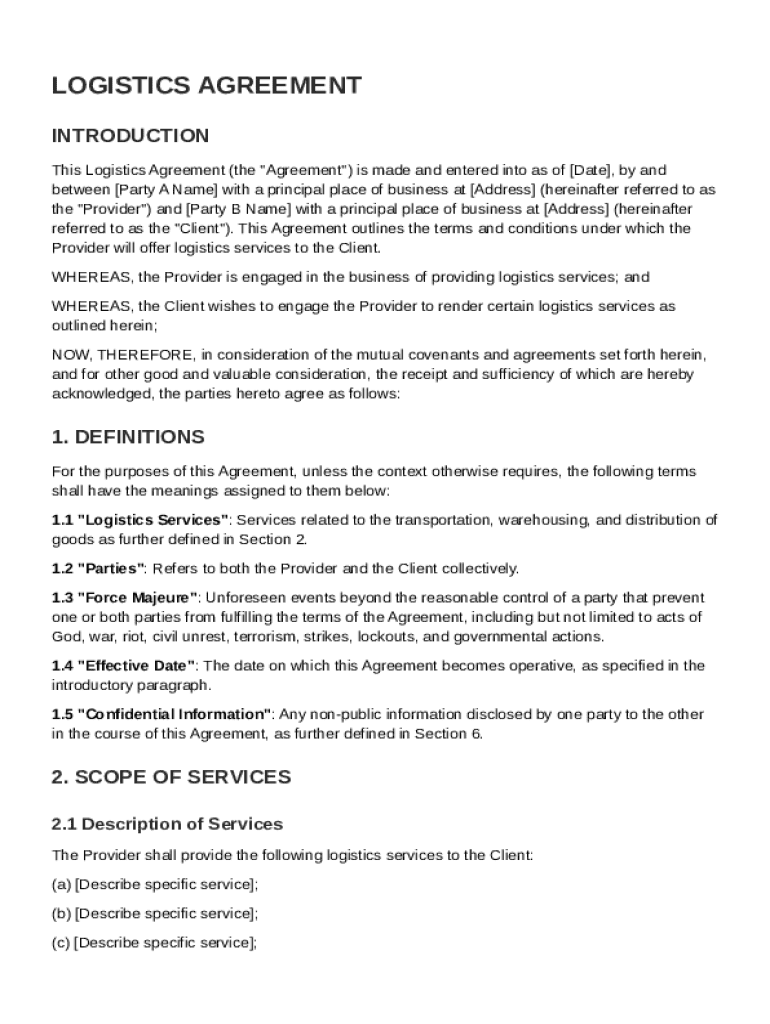
A Logistics Agreement Template serves as a formal document detailing the terms and conditions between a logistics service provider and a client. It includes critical aspects such as services like transportation, warehousing, distribution, and the responsibilities of each party involved. The template typically covers compensation structures, performance metrics, confidentiality obligations, and procedures for termination and dispute resolution. By using this template, both parties can maintain a clear understanding of the mutual cooperation, compliance with applicable laws, and guidelines for service delivery and payment structures.
Key Elements of the Logistics Agreement Template
The Logistics Agreement Template encompasses several key elements that are essential for a comprehensive understanding of the agreement:
- Scope of Services: Defines the range of services provided, such as transportation, warehousing, and distribution.
- Responsibilities: Outlines the obligations and duties of both the logistics provider and the client.
- Compensation Structure: Details the payment terms, including rates, invoicing, and payment schedules.
- Performance Metrics: Identifies the criteria used to evaluate the service provider's performance.
- Confidentiality Clauses: Sets the rules for handling confidential information shared between parties.
- Termination Procedures: Lists the conditions under which the agreement can be terminated by either party.
- Dispute Resolution: Provides methods for resolving disagreements or disputes that may arise.
Steps to Complete the Logistics Agreement Template
Completing the Logistics Agreement Template requires careful attention to detail:
- Understand the Terms: Review each section thoroughly to comprehend the legal and logistical implications.
- Fill in Service Details: Specify the services to be provided, ensuring all are clearly defined.
- Outline Responsibilities: Clearly delineate the responsibilities of each party to avoid future misunderstandings.
- Specify Compensation: Agree on a compensation structure that is fair and reflective of the services provided.
- Set Performance Metrics: Establish the standards by which the service provider will be evaluated.
- Incorporate Confidentiality Rules: Include agreements regarding the protection of sensitive information.
- Agree on Termination and Dispute Processes: Outline acceptable reasons for termination and methods for dispute resolution.
Who Typically Uses the Logistics Agreement Template
The Logistics Agreement Template is primarily used by:
- Logistics Service Providers: Companies or individuals offering transportation and storage services.
- Client Businesses: Organizations seeking to outsource their logistical needs for efficiency and cost-effectiveness.
- Supply Chain Managers: Professionals overseeing logistics operations within a company.
- Legal Advisors: Attorneys drafting or reviewing agreements to ensure compliance with relevant laws.


Legal Use of the Logistics Agreement Template
The legal use of the Logistics Agreement Template includes ensuring compliance with the applicable federal and state regulations. Such agreements must adhere to laws governing transportation, storage, and distribution services. The template also incorporates elements like confidentiality clauses and data protection, aligning with laws like the ESIGN Act for electronic signatures, ensuring that signed agreements are legally binding and enforceable.
Examples of Using the Logistics Agreement Template
Practical scenarios where the Logistics Agreement Template is employed include:
- Global Distribution Agreements: Used by multinational companies to outline terms with logistics providers handling cross-border shipments.
- E-commerce Partnerships: Agreements between online retailers and logistics companies that manage warehousing and delivery.
- Manufacturing Supply Chains: Contracts between manufacturing firms and logistics firms for regular transportation of raw materials.
State-Specific Rules for the Logistics Agreement Template
Various U.S. states may have unique regulations affecting logistics agreements:
- California: Stringent environmental and transportation safety compliance.
- New York: Detailed labor law compliance for logistics workers.
- Texas: Emphasis on commercial trucking regulations and infrastructure permissions.
Business Types That Benefit Most from Logistics Agreement Template
Several business types derive significant advantages from utilizing a Logistics Agreement Template:
- Retail Chains: Efficient distribution of goods across multiple locations.
- Manufacturers: Streamlined supply chain operations for timely delivery of parts and products.
- E-commerce Platforms: Handling large volumes of orders and ensuring timely delivery.
- Pharmaceutical Companies: Ensuring compliance and secure transportation of sensitive products.
By focusing on these aspects, users can effectively leverage the Logistics Agreement Template to enhance clarity, ensure legal compliance, and optimize logistical operations for a variety of business needs.