Definition and Purpose of a Grant Agreement Template
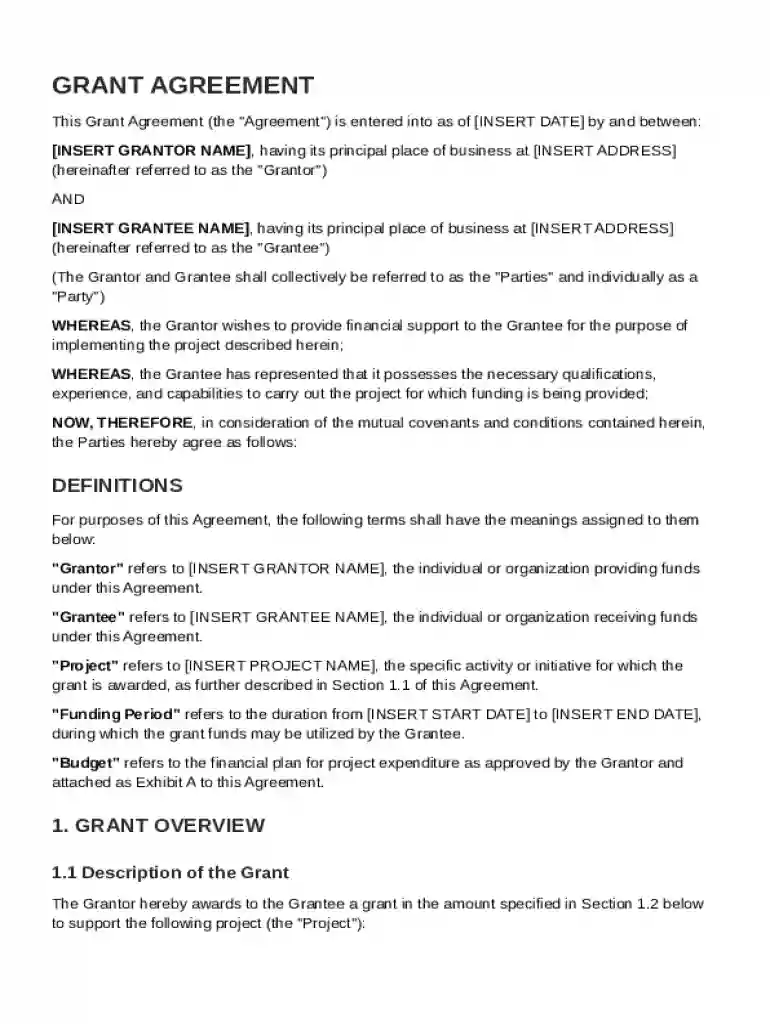
A Grant Agreement Template is a pre-designed document used to formalize the financial support relationship between a grantor and a grantee for a specific project. It outlines essential elements such as the grant amount, funding period, obligations of both parties, and reporting requirements. The template serves to ensure that all parties are aware of their responsibilities and that the funds are used appropriately.
Key Components:
- Grant Amount and Funding Period: Specifies the total financial support and the duration over which the funds are available.
- Roles and Obligations: Describes the expectations and responsibilities of both grantor and grantee regarding fund usage and compliance.
- Reporting Requirements: Details the necessary reports the grantee must submit to the grantor to demonstrate proper fund allocation.
- Amendments and Termination Procedures: Provides guidelines on how to amend the agreement or terminate it under certain conditions.
Steps to Complete the Grant Agreement Template
Successfully completing the Grant Agreement Template involves several clear steps to ensure all necessary components are appropriately addressed.
- Define Key Terms: Start by reviewing the definitions section to ensure all parties interpret terms consistently.
- Input Project Details: Fill in details about the funded project, including objectives and expected outcomes.
- Specify Financial Information: Detail the grant amount, installment schedules, and any conditions for fund disbursement.
- Outline Responsibilities: Clearly state the roles of the grantor and grantee in the management and implementation of the project.
- Set Reporting Protocols: Establish timelines and formats for submitting progress and financial reports.
- Signatures and Authorization: Conclude the form with the signatures of authorized agents from both parties to make the agreement enforceable.
Important Terms Related to Grant Agreement Template
Understanding the terminology within a Grant Agreement Template is crucial for both parties to ensure mutual understanding and compliance.
- Grantor: The party providing the financial support.
- Grantee: The recipient of the grant funds, tasked with executing the project.
- Disbursement Schedule: The timeline and criteria for releasing grant funds.
- Compliance Obligations: The set of rules and guidelines the grantee must adhere to.
Key Elements of the Grant Agreement Template
The template consists of several critical elements that must be thoroughly detailed for the effective management and oversight of the grant.
- Grant Purpose: Clearly states the intentions and goals of the funding.
- Budget Summary: Provides a detailed breakdown of how funds will be allocated across different project facets.
- Evaluation Criteria: Sets forth the standards and measures that will be used to assess the project's success.
- Indemnity Clauses: Protects both parties against legal liabilities related to the project.
Legal Use of the Grant Agreement Template
The use of a Grant Agreement Template must be legally compliant and reflect the laws governing such transactions in the United States.
- Legally Binding: Once signed, the document becomes enforceable in court.
- Compliance with Laws: Adheres to relevant state and federal regulations governing grant agreements.
- Dispute Resolution: Provides mechanisms for addressing disagreements through mediation, arbitration, or legal proceedings.
Examples of Using the Grant Agreement Template
Grant Agreement Templates are widely used across various sectors to facilitate the seamless transfer and management of funds.
- Non-Profit Organizations: Utilizes grants to support community service projects, research, and educational programs.
- Educational Institutions: Receives funding for research initiatives or student scholarship programs.
- Government Agencies: Distributes grants to support local infrastructure projects.
Why Use a Grant Agreement Template
Utilizing a Grant Agreement Template offers several advantages in managing and formalizing grant agreements.
- Standardization: Provides a consistent structure for agreements, ensuring all crucial aspects are covered.
- Efficiency: Saves time by providing a ready-made format that can be easily modified to suit specific needs.
- Risk Mitigation: Reduces the likelihood of misunderstandings by clearly outlining terms and responsibilities.
- Compliance Assurance: Assists in maintaining adherence to legal and procedural standards.