




Here's how it works



How to use or fill out the Mercer Application with our platform

- Click ‘Get Form’ to open the Mercer application in the editor.
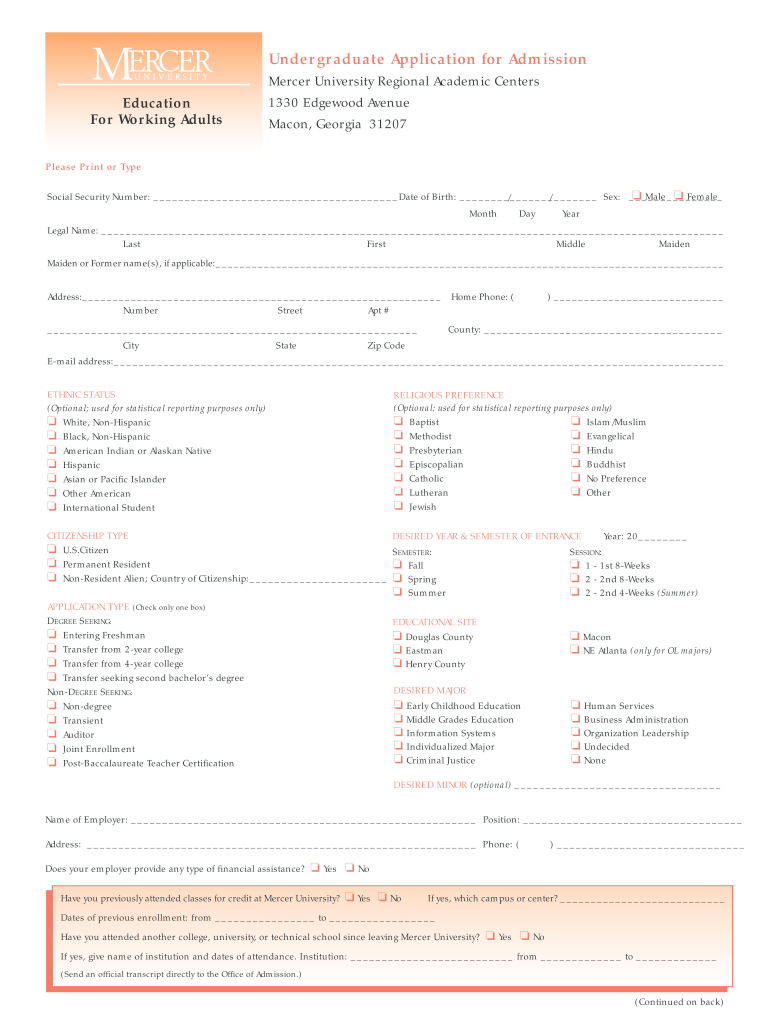
- Begin by filling in your personal information, including your legal name, date of birth, and social security number. Ensure accuracy as this information is crucial for your application.
- Next, indicate your ethnic status and citizenship type. This section is optional but helps in statistical reporting.
- Select your application type by checking the appropriate box—whether you are a degree-seeking student or a non-degree seeking applicant.
- Fill out your desired year and semester of entrance, along with your educational site preference. Choose from the available majors and minors that interest you.
- Complete the college history section by listing all institutions attended. Be sure to provide accurate dates and degrees received.
- Finally, review all entered information for accuracy before signing and submitting your application through our platform.
Start filling out your Mercer application today for free using our editor!
It's free
Got questions?
Can I fill out and sign my mercer application deadline online?
Sure, and it’s really easy! DocHub is a web-based PDF editor with advanced document management features that allow you promptly adjust your forms, fill out empty fields and drop new ones for others to fill out, and create eSignatures in several ways. Add your mercer application deadline, give information as required, and select how you want to eSign your template - by typing your name, drawing your signature, uploading its image, or using a QR code.
Can I edit blank field on my phone?
As a comprehensive document editing service, DocHub is accessible on mobile devices. Open DocHub in your choice of mobile browser and use our intelligent mobile-friendly toolset to fill out your blank field.
What GPA is needed for Mercer?
Is Mercer Law hard to get into?
How hard is it to get into Mercer?
Security and compliance
At DocHub, your data security is our priority. We follow HIPAA, SOC2, GDPR, and other standards, so you can work on your documents with confidence.
Learn more


