Type text, add images, blackout confidential details, add comments, highlights and more.
02. Sign it in a few clicks
Draw your signature, type it, upload its image, or use your mobile device as a signature pad.
03. Share your form with others
Send it via email, link, or fax. You can also download it, export it or print it out.
How to use or fill out university of tampa diploma with our platform
Ease of Setup
DocHub User Ratings on G2
Ease of Use
DocHub User Ratings on G2
Click ‘Get Form’ to open the university of tampa diploma reprint request in the editor.
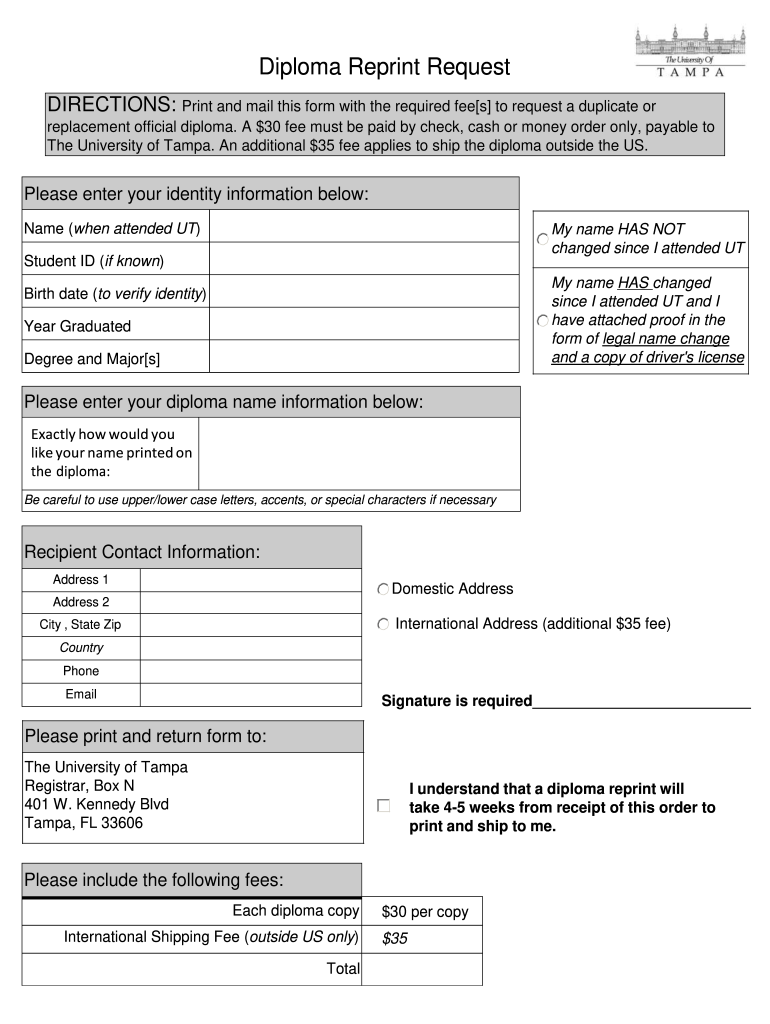
Begin by entering your identity information. Fill in your name as it was when you attended UT, and if applicable, indicate whether your name has changed. If it has, ensure you attach proof of the legal name change along with a copy of your driver's license.
Provide your Student ID if known, birth date for identity verification, year graduated, and degree/majors.
Next, specify how you would like your name printed on the diploma. Pay attention to upper/lower case letters and any special characters.
Fill in your recipient contact information including address (domestic or international), city, state, zip code, country, phone number, and email.
Sign the form where indicated to confirm your request.
Finally, review the fees section to ensure you include the correct payment amount for each diploma copy and any additional shipping fees if applicable.
Start using our platform today to streamline your diploma reprint request process!
Fill out university of tampa diploma online It's free
Graduates may request a new copy of their diploma. Replacement diplomas take six to eight weeks to ship from the date the request form and payment is receivedRead more
Cookie consent notice
This site uses cookies to enhance site navigation and personalize your experience.
By using this site you agree to our use of cookies as described in our Privacy Notice.
You can modify your selections by visiting our Cookie and Advertising Notice.