




Here's how it works



How to use or fill out species interactions worksheet answers with our platform

- Click ‘Get Form’ to open the species interactions worksheet in the editor.
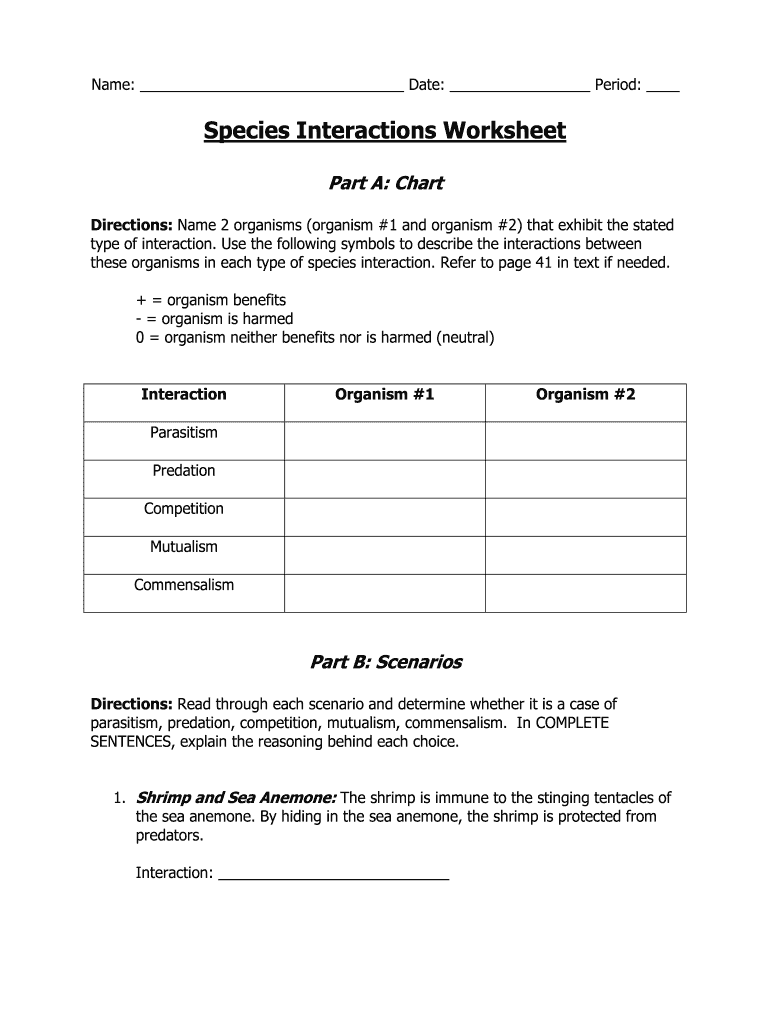
- In Part A, identify two organisms for each type of interaction listed. Use the symbols provided (+, -, 0) to describe their relationship. Fill in 'Organism #1' and 'Organism #2' fields accordingly.
- For each interaction type (Parasitism, Predation, Competition, Mutualism, Commensalism), ensure you clearly indicate the correct symbol that represents the interaction between the two organisms.
- Move to Part B and read through each scenario carefully. In the designated field for 'Interaction', write your assessment of whether it is parasitism, predation, competition, mutualism, or commensalism.
- Provide a complete sentence explanation for each scenario's interaction choice in the space provided. This will help clarify your reasoning.
Start using our platform today to easily fill out your species interactions worksheet answers for free!
It's free
Got questions?
Can I sign my species interactions worksheet on a mobile?
Sure, you’ll find many different applications for this on the web. Nonetheless, if you need to eSign your species interactions worksheet without installing extra software, DocHub is the best choice you can make. This robust editor works on mobile devices just like on desktops. Open our editor in any internet browser, register or sign in to your account, and start processing your forms.
How do you edit species interactions worksheet pdf online?
With DocHub, there are several convenient methods to edit your species interactions worksheet pdf online. You can drag and drop the form and edit it straight at the DocHub site or use our browser extension to fill out your form right away. Additionally, you can edit your PDF on your phone, as DocHub works with all the accessible mobile platforms.
Security and compliance
At DocHub, your data security is our priority. We follow HIPAA, SOC2, GDPR, and other standards, so you can work on your documents with confidence.
Learn more


