Definition & Purpose of the Child Record Review Form GSRP
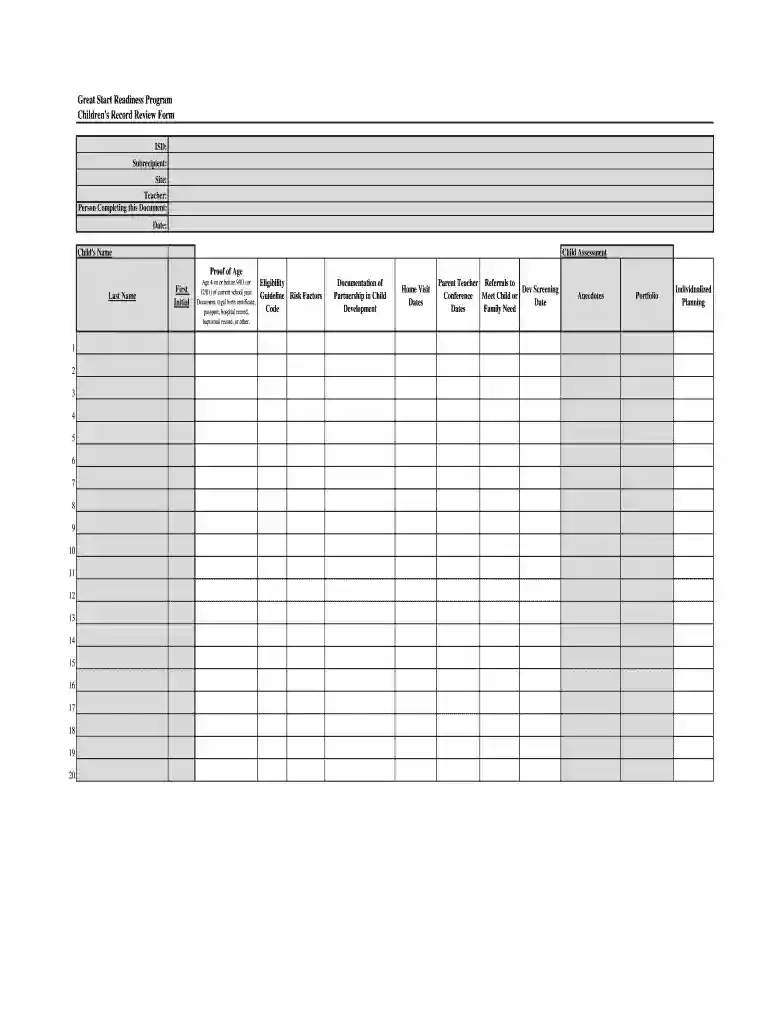
The Child Record Review Form (GSRP) is a comprehensive document used in the Great Start Readiness Program to assess children's eligibility and gather essential information regarding their development. It is an integral part of ensuring children receive appropriate educational opportunities tailored to their needs. This form plays a critical role in identifying risk factors and other variables that may affect a child's readiness for school, enabling educators and administrators to provide the necessary support.
- Eligibility Assessment: The form helps in evaluating whether a child meets the criteria for enrollment in the Great Start Readiness Program.
- Developmental Documentation: It includes sections dedicated to tracking a child's developmental progress and identifying areas needing attention or intervention.
Steps to Complete the Child Record Review Form GSRP
Completing the Child Record Review Form requires careful attention to detail and thorough information collection. The outlined steps will guide you through the process:
- Gather Required Personal Information: Collect personal details about the child, such as name, date of birth, and guardians’ contact information.
- Provide Proof of Age: Attach a birth certificate or other legal document verifying the child's age.
- Identify Risk Factors: Review and note any existing factors that could influence the child's development, such as socioeconomic status or linguistic background.
- Document Development Partnerships: Record information about collaborations between educators, family members, and community partners involved in the child's education.
- Schedule Home Visits: Include dates of any home visits conducted as part of the evaluation process.
- Record Referrals and Anecdotes: Enter details of referrals to specialists, and note any significant anecdotes or observations about the child's progress.
- Finalize the Form: Ensure all fields are complete and accurate before submission.
Key Elements of the Child Record Review Form GSRP
The form contains several essential components aimed at providing a comprehensive view of the child's readiness for school:
- Personal Information Section: This includes identifying information about the student and their family.
- Developmental History: Captures important milestones and areas for growth.
- Risk Assessment: Identifies and documents any potential barriers to a child's educational success.
- Home Visit Log: Tracks interactions between educators and the child's home environment.
How to Obtain the Child Record Review Form GSRP
The Child Record Review Form can typically be obtained through school districts or educational agencies involved in the Great Start Readiness Program. Here are the common methods to access the form:
- Directly from Your Local School District: Many school districts provide this form via their administrative offices or online portals.
- Educational Agencies: Some regions may offer the form through specialized educational agencies or support centers.
- Official Program Websites: Certain locations maintain digital copies of necessary forms via official educational program websites for ease of access.
Legal Use of the Child Record Review Form GSRP
Using the Child Record Review Form requires adherence to legal standards that protect student privacy and ensure compliance with educational regulations:
- FERPA Compliance: The Family Educational Rights and Privacy Act (FERPA) governs the privacy of student information collected on forms like the GSRP.
- State Educational Requirements: Each state may have its own set of rules regarding educational assessments, which must be followed when using this form.
- Consent Considerations: Proper consent from a child’s guardians is required before collecting and sharing their information.
Examples of Using the Child Record Review Form GSRP
Educational institutions use the form to fulfill a variety of functions:
- Enrollment Assessment: Determining a child’s qualification for entry into early education programs.
- Tailored Educational Planning: Utilizing the detailed information to develop personalized learning plans that cater to individual needs and areas of growth.
- Interdisciplinary Collaboration: Facilitating cooperation among teachers, administrators, and outside specialists to provide comprehensive support for students.
Required Documents for the Child Record Review Form GSRP
To complete and submit the Child Record Review Form correctly, certain documents may be required:
- Birth Certificate or Age Verification: Essential for confirming the child’s eligibility.
- Immunization Records: May be needed to meet state or program-specific health requirements.
- Developmental Reports: Include any existing assessments or reports relevant to the child's development.
Form Submission Methods
Once the form is completed, there are various methods for submission, each with its unique benefits:
- Online Submission: Many districts offer an online portal for direct submission, ensuring quick processing.
- Mail Submission: Sending a printed version of the form is another conventional method.
- In-Person Delivery: Direct submission at the school or district office ensures personal confirmation of receipt.
By understanding these aspects, users can efficiently navigate the Child Record Review Form for the Great Start Readiness Program, ensuring all necessary information is captured and submitted in compliance with relevant guidelines.