




Here's how it works

01. Edit your form online
Type text, add images, blackout confidential details, add comments, highlights and more.

02. Sign it in a few clicks
Draw your signature, type it, upload its image, or use your mobile device as a signature pad.

03. Share your form with others
Send it via email, link, or fax. You can also download it, export it or print it out.
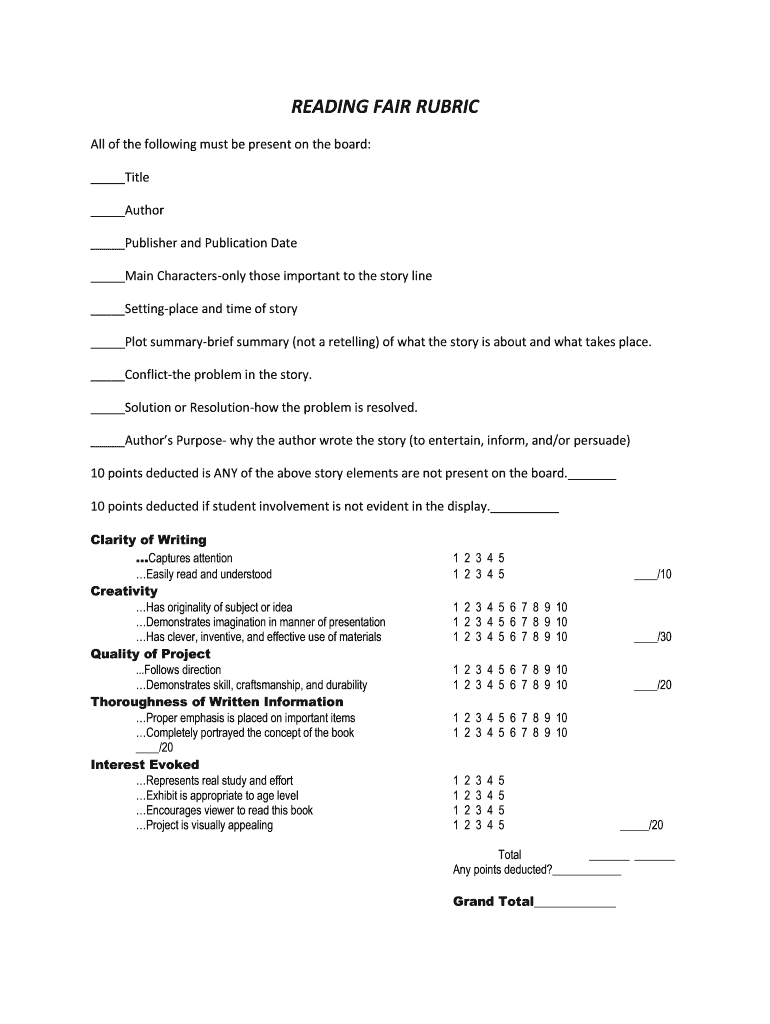
How to use or fill out grade six assessment rubric with our platform

- Click ‘Get Form’ to open the grade six assessment rubric in the editor.
- Begin by filling in the title, author, publisher, and publication date in the designated fields. Ensure all elements are present to avoid point deductions.
- Next, provide details about the main characters, setting, plot summary, conflict, and resolution. Each section should be concise yet informative.
- Evaluate clarity of writing by ensuring your text captures attention and is easily read. Use the creativity section to showcase originality and effective presentation materials.
- Assess quality by following directions closely and demonstrating craftsmanship. Thoroughly portray the book's concept in your written information.
- Finally, review interest evoked by ensuring your project is visually appealing and encourages viewers to read the book. Complete any scoring sections as needed.
Start using our platform today for free to streamline your document editing experience!
Fill out grade six assessment rubric online
It's free
It's free
Security and compliance
At DocHub, your data security is our priority. We follow HIPAA, SOC2, GDPR, and other standards, so you can work on your documents with confidence.
Learn more


