






Definition and Purpose of Outside Scholarships Reporting at Yale
Outside scholarships are funds awarded to students from non-Yale sources, such as private organizations, community groups, and corporations. For students at Yale University, it's crucial to report these scholarships to the Office of Undergraduate Financial Aid. This process ensures that the financial aid package accurately reflects all resources available to the student and complies with federal regulations governing financial aid eligibility.
Why Reporting is Necessary
- Ensures compliance with federal and institutional financial aid rules.
- Helps maintain transparency regarding a student’s financial resources.
- It allows Yale to adjust its financial aid offerings in response to external funding.
What Counts as an Outside Scholarship?
- Awards from private foundations or community organizations.
- Corporate-sponsored scholarships.
- Grants from churches or civic groups.
How to Use Yale's Outside Scholarships Form
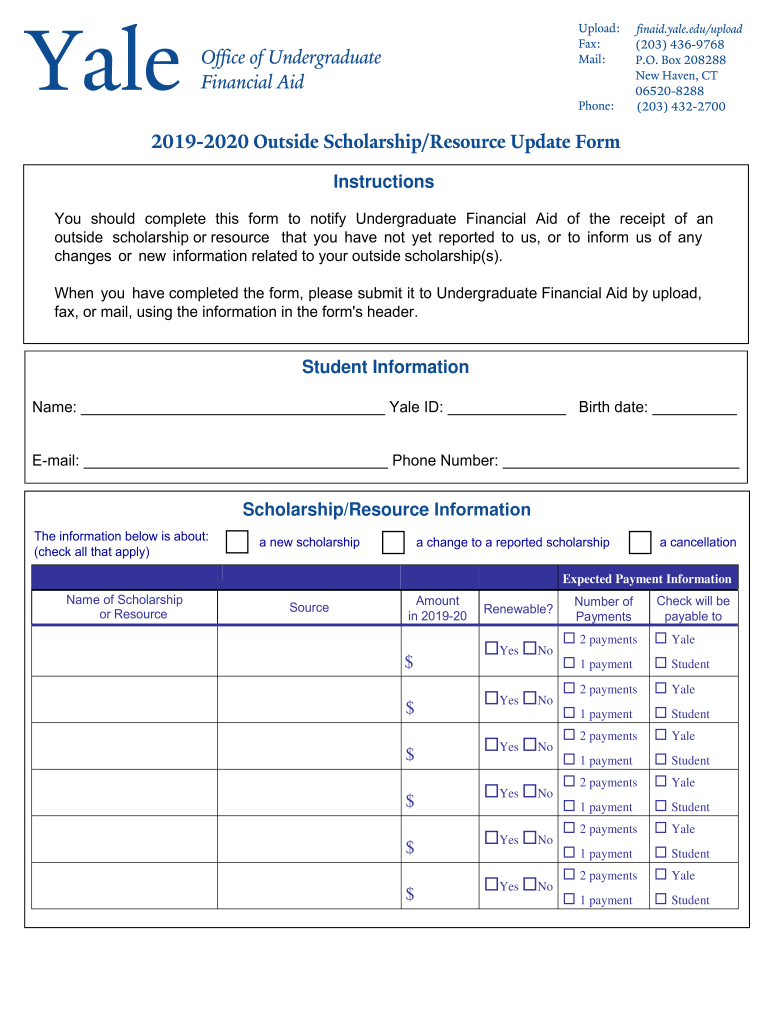
Students need to use the form provided by Yale's Office of Undergraduate Financial Aid to report any new outside scholarships or changes to existing ones. This process involves submitting detailed information about each scholarship to ensure that the financial aid office has up-to-date records of a student's resources.
Information Required
- Student’s personal and contact information.
- Details of the scholarship source, amount, and payment structure.
- Information on whether the scholarship is renewable.
Submission Method
- The completed form can be submitted online through Yale's financial aid portal or sent directly to the financial aid office via mail or in-person delivery.
Steps to Complete Yale's Outside Scholarships Form
- Gather Necessary Information: Collect all details about the scholarship, including award letters and correspondence from the granting organization.
- Fill Out Personal Information: Include your full name, student ID, and contact details.
- Describe the Scholarship: Provide details such as the scholarship amount, frequency of payment, and renewal conditions.
- Submit and Confirm: After completing the form, submit it through the specified channels and confirm receipt with the financial aid office.
Important Considerations
- Ensure accuracy: Double-check all entries for correctness.
- Submission timelines: Adhere to any deadlines specified by the financial aid office.
- Follow-up: Verify that any required adjustments to your financial aid package are made.
Who Typically Uses This Form
The primary users of the Outside Scholarships form are undergraduate students enrolled at Yale who receive funding from sources other than the university. These students generally include:
- First-year undergraduates adapting to Yale’s financial aid system.
- Returning students with renewals or changes in scholarship amounts.
- Students entering programs with competitive external funding.
Key Elements of Reporting Outside Scholarships
Understanding the requirements for reporting external scholarships ensures compliance and allows students to maximize their financial aid benefits.
Critical Sections of the Form
- Student Information: Personal and academic details.
- Scholarship Source: Name and contact information of the scholarship provider.
- Financial Details: Exact amount and distribution schedule of the scholarship.
- Renewability Status: Indicate if the scholarship is a one-time award or renewable.
Common Errors and Best Practices
- Incomplete Information: Ensure all fields are filled out completely.
- Misreporting Amounts: Report the exact scholarship amount to avoid discrepancies.
- Timeliness: Submit the report as soon as changes occur.
Penalties for Non-Compliance
Failing to report outside scholarships can have several implications on a student’s financial standing at Yale. Though not intended to penalize, the consequences ensure that financial aid integrity is upheld.
Possible Outcomes
- Adjustment of University Aid: Unreported scholarships could lead to an overpayment of university financial aid, requiring adjustments and potential repayment.
- Administrative Holds: Incomplete reporting could delay access to future aid disbursements.
- Academic Consequences: Students may face registration holds that affect course enrollment.
Legal Use and Confidentiality
When handling scholarship information, students must adhere to privacy and legal standards stipulated by Yale and federal financial aid regulations.
Legal Compliance
- Scholarships must be reported in alignment with the federal financial aid policy.
- The form’s information is used solely for determining financial aid eligibility and compliance reporting.
Privacy and Data Security
Yale's protocols ensure that all personal and financial information provided in the form is confidential and used exclusively for institutional and compliance purposes.
Digital Version and Integration
Yale offers a digital version of the Outside Scholarships reporting form to streamline the process for students and ensure consistent, secure submission.
Features
- Accessibility: Available through Yale’s student financial aid portal, allowing easy submission and updates.
- Integration with Student Accounts: Automatically synchronizes with other financial aid documents and student records for accuracy.
- Environment-Friendly: Reduces paper use and administrative overhead.
Software Compatibility
- The form can be completed using common browsers and is compatible with digital documentation systems such as DocHub, facilitating digital editing and submission.
By understanding the nuances and requirements of the Outside Scholarships documentation process, students at Yale can ensure they remain in good standing with the financial aid office while fully utilizing available external resources.