Definition and Meaning of the Smoke and Carbon Monoxide Detector Addendum
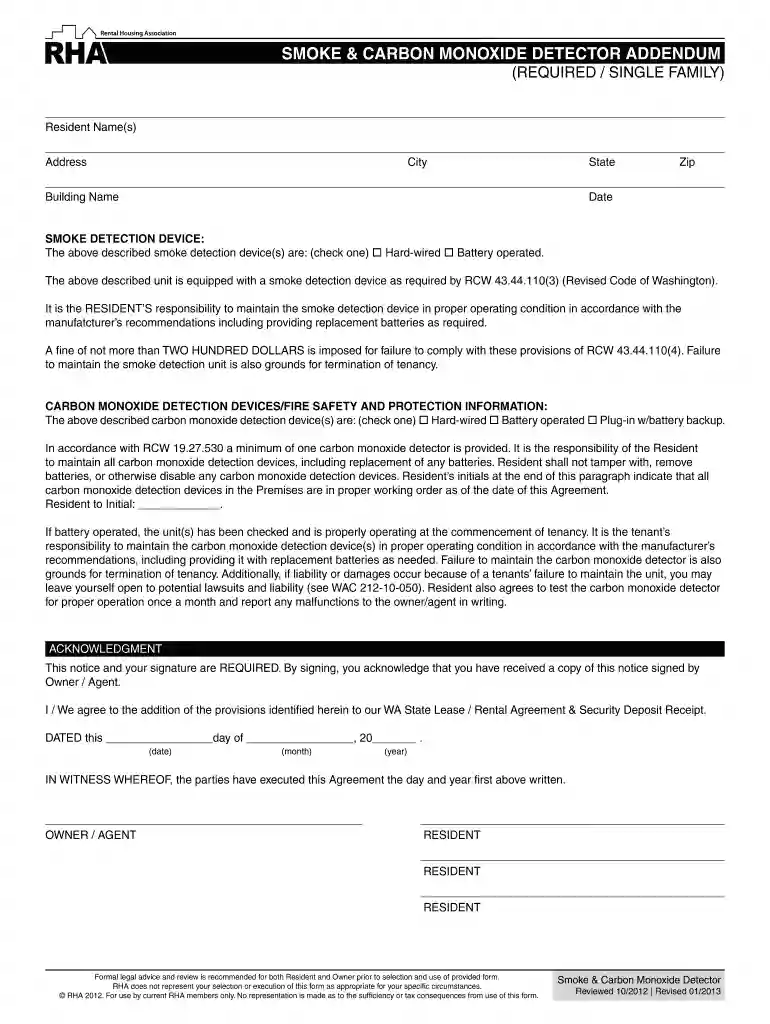
The Smoke and Carbon Monoxide Detector Addendum is a legally binding document commonly used in real estate transactions and rental agreements in the United States. It outlines the responsibilities of property residents, tenants, and landlords regarding the installation, maintenance, and operation of smoke and carbon monoxide detectors. The addendum ensures compliance with state-specific laws, particularly in Washington state, where it specifies the types of alarms required and the consequences of failing to maintain them.
Key Elements of the Smoke and Carbon Monoxide Detector Addendum
This addendum comprises several critical components:
- Installation Responsibility: Specifies who is responsible for installing smoke and carbon monoxide detectors, often the property owner or manager.
- Maintenance Requirements: Details the obligations of tenants or residents to regularly test and maintain the detectors, including replacing batteries as needed.
- Reporting Protocols: Outlines procedures for reporting malfunctions or issues with the devices to the property owner or manager.
- Compliance Requirements: Specifies the necessity to comply with state-specific laws and regulations concerning these detectors, ensuring safety and legal adherence.
How to Use the Smoke and Carbon Monoxide Detector Addendum
To use this addendum effectively:
- Review the Addendum: Both parties should carefully read the document to understand their responsibilities fully.
- Discuss Duties: Tenants and property owners should discuss their roles in maintaining the detectors.
- Sign the Document: After reviewing and agreeing to the terms, both parties should sign the addendum to legally bind the agreement.
- Keep a Copy: Ensure that all parties maintain a copy of the signed document for their records.
Steps to Complete the Smoke and Carbon Monoxide Detector Addendum
Completing the addendum involves several key steps:
- Fill Out Property Details: Include the address and specific details of the property in question.
- Identify Responsible Parties: Clearly define who will be responsible for installation, maintenance, and inspection of the detectors.
- Detail Inspection Frequency: Specify how often detectors should be tested and maintained.
- List Consequences for Non-Compliance: Clarify any penalties or actions that may result from failing to comply with the terms outlined in the addendum.
- Sign and Date: Both the property owner and resident must sign and date the document to finalize the agreement.
Why the Smoke and Carbon Monoxide Detector Addendum is Essential
This addendum serves several important functions:
- Enhances Safety: Ensuring detectors are properly maintained significantly reduces the risk of fire-related injuries and carbon monoxide poisoning.
- Legal Compliance: Adhering to the addendum helps property owners and tenants comply with state laws and avoid potential legal issues.
- Clarifies Responsibilities: It clearly delineates responsibilities, minimizing disputes between tenants and property owners.
State-Specific Rules for the Smoke and Carbon Monoxide Detector Addendum
While the general structure of the addendum remains consistent across states, specific regulations may vary:
- Washington State Requirements: Includes obligations for battery replacement and reporting malfunctions.
- California Regulations: May require additional disclosures about the installation locations and types of acceptable alarms.
- New York Standards: Focus on ensuring detectors are installed on every level of residential buildings, including basements.
Legal Use of the Smoke and Carbon Monoxide Detector Addendum
The addendum plays a crucial legal role:
- Contractual Agreement: It acts as a part of lease agreements, establishing enforceable obligations for both landlords and tenants.
- Evidence in Disputes: Can be used in legal proceedings to demonstrate compliance with safety regulations or highlight non-compliance issues.
- Protective Measure: Safeguards property owners from liability in the event that tenants neglect their responsibilities regarding detector maintenance.
Examples of Using the Smoke and Carbon Monoxide Detector Addendum
- Rental Properties: In rental housing, the addendum ensures both parties understand detector maintenance obligations.
- Property Sales: Sellers use it to inform buyers of existing detector systems and maintenance records.
- Condominiums: The document may serve collective living spaces to ensure all units have adequate safety alarms and maintenance schedules.
Penalties for Non-Compliance with the Addendum
Failure to adhere to the addendum's terms can result in:
- Fines and Legal Action: Particularly if non-compliance leads to injury or property damage due to device malfunction.
- Lease Violations: Tenants may face consequences for violating lease terms if they fail to maintain detectors.
- Increased Insurance Premiums: Property owners might incur higher insurance costs if proof of compliance is not provided.
Each section aims to maximize the content, providing thorough explanations, practical examples, and comprehensive guidance related to the Smoke and Carbon Monoxide Detector Addendum.