Corrective action report pdf 2026

Get Form
corrective action report pdf Preview on Page 1

Here's how it works

01. Edit your corrective action report pdf online
Type text, add images, blackout confidential details, add comments, highlights and more.
02. Sign it in a few clicks
Draw your signature, type it, upload its image, or use your mobile device as a signature pad.
03. Share your form with others
Send action report via email, link, or fax. You can also download it, export it or print it out.

How to use or fill out corrective action report pdf with our platform

Form edit decoration
9.5
Ease of Setup
DocHub User Ratings on G2
9.0
Ease of Use
DocHub User Ratings on G2
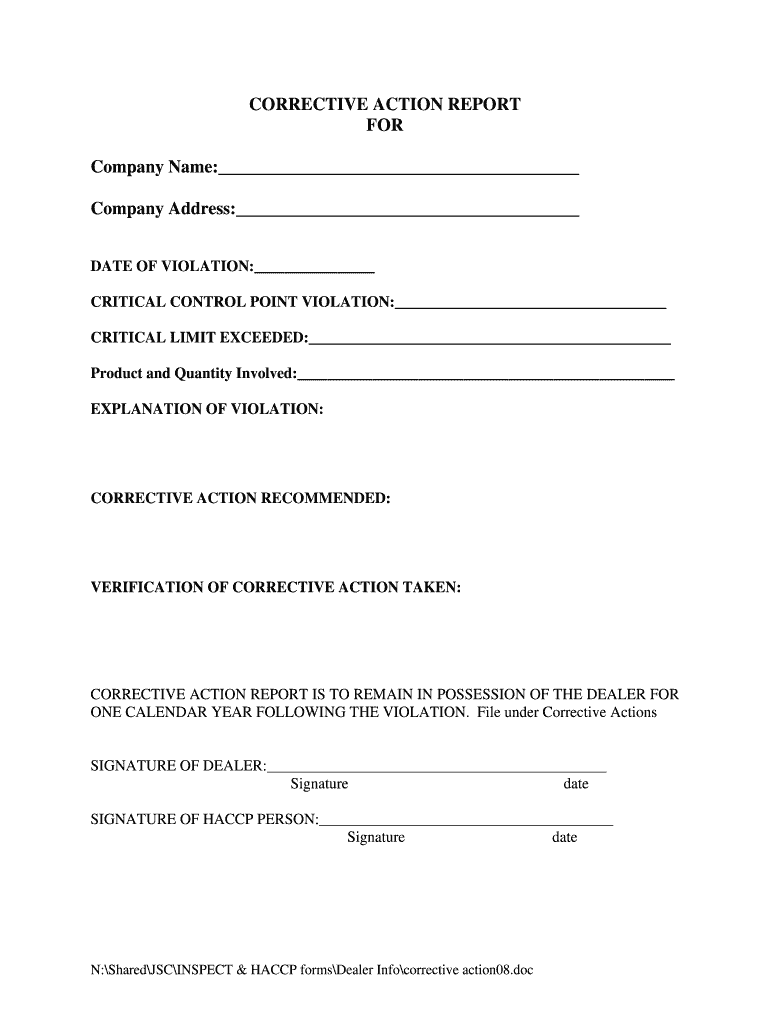
  1. Click ‘Get Form’ to open the corrective action report in the editor.
  2. Begin by entering the company name and address in the designated fields at the top of the form. This information is crucial for identifying the entity involved in the violation.
  3. Next, fill in the date of violation. This helps track when the issue occurred and is essential for record-keeping.
  4. In the section labeled 'CRITICAL CONTROL POINT VIOLATION', specify what control point was violated. Be clear and concise to ensure understanding.
  5. Indicate any critical limits that were exceeded in the next field. This provides context for the violation and aids in corrective measures.
  6. Document the product and quantity involved in this incident. Accurate details here are vital for accountability.
  7. Provide a thorough explanation of the violation in its respective section, outlining what happened and why it is a concern.
  8. Outline recommended corrective actions to address the violation effectively, ensuring they are actionable and realistic.
  9. In 'VERIFICATION OF CORRECTIVE ACTION TAKEN', confirm that necessary steps have been implemented to rectify the issue.
  10. Finally, both dealer and HACCP person should sign and date their respective sections to validate that all information is accurate and complete.

Start using our platform today to streamline your document editing process for free!

be ready to get more

Complete this form in 5 minutes or less

Get form

Got questions?

We have answers to the most popular questions from our customers. If you can't find an answer to your question, please contact us.
Contact us

Yes, you’ll find many different apps for this on the web. Nevertheless, if you need to eSign your action taken report format doc without installing extra software, DocHub is the optimum choice you can make. This powerful editor works on mobile devices just as on desktops. Open our editor in your preferred internet browser, register or sign in to your account, and start managing your paperwork.

You can easily edit fill out your action taken report template on any iOS gadget. Open an internet browser of your choice, visit the DocHub website, authorize or create a new account, add your file for editing, and make your required alterations. Our service is mobile-friendly, so using its features on your phone will be a no-brainer, even on the first try.

A CAPA report example includes: Problem description. Root cause findings. Details of corrective actions. Preventive measures planned. Monitoring results. A summary of compliance and improvement outcomes.
Corrective actions can be classified into several types, such as process adjustments, training programs, equipment upgrades, and policy changes.
5 ways to build an effective and repeatable corrective action process Define, document and automate your Corrective Action process. Ensure its easy to record your Corrective Action request. Make your Corrective Action Process a team effort. Undertake root cause analysis and take action. Make sure the team follows up.

Security and compliance

At DocHub, your data security is our priority. We follow HIPAA, SOC2, GDPR, and other standards, so you can work on your documents with confidence.

Learn more
ccpa2
pci-dss
gdpr-compliance
hipaa
soc-compliance
be ready to get more

Complete this form in 5 minutes or less

Get form

People also ask

A Corrective Action Report (CAR) is a formal document organizations use to address and resolve problems or issues. It outlines the steps taken to identify the root cause of a problem, the actions needed to fix it, and the measures to prevent the issue from happening again.
In the context of human resources, corrective actions focus on discipline. For instance, an employee who harassed a coworker may face warnings, suspension or termination. These actions aim to eliminate the cause of the harassment by reprimanding the harasser.
Corrective Action includes five levels: (1) Discovery, (2) Developmental Action Plan, (3) Corrective Action Plan, (4) Day of Decision/Last Chance Agreement, and (5) Termination.
A good corrective action report will include information about the nature of the incident, details about how it was addressed or corrected, impacts related to safety security depending on orderliness etc., any disciplinary actions taken against individuals involved along with reasons why they were sanctioned if

corrective action procedure pdf