Type text, add images, blackout confidential details, add comments, highlights and more.
02. Sign it in a few clicks
Draw your signature, type it, upload its image, or use your mobile device as a signature pad.
03. Share your form with others
Send mva maryland via email, link, or fax. You can also download it, export it or print it out.
How to use or fill out vr 009 with our platform
Ease of Setup
DocHub User Ratings on G2
Ease of Use
DocHub User Ratings on G2
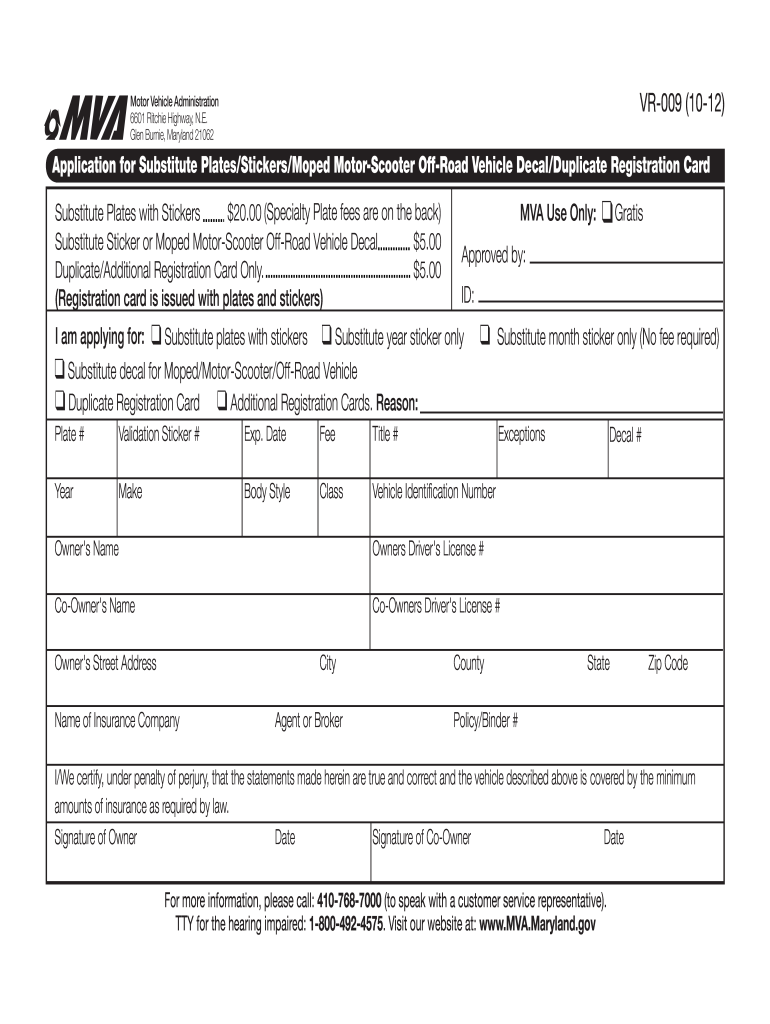
Click ‘Get Form’ to open the vr 009 application in the editor.
Begin by selecting the type of application you are submitting. Check the appropriate box for Substitute Plates, Stickers, Decals, or Duplicate Registration Card.
Fill in your vehicle details including Plate Number, Validation Sticker Number, Expiration Date, Title Number, Year, Make, Body Style, Class, and Vehicle Identification Number (VIN).
Provide owner and co-owner information. Enter names, driver’s license numbers, street address, city, county, state, and zip code.
Indicate your insurance details by entering the name of your insurance company and agent or broker information.
Review all entries for accuracy. Ensure that you have checked any applicable boxes regarding fees and reasons for application.
Sign and date the form at the bottom. Only one signature is required unless it is a company-owned vehicle.
Start filling out your vr 009 form online for free today!
vr-182 formMVA form VR-005vr-005 application for titlemva form vr-103maryland certificate of title (vr-2)maryland mva form vr-101MVA VR 461 formMaryland MVA forms
Security and compliance
At DocHub, your data security is our priority. We follow HIPAA, SOC2, GDPR, and other standards, so you can work on your documents with confidence.
Cookie consent notice
This site uses cookies to enhance site navigation and personalize your experience.
By using this site you agree to our use of cookies as described in our Privacy Notice.
You can modify your selections by visiting our Cookie and Advertising Notice.