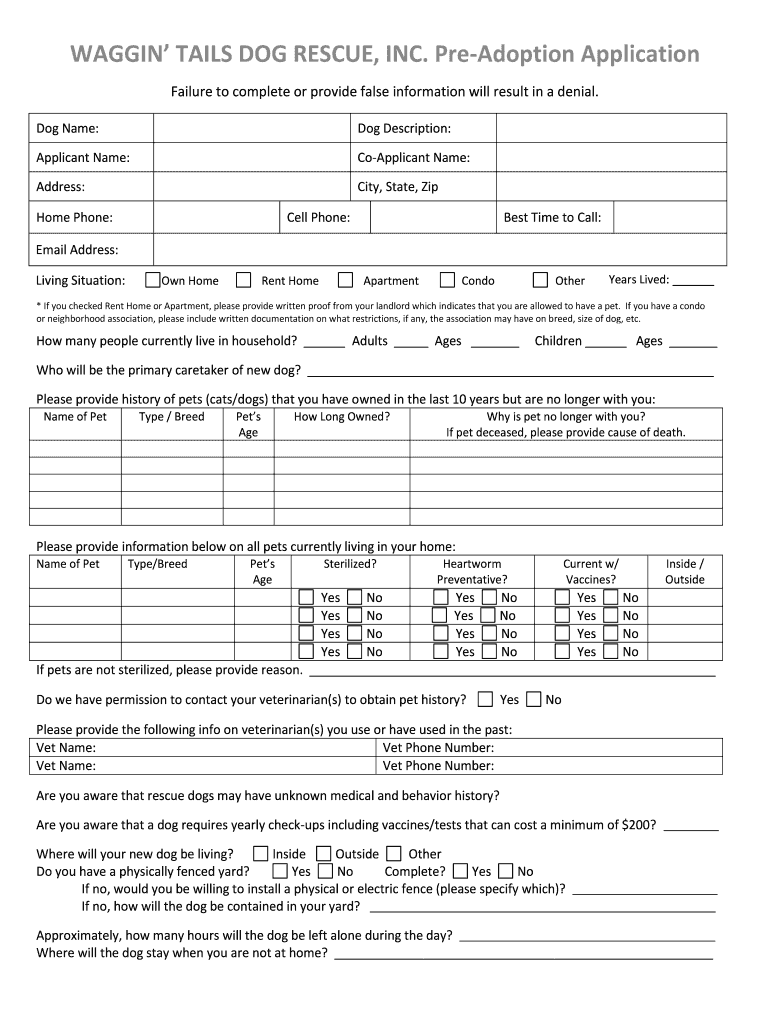
WAGGIN' TAILS DOG RESCUE , INC. Pre- Adoption Application - waggintailsdogrescue 2026

Get Form
waggin tails dog rescue Preview on Page 1

Here's how it works

01. Edit your waggin tails dog rescue online
Type text, add images, blackout confidential details, add comments, highlights and more.
02. Sign it in a few clicks
Draw your signature, type it, upload its image, or use your mobile device as a signature pad.
03. Share your form with others
Send it via email, link, or fax. You can also download it, export it or print it out.

How to use or fill out WAGGIN' TAILS DOG RESCUE, INC. Pre-Adoption Application - waggintailsdogrescue

Form edit decoration
9.5
Ease of Setup
DocHub User Ratings on G2
9.0
Ease of Use
DocHub User Ratings on G2
  1. Click ‘Get Form’ to open it in the editor.
  2. Begin by entering the dog's name and description at the top of the form. This helps identify the specific dog you are interested in adopting.
  3. Fill in your personal information, including your name, address, phone numbers, and email address. Ensure accuracy as this will be used for communication.
  4. Indicate your living situation by selecting from options such as 'Own Home', 'Rent Home', or 'Apartment'. If renting, attach proof from your landlord allowing pets.
  5. Provide details about household members, including adults and children, along with their ages. This information is crucial for assessing compatibility with the dog.
  6. Complete sections regarding past and current pets. Include their names, types, ages, and any relevant history to demonstrate your experience as a pet owner.
  7. Answer questions about your yard's fencing status and how you plan to contain the dog when outside. This ensures a safe environment for the new pet.
  8. Finally, review all sections carefully before submitting. Your signature at the end confirms that you understand the adoption process and requirements.

Start filling out your application today using our platform for free!

be ready to get more

Complete this form in 5 minutes or less

Get form

Got questions?

We have answers to the most popular questions from our customers. If you can't find an answer to your question, please contact us.
Contact us

Microsoft Word doesn’t have signing tools to create valid eSignatures and enforceable paperwork. Luckily, DocHub is an online eSignature-compliant editor that supports different document formats, including .doc files. Log in to your account and import the Word version of your WAGGIN' TAILS DOG RESCUE , INC. Pre- Adoption Application - waggintailsdogrescue from your device and cloud, or URL - our editor will automatically transform it into an editable PDF. Make all essential adjustments in your form and click Sign to create your own legally-binding eSignature. You will find four signing methods from which to choose.

It is a no-brainer on a computer or via a mobile phone to complete a WAGGIN' TAILS DOG RESCUE , INC. Pre- Adoption Application - waggintailsdogrescue with DocHub. All you need to do is open any installed web browser on your smartphone and go to the DocHub site. Once authenticated, add your file and open it in editing mode. Use our toolbar to make your edits and save adjustments. Optionally, keep your file in your files or send it to a recipient immediately.

Security and compliance

At DocHub, your data security is our priority. We follow HIPAA, SOC2, GDPR, and other standards, so you can work on your documents with confidence.

Learn more
ccpa2
pci-dss
gdpr-compliance
hipaa
soc-compliance