




Here's how it works

01. Edit your download form sf 180 pdf online
Type text, add images, blackout confidential details, add comments, highlights and more.

02. Sign it in a few clicks
Draw your signature, type it, upload its image, or use your mobile device as a signature pad.

03. Share your form with others
Send sf 180 via email, link, or fax. You can also download it, export it or print it out.
How to use or fill out sf 180 with our platform

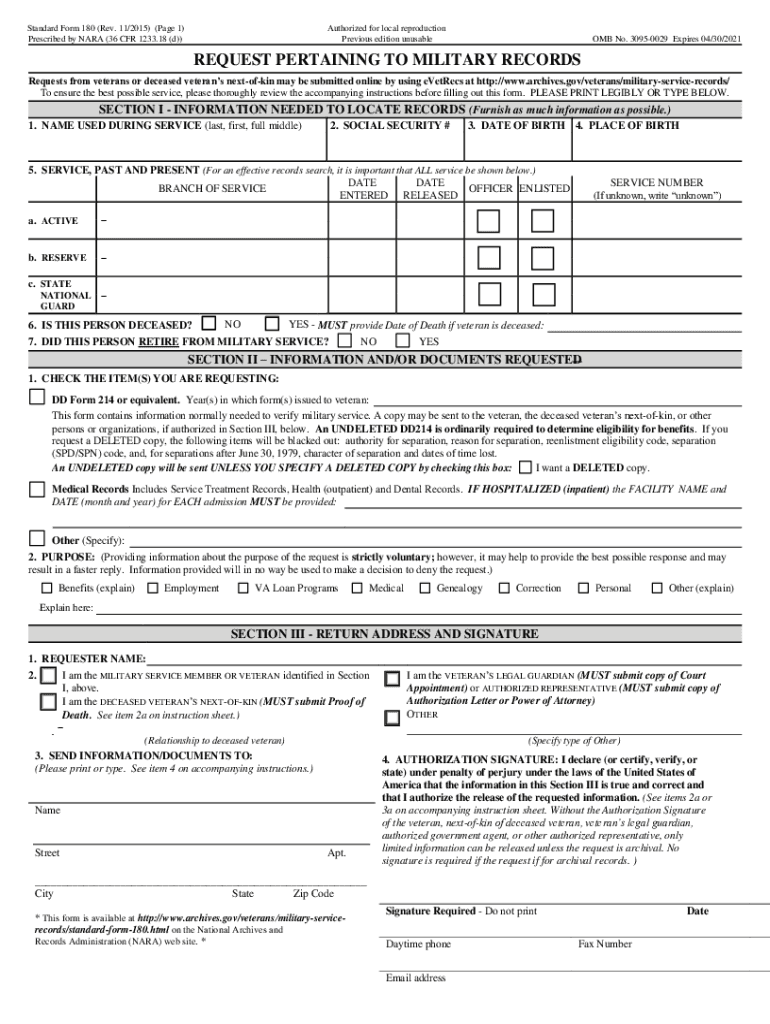
- Click ‘Get Form’ to open the SF 180 in the editor.
- In Section I, provide your name used during service, social security number, date and place of birth. Ensure all fields are filled accurately to avoid delays.
- Detail your military service history by entering dates of entry and release for active duty, reserve, and National Guard service. If applicable, indicate if the individual is deceased.
- In Section II, check the items you are requesting such as DD Form 214 or medical records. Specify any additional documents needed.
- Complete Section III with your name and address. Sign the authorization signature field to allow for the release of information.
- Review all entries for accuracy before submitting your request through our platform for a seamless experience.
Start filling out your SF 180 today using our platform for free!
Fill out sf 180 online
It's free
It's free
Security and compliance
At DocHub, your data security is our priority. We follow HIPAA, SOC2, GDPR, and other standards, so you can work on your documents with confidence.
Learn more


