Fam012 2026

Get Form
lacourt org b2p Preview on Page 1

Here's how it works

01. Edit your lacourt org b2p online
Type text, add images, blackout confidential details, add comments, highlights and more.
02. Sign it in a few clicks
Draw your signature, type it, upload its image, or use your mobile device as a signature pad.
03. Share your form with others
Send los angeles ca fam modria via email, link, or fax. You can also download it, export it or print it out.

How to use or fill out fam012 with our platform

Form edit decoration
9.5
Ease of Setup
DocHub User Ratings on G2
9.0
Ease of Use
DocHub User Ratings on G2
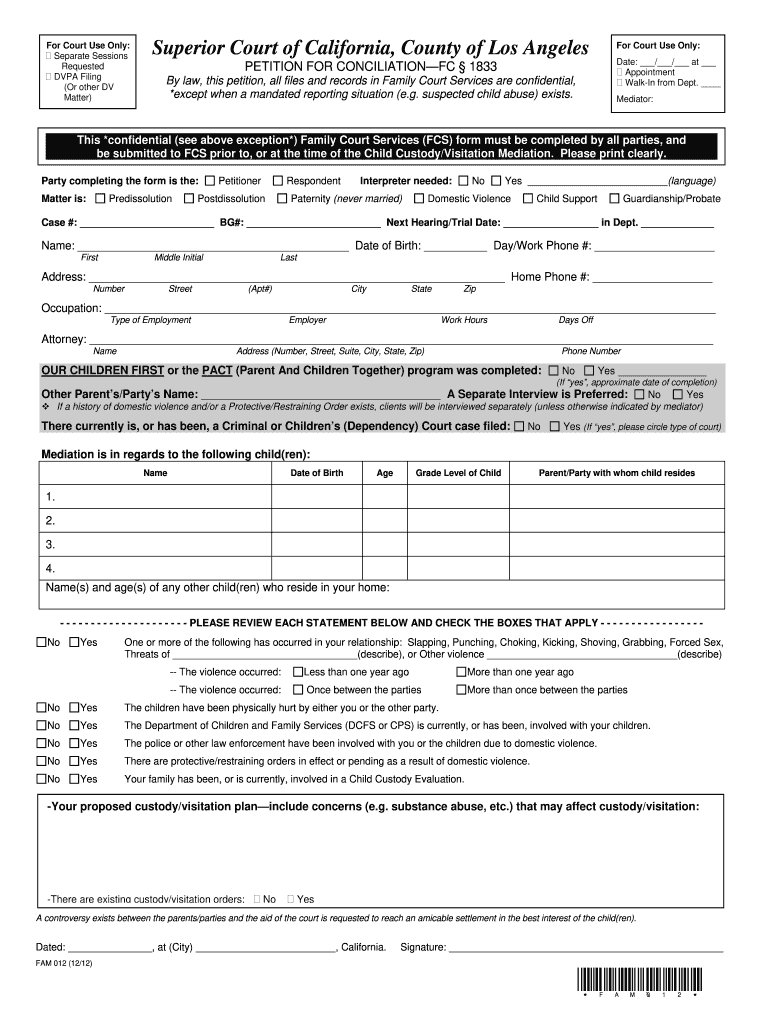
  1. Click ‘Get Form’ to open fam012 in the editor.
  2. Begin by filling in the 'For Court Use Only' section, including the date and appointment details if applicable.
  3. Identify yourself as either the Petitioner or Respondent and indicate if an interpreter is needed.
  4. Complete your personal information, including name, date of birth, contact numbers, and address. Ensure clarity for easy reading.
  5. Provide details about your employment and attorney, if applicable. This helps streamline communication.
  6. Indicate whether you have completed the OUR CHILDREN FIRST or PACT program and provide details about any other parent/party involved.
  7. Fill out the section regarding children involved in mediation, including their names and ages.
  8. Review each statement regarding domestic violence carefully and check the boxes that apply to your situation.
  9. Outline your proposed custody/visitation plan and any existing orders before signing at the bottom of the form.

Start using our platform today to complete fam012 easily and for free!

be ready to get more

Complete this form in 5 minutes or less

Get form

Got questions?

We have answers to the most popular questions from our customers. If you can't find an answer to your question, please contact us.
Contact us

If you often deal with documents stored in your Google Drive, DocHub is a perfect option for you to easily and quickly complete, edit, and approve them. This editor integrates properly with Google apps, so you can export your fam012 from your Google Drive to the editor without the need of downloading and re-uploading it. Right-click on your document, select Open With → DocHub PDF Sign and Edit. In our editor, add and assign Signature Fields for all parties involved, then click on the Menu option above → Send → select how you want to share your paperwork.

You may get and modify your fam012 online with the help of DocHub. Its straightforward but feature-rich design allows you to start effective work right after you register your account. Create your account and add your file, and then our user interface will guide you via our stress-free form completion experience.

Section 6340. If the court makes any order for custody, visitation, or support, that order shall survive the termination of any protective order. The Judicial Council shall provide notice of this provision on any Judicial Council forms related to this subdivision.
On your Memorandum of Costs After Judgment (MC-012), you must include the exact amount of all allowable costs, the payments credited toward the principal and interest, and the amount of accrued interest. This means you are responsible for calculating these amounts.

Security and compliance

At DocHub, your data security is our priority. We follow HIPAA, SOC2, GDPR, and other standards, so you can work on your documents with confidence.

Learn more
ccpa2
pci-dss
gdpr-compliance
hipaa
soc-compliance
be ready to get more

Complete this form in 5 minutes or less

Get form