01. Edit your cochise county building permits online
Type text, add images, blackout confidential details, add comments, highlights and more.
02. Sign it in a few clicks
Draw your signature, type it, upload its image, or use your mobile device as a signature pad.
03. Share your form with others
Send it via email, link, or fax. You can also download it, export it or print it out.
How to use or fill out affidavit county cochise with our platform
Ease of Setup
DocHub User Ratings on G2
Ease of Use
DocHub User Ratings on G2
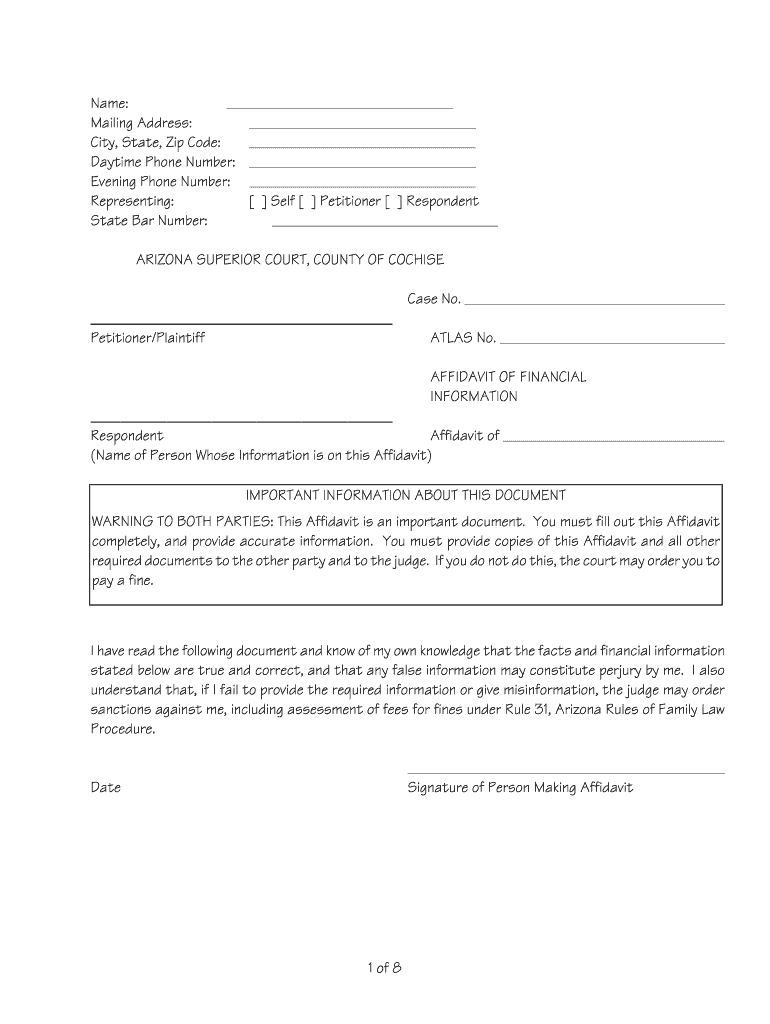
Click ‘Get Form’ to open the affidavit county cochise in the editor.
Begin by entering your Name, Mailing Address, City, State, and Zip Code in the designated fields. Ensure all information is accurate.
Indicate whether you are representing yourself, the petitioner, or the respondent by checking the appropriate box.
Fill in your Daytime and Evening Phone Numbers for contact purposes.
In the General Information section, provide details such as Date of Birth, Current Address, and any relevant information about children involved.
Complete the Employment Information section by detailing your job title, employer's name and address, and income details. Attach necessary documents if required.
Proceed to list your Gross Monthly Income and any other financial details as prompted in the form. Be thorough to avoid penalties.
Review all entries for accuracy before signing at the bottom of the document. Ensure you understand that false information may lead to legal consequences.
Start filling out your affidavit county cochise today for free using our platform!
Fill out affidavit county cochise online It's free
3. What are the requirements of an Affidavit? Full name of the deponent and their signature. Statement indicating whether the affidavit has been sworn or not. Date and place where the affidavit is being signed. Designation and full name of the Notary or Magistrate (person attesting the affidavit)
How do I obtain my affidavit?
When you need an affidavit you will need to have the document docHubd in order for it to be legally binding. This can be done with a traditional in-person or mobile notary, or an affiant can provide their statement using Remote Online Notarization (RON).
Can I write my own affidavit for court?
How to Write An Affidavit. Although affidavits are considered legal documents, anyone can draft one. As long as it is signed, witnessed, and docHubd correctly, the affidavit will be valid. This means that you do not need to ask a lawyer to create an affidavit.
Who is the sheriff of Cochise County, AZ?
Sheriff Mark J. Dannels is a 41-year veteran of law enforcement. He holds a masters degree in criminal justice management from Aspen University and is a Certified Public Manager from Arizona State University.
What are the requirements to get an affidavit?
Each notarization of an affidavit must be logged with: Entry number. Date and time of notarization. Type of document docHubd (i.e., an affidavit) Name, address, and competent evidence of identity of the affiant. Signatures of the affiant and the notary public.
Related Searches
Affidavit county cochise arizonaCochise county formsCochise county small estate affidavitCochise county family court formsCochise county power of attorney formCochise county Superior Court FormsCochise County Court casesSmall estate affidavit Arizona
Security and compliance
At DocHub, your data security is our priority. We follow HIPAA, SOC2, GDPR, and other standards, so you can work on your documents with confidence.
In order to provide a statement for an affidavit, an affiant must simply be willing to sign or eSign the statement in the presence of a third-party, commissioned notary public. This must of course be done in accordance with all applicable state laws.
What is an Affidavit in Arizona?
Affidavit. A written statement of fact, signed and sworn to in front of a notary or a person who has the right to administer an oath.
Related links
Miscellaneous Forms | Cochise County, AZ
Individual Forms Affidavit of Financial Information (PDF) Affidavit of Financial Information (Spanish) (PDF) Affidavit of Direct Payments (PDF) Affidavit ofRead more
The Pima County and Cochise County Board of Supervisors have refused to provide voters who inadvertently failed to sign their ballot affidavits with anRead more
Cookie consent notice
This site uses cookies to enhance site navigation and personalize your experience.
By using this site you agree to our use of cookies as described in our Privacy Notice.
You can modify your selections by visiting our Cookie and Advertising Notice.