







Definition & Meaning
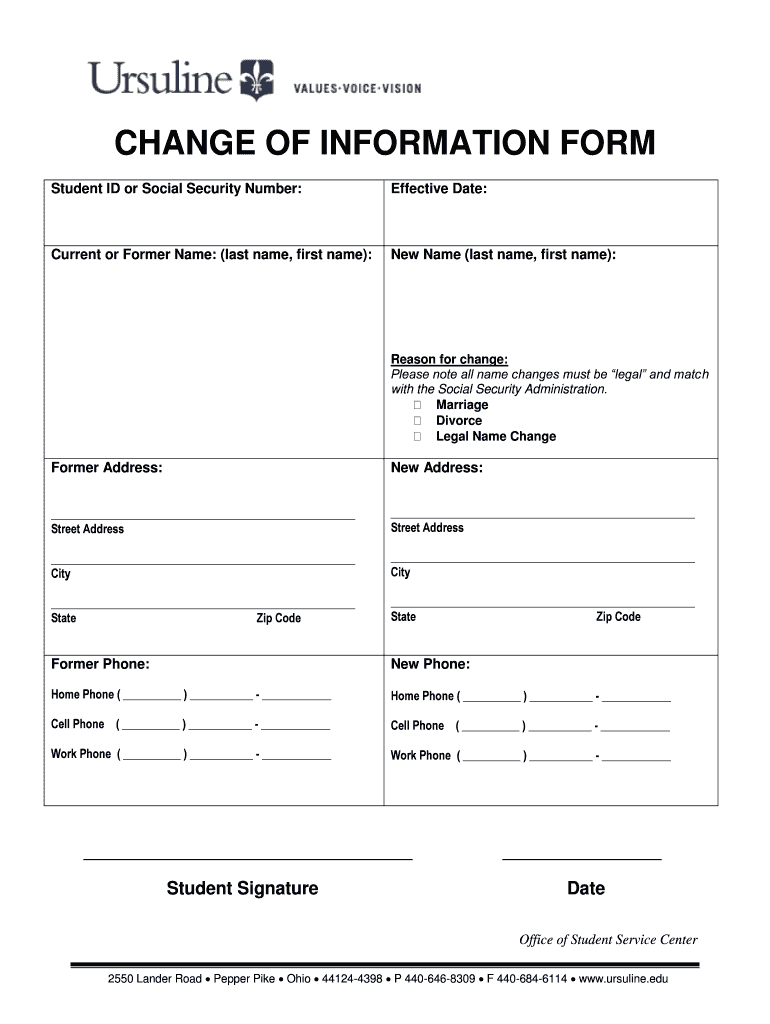
The "Student ID or Social Security Number - ursuline" form serves as an essential tool for verifying a student's identity within the Ursuline educational system. This form typically requires students to provide either their student identification number or their social security number, depending on which identifier they prefer or is requested by the institution. The form's primary purpose is to facilitate the accurate and efficient updating of student records, ensuring all personal and academic information is correctly linked to the corresponding student ID.
Students often employ this form when they need to update or verify their details in the institution's database, whether for enrollment, attendance tracking, or accessing specific student services. The student ID functions as a unique identifier that ties the student to their academic history and personal data, whereas the social security number, when used, assists in legally verifying the student's identity.
How to Use the Student ID or Social Security Number - Ursuline
Using the "Student ID or Social Security Number - ursuline" form involves a straightforward process, which is generally completed online or through a physical submission method. To initiate the process, students should first access the form from the Ursuline institution's official website or obtain a hard copy from the administration office.
-
Filling Out the Form:
- Insert your student ID or social security number, ensuring all digits are accurate.
- Review all pre-filled sections (if applicable) for current data verification.
-
Verification Steps:
- Attach any necessary documentation that supports the identification numbers provided. This could include a copy of a student ID card, social security card, or another form of official identification.
- Double-check all entries before submitting to avoid errors that might delay processing.
-
Submission:
- If online, use the institution's portal to upload the completed form and accompanying documents.
- For physical submissions, ensure the form is sealed in a provided envelope and delivered to the appropriate office, such as the registrar or student services office.
How to Obtain the Student ID or Social Security Number - Ursuline
Acquiring the "Student ID or Social Security Number - ursuline" form can be done through several channels to cater to different accessibility needs. Students can retrieve this form directly from the official student services website of the Ursuline institution, where it is typically available for download in PDF or DOC format.
For students who prefer or require a hard copy, the form is accessible at the student services office. The process usually involves requesting it over the counter, where staff can also provide guidance on how to fill it out and return it.
In some cases, institutions might mail forms directly to students at their registered address, particularly if it relates to ongoing academic processes like re-enrollment or special program applications. In such instances, students will receive instructions along with the form on how to complete and return it.
Steps to Complete the Student ID or Social Security Number - Ursuline
Completing the "Student ID or Social Security Number - ursuline" form requires attention to detail to ensure all information is accurate and verified. The steps are straightforward and designed to streamline the process:
-
Gather Required Information:
- Student ID number
- Social security number, if required or preferred
- Additional identification, such as a driver's license or passport
-
Complete Personal Information:
- Fill in personal details like name, address, and contact number
- Double-check the spelling and correctness of each field
-
Attach Supporting Documents:
- Securely attach copies of the necessary IDs
- Confirm that all documents are legible and valid
-
Review and Submit:
- Review the entire form for any errors or omissions
- Submit the form as per the outlined method (online or in-person)
Understanding and following these steps helps prevent delays and errors during the processing phase, ensuring a smooth and effective experience for students.
Key Elements of the Student ID or Social Security Number - Ursuline
The form contains several key sections that students must complete to ensure their information is processed correctly. These sections include:
-
Identification Information: This part captures either the student ID number or the social security number, with fields for supporting identification documentation.
-
Personal Details: Includes fields for the student's full name, address, date of birth, and contact information. Accuracy is crucial here for valid record updates.
-
Authorization: A section where students authorize the use of the submitted information, often requiring a signature to verify consent.
Each key element plays a role in confirming the student's identity and maintaining the institution's database integrity. Understanding these components ensures students provide accurate data where needed.
Legal Use of the Student ID or Social Security Number - Ursuline
The legal framework surrounding the use of the "Student ID or Social Security Number - ursuline" form focuses on protecting students' privacy and ensuring data security. The use of either a student ID number or social security number must comply with federal and state regulations, ensuring the submitted data is stored and processed securely.
-
Privacy Protections: Under the Family Educational Rights and Privacy Act (FERPA), educational institutions must maintain the confidentiality of student records, allowing access only to authorized personnel.
-
Data Security: Institutions implement security measures such as encryption technologies and secure databases to protect sensitive information from unauthorized access or breaches.
Students are reassured that their information is handled legally and ethically, and they retain rights to access and amend their records as necessary.
Who Typically Uses the Student ID or Social Security Number - Ursuline
The primary users of the "Student ID or Social Security Number - ursuline" form encompass a specific group within the academic environment:
-
Students: The main users who need to complete or update their personal information within the school's records.
-
Administrative Staff: Those responsible for processing and maintaining student records, ensuring all data is accurate and up-to-date.
-
Faculty Members: When necessary, to authorize certain actions or access related to academic performance and enrollment status.
Other stakeholders might include parents or legal guardians, especially in matters concerning minors or students under special circumstances.


Important Terms Related to Student ID or Social Security Number - Ursuline
To understand the "Student ID or Social Security Number - ursuline" form effectively, it's helpful to familiarize oneself with significant terms commonly associated with it:
-
Student ID Number: A unique numeric or alphanumeric code assigned to students to ensure their academic and personal records are accurately managed.
-
Social Security Number (SSN): A federal identifier used to verify identity, primarily for individuals eligible for employment or taxation in the U.S.
-
Authorization: The act of consenting to the use and sharing of one's information for institutional purposes.
Awareness of these terms aids students in comprehending the form's purpose and significance within the educational framework.
Required Documents for the Student ID or Social Security Number - Ursuline
Submitting the "Student ID or Social Security Number - ursuline" form requires specific documentation to authenticate the information provided. Generally, students should prepare the following:
-
Proof of Identification: A copy of a valid ID, such as a driver's license, passport, or student ID card.
-
Social Security Documentation: Where applicable, a copy of the social security card to validate the number provided.
-
Additional Forms: If ancillary documentation is requested, such as a birth certificate or resident status proof, ensure these are current and legible.
These documents are essential in preventing fraud and ensuring the correct person submits and updates their student records.
Form Submission Methods (Online / Mail / In-Person)
Ursuline ensures flexibility through multiple submission methods for the "Student ID or Social Security Number - ursuline" form, catering to various preferences and accessibilities:
-
Online Submission: Leveraging the institution's secure portal, students can digitally submit the form, ensuring faster processing time and minimal paper usage.
-
Mail Submissions: Packages the completed form and necessary documents, sending them through certified mail to track receipt and delivery to the appropriate office.
-
In-Person Delivery: Directly hand over the form and any additional documentation at the student services or registrar's office, allowing immediate acknowledgment of receipt.
Each method offers a secure avenue for submission, enabling students to choose based on convenience and personal preference.
Penalties for Non-Compliance
Failure to comply with the submission or proper completion of the "Student ID or Social Security Number - ursuline" form can lead to several consequences:
-
Delayed Processing: Missing or incorrect information can delay records updates, potentially impacting course registrations or access to student services.
-
Administrative Holds: The institution may place a hold on a student's account, affecting their ability to enroll in classes or request transcripts.
-
Non-Enrollment: Continued non-compliance could result in the inability to enroll for upcoming terms until rectified.
Understanding and adhering to submission guidelines prevents these adverse outcomes, ensuring students remain in good standing with their institution.


