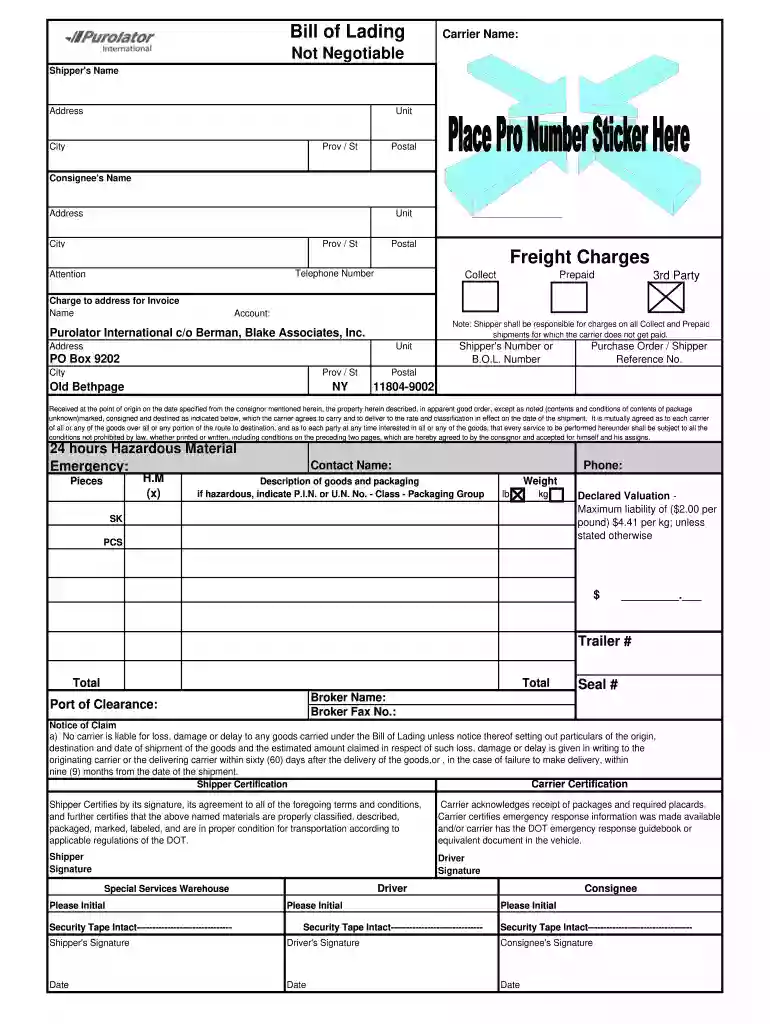
Definition & Meaning of Purolator Shipping Label Template
A Purolator shipping label template is a pre-designed format used for creating shipping labels for packages to be sent via Purolator, a prominent courier and logistics company in Canada and the U.S. These templates streamline the preparation of necessary shipping documents by providing structured fields for essential information. This includes:
- Sender's Information: The name, address, and contact number of the person or company sending the package.
- Recipient's Information: The name, address, and contact number of the package recipient.
- Shipping Details: Specification of weigh, dimensions, and any service options selected, such as express delivery or standard shipping.
- Tracking Number: A unique identifier for tracking the shipment throughout its transit.
Using a template ensures consistency and accuracy when preparing shipping labels, minimizing the risk of errors that could delay package delivery.
How to Use the Purolator Shipping Label Template
Utilizing the Purolator shipping label template involves several steps to ensure complete and accurate labeling for your packages. The process typically includes:
- Select the Template: Download an appropriate template based on your shipping needs—whether you require a standard label or a prepaid shipping label.
- Input Sender Information: Fill in the fields for your name, address, and contact details accurately to ensure the package can be returned if delivery fails.
- Enter Recipient Information: Provide the recipient's name, address, and contact number, confirming that this is correct to avoid any delivery issues.
- Specify Package Details: Indicate the weight and size of the package, and choose the shipping service (standard, express, etc.).
- Generate the Shipping Label: Once all information is entered, the template can typically be saved or printed directly, ensuring a clean and professional appearance.
- Affix the Label: Attach the printed label securely to the package in a visible location to facilitate scanning and identification during transit.
Other considerations include ensuring that your label is readable and adheres to any specific guidelines set forth by Purolator.
How to Obtain the Purolator Shipping Label Template
Accessing the Purolator shipping label template is straightforward. There are several options available:
- Official Purolator Website: Visit the Purolator website, where templates are often provided for download. Look for a section dedicated to shipping resources or forms.
- Online Document Editors: Use platforms like DocHub to create and customize your own shipping label by starting from a blank document or importing a template.
- Third-Party Tools: Various shipping software solutions offer preformatted Purolator shipping label templates, which can be beneficial for businesses that frequently ship products.
- Email Support: If unable to locate the template online, contacting Purolator customer service can provide guidance on requesting direct access to necessary forms.
Having access to the correct template ensures that all necessary details are included, minimizing delays in shipping.
Steps to Complete the Purolator Shipping Label Template
Completing a Purolator shipping label template involves several distinct stages, which include:
- Download the Template: Acquire the appropriate shipping label template from a reliable source.
- Open the Template: Use a compatible program to open the template file, such as a PDF editor or a word processing application.
- Fill in Sender Information: Input your name, address, and contact details in the designated fields for the sender.
- Specify Recipient Info: Clearly provide the recipient’s name, delivery address, and phone number to ensure proper handling.
- Detail Package Contents: Describe the items being shipped, along with weight and other relevant shipping details.
- Select Shipping Method: Choose the preferred delivery option according to urgency and cost.
- Review and Print: Double-check all entries for accuracy, then print the shipping label as directed by your document editing tool.
- Attach Label to Package: Secure the label on your package ensuring it is visible and legible for postal workers.
Completing these steps carefully helps maintain the integrity of the shipping process.
Key Elements of the Purolator Shipping Label Template
A well-structured Purolator shipping label template contains several critical elements:
- Barcodes: Essential for tracking and scanning, barcodes ensure that packages can be efficiently processed through shipping facilities.
- Sender and Recipient Details: Clear differentiations between the sender and recipient's information are vital for successful delivery.
- Service Selection: Options for choosing delivery methods, like express or bundled service, should be visibly marked on the label.
- Tracking Number: Providing a unique tracking number allows both the sender and the recipient to monitor the progress of the shipment.
- Customs Information: For international shipments, customs details may be required to clear products through global logistics systems.
Each element serves a specific purpose, ensuring that the shipping process is effective and compliant with shipping regulations and guidelines.