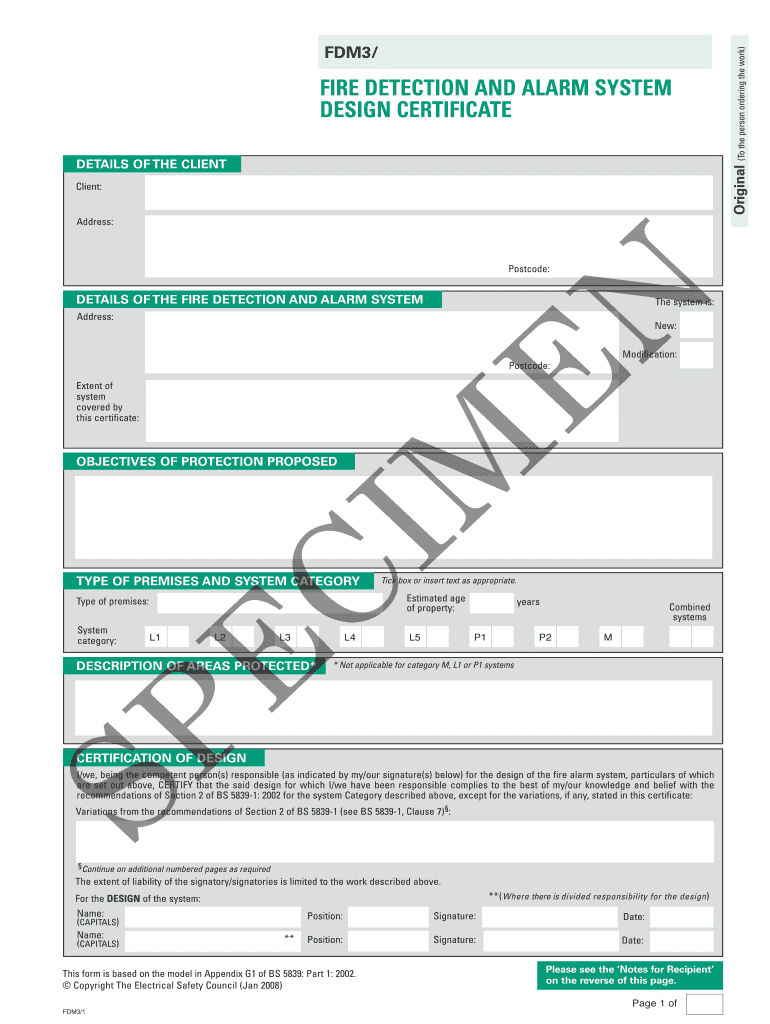
Certificate of alarm monitoring fill in template 2026

Get Form
alarm certificate for insurance template free Preview on Page 1

Here's how it works

01. Edit your alarm certificate for insurance template free online
Type text, add images, blackout confidential details, add comments, highlights and more.
02. Sign it in a few clicks
Draw your signature, type it, upload its image, or use your mobile device as a signature pad.
03. Share your form with others
Send ring alarm certificate template via email, link, or fax. You can also download it, export it or print it out.

How to use or fill out certificate of alarm monitoring fill in template

Form edit decoration
9.5
Ease of Setup
DocHub User Ratings on G2
9.0
Ease of Use
DocHub User Ratings on G2
  1. Click ‘Get Form’ to open the certificate of alarm monitoring fill in template in our editor.
  2. Begin by filling out the 'Details of the Client' section. Enter the client's name, address, and postcode accurately to ensure proper identification.
  3. Next, move to 'Details of the Fire Detection and Alarm System'. Specify whether the system is new or a modification and provide the relevant address and postcode.
  4. In the 'Objectives of Protection Proposed' section, briefly describe what protection is intended with this system. This helps clarify its purpose.
  5. Select the type of premises and system category by ticking the appropriate boxes. Ensure you provide an estimated age for the property as well.
  6. Complete the 'Certification of Design' section by entering names, positions, signatures, and dates for all responsible persons involved in designing the fire alarm system.
  7. Finally, review all entries for accuracy before saving or exporting your completed document. This ensures compliance with necessary standards.

Start using our platform today to easily complete your certificate of alarm monitoring form online for free!

be ready to get more

Complete this form in 5 minutes or less

Get form

Got questions?

We have answers to the most popular questions from our customers. If you can't find an answer to your question, please contact us.
Contact us
To download ADT certificates (Alarm Monitoring Certificate or W-9 Tax Form) from MyADT: Log into myadt.com. Once logged in, navigate to the Account Document tab. Scroll down to see Certificates Forms. Click on the W-9 Form or Alarm Monitoring Certificate to open a downloadable PDF.
Download your Certificate of Alarm System Sign in to customer.xfinity.com/#/services/home with your Xfinity ID and password. Scroll down to the Security Alarm Certificate section. Click the Download the Alarm Certificate link.
What is an alarm certificate? An alarm certificate (otherwise known as an alarm permit) is a permit that allows a homeowner or renter to a burglar alarm in their home. The main purpose of such permits is to prevent emergency responders from having to deal with excessive false alarm situations.
You may download one at (), or call Vivint with your insurance companys name and fax number, as well as your agents name, and they will fax it to them directly.
ADT is recognised in the security industry as a standard bearer for quality. In fact, were certified Gold across installation, monitoring and servicing by the National Security Inspectorate.

Security and compliance

At DocHub, your data security is our priority. We follow HIPAA, SOC2, GDPR, and other standards, so you can work on your documents with confidence.

Learn more
ccpa2
pci-dss
gdpr-compliance
hipaa
soc-compliance
be ready to get more

Complete this form in 5 minutes or less

Get form